

Overview
Redpoint AI lets RPI use Azure AI services to assist in building the criteria of basic selection rules from natural language. An operator describes a segment in plain language, and RPI uses an Azure OpenAI chat model, grounded with the tenant's attribute metadata, to compose the selection rule criteria.
This topic covers the configuration required for using Redpoint AI to build basic selection rules as well as using Redpoint AI as a content creation tool.
-
Whether you’re only using AI for selection rules or are using both features, you’ll follow all of the configuration instructions in this topic.
-
If you’re only using Redpoint AI as a Content Creation tool (and not using it for basic selection rules), you’ll use a subset of the configuration instructions outlined in this topic; you’ll only need to set the
redpointAI.naturalLanguagevalues in your Helm overrides, leaving thecognitiveSearchandmodelStoragesections alone.
Three Azure services back the feature. You provision all three in your own Azure subscription:
|
Service |
Role |
|---|---|
|
Azure OpenAI |
A chat model that interprets the request and composes the rule, and the |
|
Azure AI Search |
Holds the vector and keyword index of the tenant's attribute metadata that grounds the model. |
|
Azure Blob Storage |
Holds the index source documents that RPI generates and that Azure AI Search ingests. |
You provision the three services empty. RPI builds the search index, the vector search, the vector algorithm, and the embeddings on demand when an operator runs Update AI Model on a SQL Database Definition. RPI re-creates the index on each run, so there is no client-facing configuration of the index schema or vector algorithm, and manual edits to the index are overwritten on the next run.
The feature runs in the same cluster and namespace as the rest of RPI. It is configured through the Helm chart's redpointAI values block, and its credentials live in the shared RPI Secret alongside every other RPI secret.
Azure OpenAI is a proprietary Microsoft service and requires a separate license subscription from Microsoft to access.
Architecture
Index build
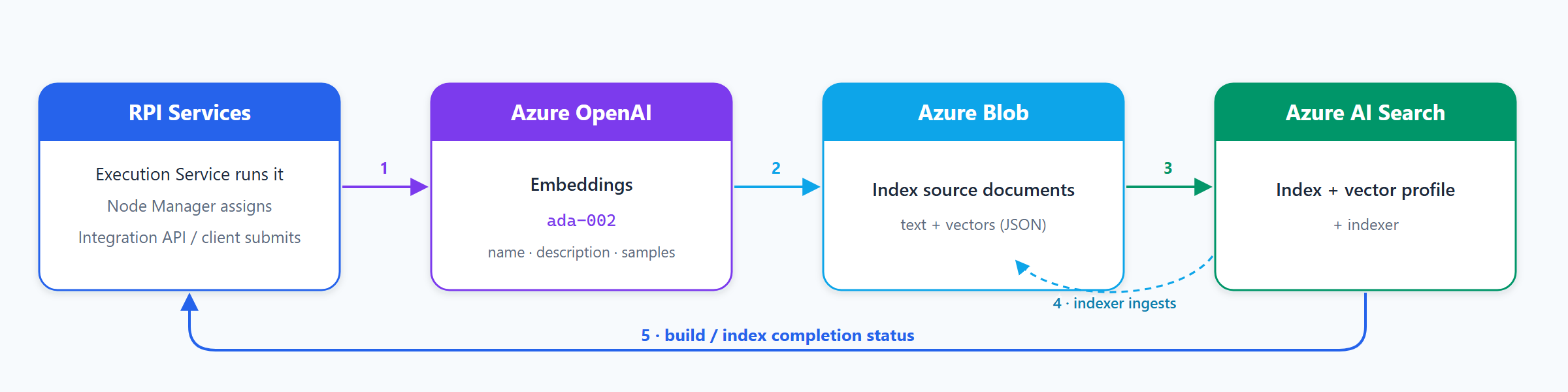
Index build (operator runs Update AI Model on a basic SQL Database Definition):
-
RPI reads the attribute metadata for the SQL Database Definition and calls Azure OpenAI (text-embedding-ada-002) to vectorize each attribute's name, description, and sample values.
-
Attributes flagged to be excluded from the AI model are skipped.
-
Sample values are read from the tenant's data warehouse.
-
-
RPI writes the vectorized source documents into your Blob container and folder.
-
RPI creates or re-creates the Azure AI Search index, vector search configuration, and indexer. One index is created per SQL Database Definition.
-
The indexer ingests the documents from Blob into the index.
-
Azure AI Search returns a build / index completion status to RPI.
Rule generation
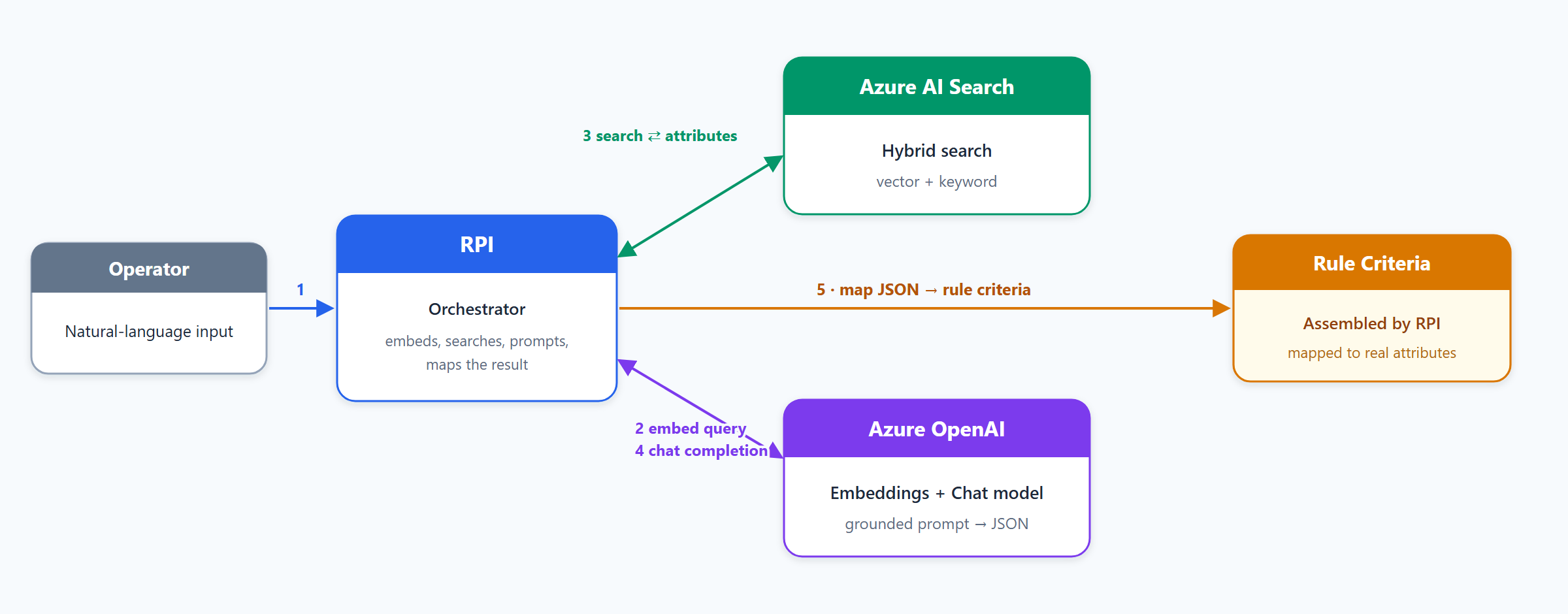
Rule generation (operator enters a natural-language description):
-
The operator's plain-language description goes to RPI.
-
RPI calls Azure OpenAI (text-embedding-ada-002) to embed the query.
-
RPI runs a hybrid (vector and keyword) search against the index; the most relevant attributes are returned to RPI.
-
RPI sends those attributes to the Azure OpenAI chat model in a grounded prompt. The model composes criteria only from the attributes provided and does not invent fields; the JSON response returns to RPI.
-
RPI maps the response back to real attributes and assembles the basic selection rule's criteria. Anything the model cannot map to a real attribute is reported back rather than guessed.
Data handling
Redpoint AI sends data to the Azure services you provision. Because all three services live in your Azure subscription, this data stays within your own Azure environment. RPI does not send it to any Redpoint-hosted service.
-
During Update AI Model, RPI sends each attribute's name, description, and sample values (real values read from your data source) to Azure OpenAI to generate embeddings. It then stores those documents (the sample values and their vectors) in your Blob container and Azure AI Search index.
-
During rule generation, RPI sends the operator's natural-language request plus the retrieved attribute names, data types, and sample values to the Azure OpenAI chat model.
To keep specific attributes (sensitive or noisy fields) out of all of the above, exclude them from the AI model on the SQL Database Definition. Excluded attributes are never embedded, stored, or sent. Per Microsoft's Azure OpenAI terms, prompts and content are not used to train the foundation models; review Microsoft's Azure OpenAI data, privacy, and security documentation for how Azure processes each request.
Costs
All three Azure services bill independently in your subscription:
-
Azure OpenAI: charged per token. Update AI Model makes one embeddings call per included attribute; rule generation makes embedding and chat-completion calls per request. Cost scales with the number of attributes and how often Update AI Model is run.
-
Azure AI Search: charged by service tier and the replicas/partitions you provision, sized to your attribute volume.
-
Azure Blob Storage: charged for the small JSON source documents RPI stores.
Re-running Update AI Model frequently, or on very large definitions, increases Azure OpenAI usage. See each service's Azure pricing for current rates.
Prerequisites
|
Requirement |
Detail |
|---|---|
|
Azure subscription |
Approved for Azure OpenAI, with model quota in your target region. |
|
Azure permissions |
Ability to create resource groups, Azure OpenAI (Cognitive Services), Azure AI Search, and Storage resources, and to read their keys. |
|
Network egress |
The RPI cluster must have outbound network access to your Azure OpenAI, Azure AI Search, and Azure Blob Storage endpoints. All embedding, indexing, and chat calls are made from RPI to those services. |
|
RPI version |
Any current v7.x GA release of RPI. |
|
Helm chart |
A chart that includes the |
|
RPI tenant |
A configured tenant with at least one basic SQL Database Definition that has Enable AI turned on (see Step 4). This is the object you run Update AI Model on. |
|
Source data connectivity |
Update AI Model reads sample attribute values from the database the SQL Database Definition maps to (your data source or warehouse) at build time, so that database must be configured and reachable from the cluster. The sample size is governed by the |
|
RPI services running |
The build and rule-generation jobs run server-side, not in the desktop client. The Integration API (or client) submits the job; the Execution Service executes it, with the Node Manager assigning the work. All three must be running, and the Execution Service must have the NLP configuration so it can reach Azure (see Step 3, "What the chart wires"). |
|
CLI tooling |
|
Azure OpenAI model availability, version strings, and deployment types vary by region and change over time. Choose a supported chat model available in your region; see Region availability for Foundry Models sold by Azure. The examples below deploy the tested gpt-5.1 / 2025-11-13 (Global Standard); substitute the model and version Azure offers in your region. Step 2 lists the full tested deployment.
Step 1: Provision Azure infrastructure
Provision with either the Azure CLI or the Bicep template below. Both create the three services empty. RPI populates Search and Blob later.
Azure CLI
# variables (edit these)
LOCATION="eastus2"
RG="rg-rpi-ai"
OPENAI="rpi-openai-001"               # Azure OpenAI (Cognitive Services) account
SEARCH="rpi-aisearch-001"             # Azure AI Search service
STORAGE="rpiaistore001"               # Storage account (3-24 lowercase alphanumeric)
CONTAINER="redpoint-ai"               # Blob container
CHAT_DEPLOYMENT="gpt-5.1"             # your chat model deployment name
EMBED_DEPLOYMENT="text-embedding-ada-002"

# resource group
az group create -n "$RG" -l "$LOCATION"

# Azure OpenAI
az cognitiveservices account create \
  -n "$OPENAI" -g "$RG" -l "$LOCATION" \
  --kind OpenAI --sku S0 --custom-domain "$OPENAI" --yes

# chat model deployment. The deployment NAME is what you set in
# redpointAI.naturalLanguage.ChatGptEngine.
az cognitiveservices account deployment create \
  -n "$OPENAI" -g "$RG" \
  --deployment-name "$CHAT_DEPLOYMENT" \
  --model-name "gpt-5.1" --model-version "2025-11-13" \
  --model-format OpenAI --sku-capacity 150 --sku-name "GlobalStandard"

# embeddings model deployment
az cognitiveservices account deployment create \
  -n "$OPENAI" -g "$RG" \
  --deployment-name "$EMBED_DEPLOYMENT" \
  --model-name "text-embedding-ada-002" --model-version "<region-available-version>" \
  --model-format OpenAI --sku-capacity 1 --sku-name "Standard"

# Azure AI Search (Basic tier or higher is required for vector search)
az search service create \
  -n "$SEARCH" -g "$RG" -l "$LOCATION" --sku basic

# Storage account and container
az storage account create \
  -n "$STORAGE" -g "$RG" -l "$LOCATION" --sku Standard_LRS --kind StorageV2
az storage container create \
  --account-name "$STORAGE" --name "$CONTAINER" --auth-mode login
Bicep
redpoint-ai.bicep:
param location string = resourceGroup().location
param openAiName string
param searchName string
param storageName string
param containerName string = 'redpoint-ai'
param chatDeploymentName string = 'gpt-5.1'
param chatModelName string = 'gpt-5.1'
param chatModelVersion string = '2025-11-13'  // tested value; verify region availability
param embedDeploymentName string = 'text-embedding-ada-002'
param embedModelVersion string                // region-available version

resource openai 'Microsoft.CognitiveServices/accounts@2024-10-01' = {
  name: openAiName
  location: location
  kind: 'OpenAI'
  sku: { name: 'S0' }
  properties: { customSubDomainName: openAiName }
}

resource chat 'Microsoft.CognitiveServices/accounts/deployments@2024-10-01' = {
  parent: openai
  name: chatDeploymentName
  sku: { name: 'GlobalStandard', capacity: 150 }   // tested: Global Standard, 150k TPM
  properties: {
    model: { format: 'OpenAI', name: chatModelName, version: chatModelVersion }
  }
}

resource embed 'Microsoft.CognitiveServices/accounts/deployments@2024-10-01' = {
  parent: openai
  name: embedDeploymentName
  dependsOn: [ chat ]                          // serialize deployments
  sku: { name: 'Standard', capacity: 1 }
  properties: {
    model: { format: 'OpenAI', name: 'text-embedding-ada-002', version: embedModelVersion }
  }
}

resource search 'Microsoft.Search/searchServices@2024-03-01-preview' = {
  name: searchName
  location: location
  sku: { name: 'basic' }                       // Basic tier or higher for vector search
  properties: { replicaCount: 1, partitionCount: 1 }
}

resource storage 'Microsoft.Storage/storageAccounts@2023-05-01' = {
  name: storageName
  location: location
  sku: { name: 'Standard_LRS' }
  kind: 'StorageV2'
}

resource blob 'Microsoft.Storage/storageAccounts/blobServices/containers@2023-05-01' = {
  name: '${storageName}/default/${containerName}'
  dependsOn: [ storage ]
}

output openAiEndpoint string = openai.properties.endpoint
output searchEndpoint string = 'https://${searchName}.search.windows.net'
az deployment group create -g "$RG" -f redpoint-ai.bicep \
  -p openAiName="$OPENAI" searchName="$SEARCH" storageName="$STORAGE" \
     chatModelVersion="2025-11-13" \
     embedModelVersion="<region-available-version>"
Step 2: Configure Azure services
Azure OpenAI model deployments
Deploy one chat model and the embeddings model.
Chat model
Redpoint AI works with the current GPT‑5.x chat models. Model names, versions, deployment types, and regional availability change over time, so deploy a model that is generally available in your Azure region. Check Azure's lists before deploying:
-
Foundry Models sold by Azure: the supported models and their version strings.
-
Region availability for Foundry Models sold by Azure: which models and deployment types are offered in each region.
Redpoint validates Redpoint AI against the following Azure OpenAI chat deployment. Treat it as a tested reference, not a hard requirement; match it where your region allows, or substitute a comparable GA GPT‑5.x model from the lists above.
|
Setting |
Tested value |
|---|---|
|
Model name |
|
|
Model version |
|
|
Deployment type |
Global Standard |
|
Content filter |
DefaultV2 |
|
Capacity |
150 (×1,000 TPM) |
|
Rate limit |
150,000 TPM |
Capacity is the deployment's tokens-per-minute allowance in thousands, so 150 provisions a 150,000 TPM rate limit; size it for your throughput. If the tested model, version, or the Global Standard deployment type is not offered in your region, pick the closest GA GPT‑5.x option the region-availability page lists.
The deployment name you choose for the chat model is the value you set in redpointAI.naturalLanguage.ChatGptEngine.
Embeddings model
The embeddings model is text-embedding-ada-002, which produces 1536-dimension vectors.
The embeddings deployment name is the value you set in redpointAI.modelStorage.EmbeddingsModel.
Azure AI Search
Do not create the index, data source, or indexer by hand. RPI builds all of it when an operator runs Update AI Model (see Step 4) and re-creates it on each run. Any manual changes you make to the index, vector search configuration, or indexer are overwritten the next time an operator runs Update AI Model. The search service only needs to exist and to be on a tier that supports vector search (Basic or higher).
A single set of Azure services serves the whole RPI cluster. Every tenant and SQL Database Definition gets its own index within the one search service, drawing on the same Azure OpenAI deployment and Blob container. Size the search tier for your total attribute volume across all tenants.
Azure Blob Storage
Provide an existing container, and optionally a folder, where RPI writes the index source documents. RPI manages the contents.
Authentication
The Redpoint AI runtime authenticates to Azure with keys and a connection string:
|
Azure service |
Credential |
Retrieve with |
|---|---|---|
|
Azure OpenAI |
account API key |
|
|
Azure AI Search |
admin key |
|
|
Azure Blob Storage |
connection string |
|
These three values become the Kubernetes Secret entries in Step 3.
Redpoint AI authenticates with these keys and the connection string only. Microsoft Entra ID or managed-identity authentication is not supported for this feature.
Step 3: Configure the Helm chart
Values
Enable Redpoint AI and set the endpoints, model, and storage values in your overrides:
redpointAI:
  enabled: true
  naturalLanguage:
    ApiBase: https://<your-openai-name>.openai.azure.com/   # Azure OpenAI endpoint
    ApiVersion: 2023-07-01-preview                          # Azure OpenAI API version
    ChatGptEngine: gpt-5.1                                  # chat model deployment name
    ChatGptTemp: 0.5                                        # 0.0 (deterministic) to 2.0 (creative)
  cognitiveSearch:
    SearchEndpoint: https://<your-search-name>.search.windows.net
  modelStorage:
    EmbeddingsModel: text-embedding-ada-002                 # embeddings deployment name
    ModelDimensions: 1536                                   # must match the embedding model (ada-002 is 1536)
    ContainerName: redpoint-ai                              # Blob container
    BlobFolder: redpoint-ai                                 # Blob folder for the index source documents
    EnableTrace: false                                      # verbose OpenAI-call tracing (see Step 5)
The only Azure AI Search values you provide are cognitiveSearch.SearchEndpoint and the search admin key (held as a secret). There is no vector-search profile, vector-search configuration, or index field definition to set; RPI generates the index, its vector search profile, and the vector algorithm when it runs Update AI Model.
The search endpoint and admin key exist as soon as you create the empty Azure AI Search service in Step 1, so you can complete the YAML before any index exists. RPI does not need to generate the index first; it builds the index on the first Update AI Model run.
Secrets
The three sensitive values live in the shared RPI Secret (default redpoint-rpi-secrets), not in values.yaml. The required keys are:
|
Secret key |
Value |
|---|---|
|
|
Azure OpenAI API key |
|
|
Azure AI Search admin key |
|
|
Blob storage connection string |
For secretsManagement.provider: kubernetes, add them to the shared Secret:
kubectl create secret generic redpoint-rpi-secrets \
  --namespace <rpi-namespace> \
  --from-literal=RPI_NLP_API_KEY="$OPENAI_KEY" \
  --from-literal=RPI_NLP_SEARCH_KEY="$SEARCH_KEY" \
  --from-literal=RPI_NLP_MODEL_CONNECTION_STRING="$BLOB_CONNSTR" \
  --dry-run=client -o yaml | kubectl apply -f -
For csi mode, populate the same keys in your CSI-backed secret store. For sdk mode, store them in your cloud vault under the same key names. The chart does not bind secretKeyRef entries in SDK mode, and RPI fetches the values at runtime. See Secrets Management.
What the chart wires
When redpointAI.enabled is true, the chart emits the RPI__NLP__* environment contract:
-
The Execution Service, Node Manager, and Integration API receive the full configuration plus the three secret-backed values.
-
The Interaction API receives the three secret-backed values only.
Apply with your normal upgrade:
helm upgrade --install rpi ./chart -n <rpi-namespace> -f my-values.yaml
Step 4: Configure RPI
-
Ensure the target tenant is configured.
-
Ensure the tenant has a basic SQL Database Definition whose attributes you want available to natural-language rule building. This is the object the AI model is built from. Attributes you do not want the assistant to use, such as sensitive or noisy fields, can be excluded from the AI model on the definition; excluded attributes are never vectorized, indexed, or suggested.
-
In the RPI client, open the SQL Database Definition and turn on Enable AI (this makes Update AI Model and the natural-language assist available for the definition). Run Update AI Model. RPI then:
-
Generates embeddings for the definition's attributes (Azure OpenAI)
-
Writes the index source documents to your Blob container
-
Creates or recreates the Azure AI Search index, vector search, and indexer
Re-run Update AI Model whenever the attribute set changes. Each run re-creates the index. Larger definitions take longer, because RPI makes an embeddings call per attribute.
-
-
In a basic selection rule, open the natural-language assist and describe the audience in plain language (for example, "customers in Boston who purchased in the last 6 months"). RPI returns the drafted criteria together with a plain-language summary of what it built. You can refine the result conversationally, and the assist keeps the context of the exchange. Nothing is applied to the rule until you build it. RPI maps the request onto the definition's text, numeric, date, and Boolean attributes, choosing an operator and value for each and using the indexed sample values to match wording (such as a city or status) to a real value.
Disabling Redpoint AI or deleting the SQL Database Definition does not remove the Azure AI Search index or the Blob source documents RPI created. Remove them in Azure if you no longer need them.
The RPI Integration API service must be running for this feature.
Step 5: Validate the installation
Configuration checks
# The NLP configuration env is present on the consuming services when enabled.
kubectl exec -n <ns> deploy/rpi-executionservice -- printenv | grep '^RPI__NLP__' | sort
# Expect: ApiBase, ApiVersion, ChatGptEngine, ChatGptTemp, SearchEndpoint,
# EmbeddingsModel, Model__ModelDimensions, Model__ContainerName,
# Model__BlobFolder, EnableTrace. The secret-backed ApiKey, SearchKey, and
# Model__ConnectionString are injected from the Secret in kubernetes and csi modes.
Functional check
-
Run Update AI Model on the SQL Database Definition.
-
Confirm a new index exists in Azure AI Search with a populated document count. RPI names the index from the client and definition identifiers, and creates one index per SQL Database Definition.
-
Confirm the Blob container holds the generated source documents.
-
In a basic selection rule, generate criteria from a natural-language description and confirm a valid rule is produced.
Tracing
Set redpointAI.modelStorage.EnableTrace to true for diagnostics. On each call to the OpenAI API during Update AI Model, RPI logs the following to the RPI Server Log as errors (informational tracing, not a failure):
-
A JSON representation of all
RPI_NLP_settings, with keys partially obfuscated -
The endpoint called
-
The payload sent
-
The response received
Turn tracing off for normal operation.
Troubleshooting
|
Symptom |
Likely cause |
Resolution |
|---|---|---|
|
Azure OpenAI 401 or 403 |
Wrong or expired |
Re-fetch the key with |
|
Azure OpenAI 404, deployment not found |
|
These are deployment names, not model names. List them with |
|
Azure OpenAI 429 |
Throttling or insufficient model quota. |
Raise the deployment capacity, or retry. Limit how often Update AI Model runs. |
|
Update AI Model fails building the index |
Wrong search key, search tier without vector support, or wrong endpoint. |
Verify |
|
Update AI Model fails creating the index, with a quota or index-limit error |
The Azure AI Search service has reached its tier's maximum index count. RPI creates one index per SQL Database Definition, so this can occur as more definitions enable AI. |
Move to a higher Azure AI Search tier with a larger index quota, or delete indexes for definitions that no longer use AI. |
|
Embedding dimension mismatch |
|
Set |
|
Index empty after Update AI Model |
Wrong Blob connection string, or missing container or folder. |
Verify |
|
Blob access denied |
Connection string lacks access, or the storage firewall blocks the cluster. |
Re-issue the connection string. Ensure storage network rules allow the cluster. |
|
Update AI Model fails reading attribute data, or returns "no samples" for attributes |
The data source the SQL Database Definition maps to is unreachable from the cluster, or its connection or timeout is misconfigured. |
Confirm the data source or warehouse connection is configured and reachable from the cluster. Increase |
|
Cannot reach Azure endpoints, or calls time out |
Cluster egress to Azure OpenAI, Azure AI Search, or Blob is blocked. |
Allow outbound access from the cluster to all three endpoints (see Prerequisites). Check egress firewall/NAT, and any private-endpoint or DNS configuration. |
|
Poor or incorrect rule results |
Stale index, or temperature too high. |
Re-run Update AI Model after attribute changes. Lower |
|
NLP env vars missing on a pod |
|
Set |
To capture the exact OpenAI request and response, enable EnableTrace (see Step 5) and inspect the RPI Server Log.
Reference example
# my-values.yaml (Redpoint AI portion)
secretsManagement:
  provider: kubernetes            # or csi or sdk

redpointAI:
  enabled: true
  naturalLanguage:
    ApiBase: https://acme-rpi-openai.openai.azure.com/
    ApiVersion: 2023-07-01-preview
    ChatGptEngine: gpt-5.1        # chat model deployment name
    ChatGptTemp: 0.5
  cognitiveSearch:
    SearchEndpoint: https://acme-rpi-search.search.windows.net
  modelStorage:
    EmbeddingsModel: text-embedding-ada-002
    ModelDimensions: 1536
    ContainerName: redpoint-ai
    BlobFolder: prod
    EnableTrace: false
Secret  redpoint-rpi-secrets:
  RPI_NLP_API_KEY                  = <Azure OpenAI key>
  RPI_NLP_SEARCH_KEY               = <Azure AI Search admin key>
  RPI_NLP_MODEL_CONNECTION_STRING  = <Blob connection string>
Checklist:
- Azure OpenAI with a supported chat model and
text-embedding-ada-002. - Azure AI Search on Basic tier or higher (vector search), sized for your attribute volume.
- Storage account and container reachable from the cluster.
- The three secret keys populated via your secrets provider.
redpointAI.enabledset totrueand values applied.- Update AI Model run on each relevant SQL Database Definition.
EnableTraceset tofalsein steady state.
Settings reference
|
Helm value |
Environment variable |
Required |
Notes |
|---|---|---|---|
|
|
gate |
yes |
Master toggle. Default |
|
|
|
yes |
Azure OpenAI endpoint. |
|
|
|
yes |
For example, |
|
|
|
yes |
Chat model deployment name. |
|
|
|
yes |
|
|
|
|
yes |
Azure AI Search endpoint. |
|
|
|
yes |
Embeddings deployment name. |
|
|
|
yes |
|
|
|
|
yes |
Blob container. |
|
|
|
yes |
Blob folder for the index source documents. |
|
|
|
no |
Verbose tracing. Default |
|
|
|
yes |
Azure OpenAI key. |
|
|
|
yes |
Search admin key. |
|
|
|
yes |
Blob connection string. |
Glossary
|
Term |
Meaning in this feature |
|---|---|
|
Embedding |
A list of numbers (a vector) that captures the meaning of a piece of text, produced by the Azure OpenAI embeddings model ( |
|
Vector |
The embedding itself, here a 1536-number array ( |
|
Vector search |
Finding the attributes whose vectors are closest to the request's vector, that is, closest in meaning rather than by exact keywords. |
|
Hybrid search |
Combining vector (meaning) search with traditional keyword search in a single query for better recall. RPI uses hybrid search to pick the relevant attributes. |
|
k-NN |
Short for "k nearest neighbours". The vector search returns the k closest matches. |
|
HNSW |
The algorithm Azure AI Search uses to run k-NN quickly over many vectors (Hierarchical Navigable Small World), with cosine distance. RPI configures this automatically; it is the "vector search configuration" RPI creates and you do not edit. |
|
Index |
The searchable store of attribute metadata in Azure AI Search. RPI creates one index per SQL Database Definition and recreates it on each Update AI Model run. It holds the attribute text fields plus their vectors. |
|
Indexer / data source |
Azure AI Search components RPI creates: the data source points at your Blob container, and the indexer ingests the source documents from Blob into the index. |
|
Index source documents |
The JSON files RPI writes to your Blob container: one set of attribute records, with embeddings, that the indexer loads into the search index. |
|
RAG (Retrieval-Augmented Generation) |
The overall pattern: retrieve the relevant attributes from the index first, then have the chat model generate the rule using only those attributes, so it works from your tenant's real data rather than the model's training memory. |
|
Chat model / chat completion |
The Azure OpenAI chat model ( |
|
Sample values |
Example real values RPI pulls from the data warehouse for each attribute (for example, "Boston" for a City attribute) and indexes, so the model can match the operator's wording to actual values. |
|
Attribute metadata |
The attribute names, descriptions, data types, and sample values from a SQL Database Definition; this is the data RPI vectorizes and indexes to ground the model. Attributes can be excluded from the model so they are never indexed or suggested. |
|
Basic Selection Rule (BSR) |
The selection rule this feature builds. The operator describes the audience; RPI populates the rule's criteria. |
|
Grounded prompt |
The prompt RPI sends to the chat model, "grounded" with the retrieved attributes so the model composes criteria only from real, available attributes rather than inventing fields. |
|
SQL Database Definition |
The RPI object that defines a SQL data source and its attributes. Redpoint AI is enabled on a SQL Database Definition, and Update AI Model builds the index from its attributes. |
|
Deployment name |
In Azure OpenAI, the name you assign to a model when you deploy it into your resource, distinct from the underlying model name. |
|
Token |
The unit of text Azure OpenAI processes and bills by (roughly a fragment of a word). Embedding and chat usage, and therefore cost, are measured in tokens. |
|
Temperature |
A chat-model setting ( |