

Overview
A Map item attribute allows you to access data within an element contained within a map value and indexed via a key.
The following interface is displayed when configuring a Map Item attribute:
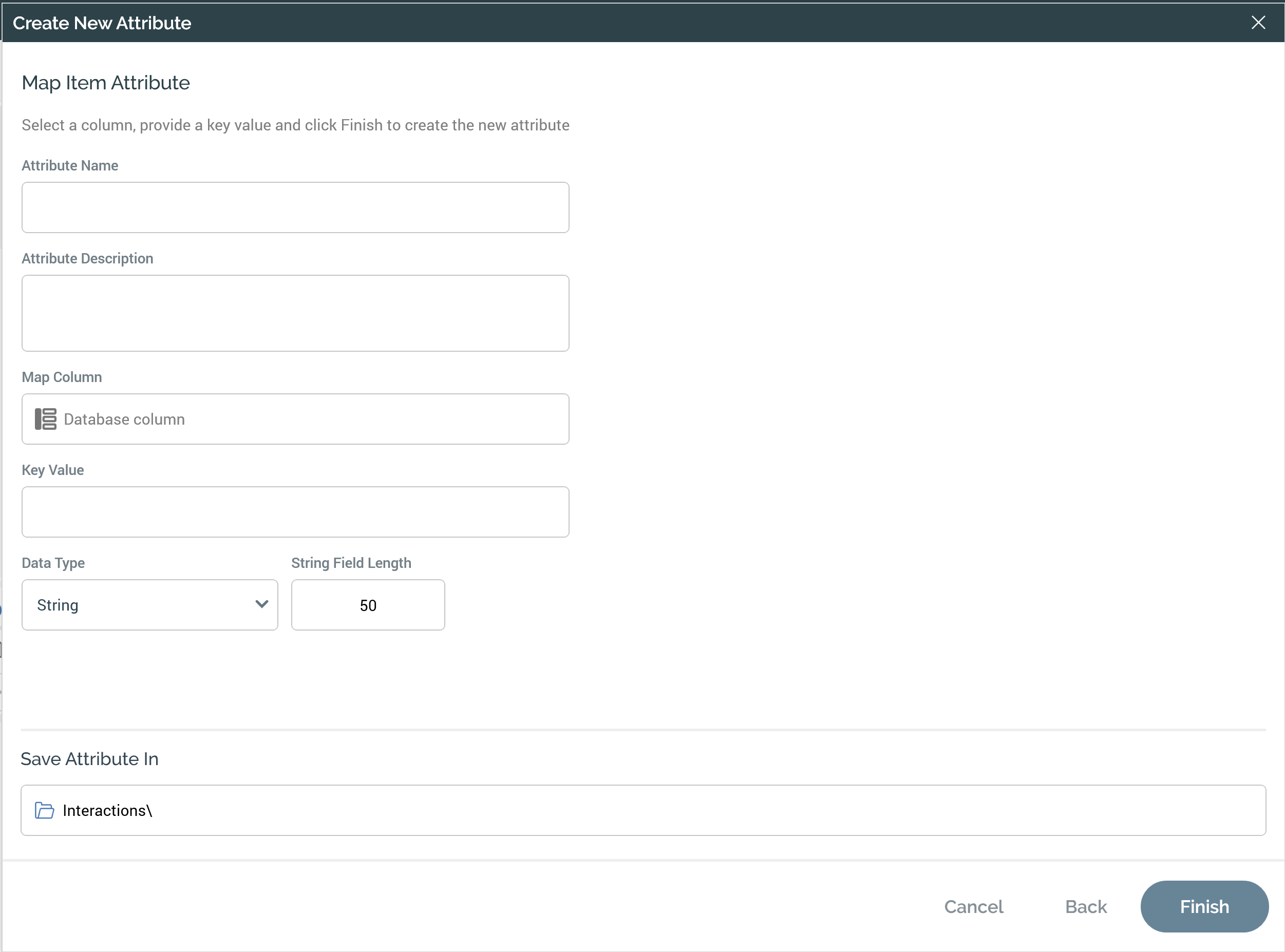
A Map item attribute reads one value from map data stored in a database column. The map data is a JSON document, and the attribute uses a key to pick out the element you want. For example, an attribute can read a customer's loyalty tier from a JSON column that holds their whole loyalty profile.
Properties
A Map item attribute has the following properties:
-
Map Column: the database column that holds the JSON data. Required. The column must use a data type your database platform supports for this feature (see Supported platforms and column data types).
-
Key Value: the key of the element to read, such as
loyaltyTier. Required, with a maximum of 100 characters. To read a nested element, separate each level with a period, such aspreferences.channel. -
Data Type: the data type RPI returns the value as: BigInteger, Bool, Date, DateTime, Decimal, Integer, or String. RPI converts the JSON value to this type in the database query. Some platforms handle certain types differently (see How each data type is returned).
-
String Field Length: the maximum length of the returned value. Only shown when Data Type is set to String. The default is 50.
Supported platforms and column data types
Map item attributes are supported on the following database platforms. On every platform, RPI treats the map column as a text column, and the value in it must be valid JSON. The underlying column type differs by platform, because each platform's JSON functions accept different types.
|
Database platform |
Column data type to use |
Notes |
|---|---|---|
|
Amazon Redshift |
|
Don't use |
|
Azure Database for MySQL |
|
|
|
Azure PostgreSQL PostgreSQL |
|
Don't use |
|
Azure SQL Database SQL Server |
|
Don't use |
|
Google BigQuery |
|
|
|
Snowflake |
|
Don't use |
For example, to add a map column to a customer table:
-- Amazon Redshift
ALTER TABLE public.customer ADD COLUMN loyalty_profile VARCHAR(65535);
-- Azure Database for MySQL
ALTER TABLE customer ADD COLUMN loyalty_profile json;
-- Azure PostgreSQL / PostgreSQL
ALTER TABLE public.customer ADD COLUMN loyalty_profile json;
-- Azure SQL Database / SQL Server
ALTER TABLE dbo.Customer ADD LoyaltyProfile nvarchar(max);
-- Google BigQuery
ALTER TABLE mydataset.customer ADD COLUMN loyalty_profile JSON;
-- Snowflake
ALTER TABLE public.customer ADD COLUMN loyalty_profile VARIANT;
If your platform doesn't appear in the table, RPI shows an error when you try to use a Map item attribute on it.
How each data type is returned
Most data types behave the same on every platform. The exceptions are:
Amazon Redshift
-
Bool: the value isn't converted, so it's returned as the text
trueorfalse. Choose String and compare the value withtrue. -
Decimal: values are rounded to four decimal places.
Azure Database for MySQL
-
Integer and BigInteger: Choose Decimal for whole numbers.
-
Bool: a JSON value of
truereturns1. Any other value, includingfalseor a missing key, returns0. -
Decimal: values are rounded to four decimal places.
Azure PostgreSQL
-
Bool: the value isn't converted, so it's returned as the text
trueorfalse. Choose String and compare the value withtrue. -
Decimal on PostgreSQL and Azure PostgreSQL: values are rounded to four decimal places, and values of 1,000,000 or more cause the query to fail. For larger values, choose String.
Azure SQL Database
-
Integer: the value isn't converted, so it's returned as text. Comparisons with a number still work, but sorting is alphabetical (
100sorts before20). To get a true number, choose BigInteger instead. -
Bool: a JSON value of
truereturns1. Any other value, includingfalseor a missing key, returns0. -
Decimal: the value is returned as a single-precision floating-point number, which keeps about seven significant digits. For larger or exact values, such as currency, choose String.
Google BigQuery
-
Bool: a JSON value of
truereturns1. Any other value, includingfalseor a missing key, returns0.
PostgreSQL
-
Bool: the value isn't converted, so it's returned as the text
trueorfalse. Choose String and compare the value withtrue. -
Decimal: values are rounded to four decimal places, and values of 1,000,000 or more cause the query to fail. For larger values, choose String.
Snowflake
-
Decimal: the value is returned as a floating-point number.
SQL Server
-
Integer: the value isn't converted, so it's returned as text. Comparisons with a number still work, but sorting is alphabetical (
100sorts before20). To get a true number, choose BigInteger instead. -
Bool: a JSON value of
truereturns1. Any other value, includingfalseor a missing key, returns0. -
Decimal: the value is returned as a single-precision floating-point number, which keeps about seven significant digits. For larger or exact values, such as currency, choose String.
Sample JSON
The following JSON document shows a typical value for a map column. Each row in the table holds one document like this.
{
  "loyaltyTier": "Gold",
  "pointsBalance": 12500,
  "lifetimeSpend": 4321.75,
  "memberSince": "2019-04-12",
  "lastPurchase": "2024-08-01T14:30:00",
  "emailOptIn": true,
  "preferences": {
    "channel": "SMS",
    "store": "Boston"
  }
}
The following table shows how you'd configure an attribute for each element:
|
To read |
Key Value |
Data Type |
|---|---|---|
|
Loyalty tier |
|
String |
|
Points balance |
|
BigInteger |
|
Lifetime spend |
|
Decimal |
|
Member since |
|
Date |
|
Last purchase |
|
DateTime |
|
Email opt-in |
|
Bool (String on Amazon Redshift, Azure PostgreSQL, and PostgreSQL) |
|
Preferred channel |
|
String |
Tips for preparing your JSON
-
Store dates in ISO 8601 format: use
YYYY-MM-DDfor dates andYYYY-MM-DDTHH:MM:SSfor date-times so every platform can convert them. -
Store numbers as JSON numbers: write
12500, not"12,500". Thousands separators and currency symbols stop the value converting to a number. -
Keep key names simple: use letters, digits, and underscores. RPI treats a period in Key Value as a nesting separator, so a key that itself contains a period or a space can't be read.
-
Expect missing keys to return no value: if a row's JSON doesn't contain the key, the attribute returns no value for that row rather than failing.