

Overview
The following interface is displayed when configuring a Parameter attribute:
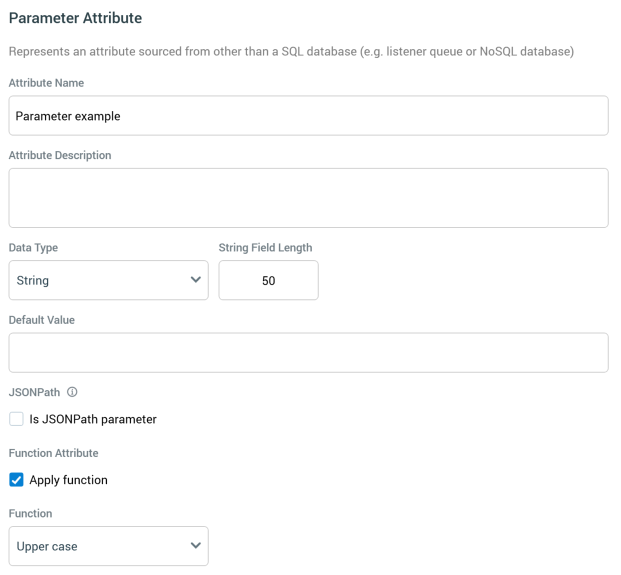
A parameter attribute has the following specific properties:
-
Data Type: a dropdown field, exposing the following values:
-
BigInt
-
Date
-
DateTime
-
Decimal
-
Integer
-
Money
-
String (the default)
-
-
String Field Length: this property is only displayed if Data type is set to String. Its default value is 50, and the value provided must be greater than 0. A validation error is raised if the length of a provided string Default value exceeds the String field length specified.
-
Default Value: it is mandatory to provide a default value for a parameter attribute. A data entry mask, accordant with the selected Data type, is provided.
-
JSONPath: this section allows you to specify that the parameter attribute should source its values from JSON using a JSONPath query.
-
Is JSONPath parameter: check this checkbox to indicate that the parameter attribute is a JSONPath parameter. When checked, the Realtime JSON Parameter Name and Query properties are shown.
-
Realtime JSON Parameter Name: this property represents a visitor parameter storing JSON, from which attribute's value is to be sourced. It is displayed when Is JSONPath parameter is checked. An optional text field, it is empty by default.
-
JSONPath Query: this property allows you to specify a JSONPath query, which will be used to source the attribute's value from the supplied JSON parameter. It is displayed when Is JSONPath parameter is checked. A multi-line text field, it is empty by default, and is mandatory when shown.
If the attribute is to be used as repeater parameter, it must reference the JSON array from which it is to be sourced, and the attribute name must match the property name provided in the JSON array.
-
Function Attribute: this checkbox, which is not displayed at parameter attributes created from a NoSQL database collection definition, is unchecked by default. It allows you to apply a function to the a parameter attribute's data. Checking the property displays the Function dropdown.
-
Function: this dropdown property is displayed when Function Attribute is checked, and is mandatory when shown. The functions available, and their supporting arguments, are contingent on the attribute's selected data type.
Functions and Arguments
All arguments are mandatory unless explicitly advised otherwise; all integer arguments must make logical sense (e.g. no negative values supported).
-
String: Upper case, Lower case, Camel case, SubString (Start position, Number of characters), Left (Number of characters), Right (Number of characters)
-
BigInt/Integer: To string (Format to be applied)
-
Date/Datetime: To string (Format to be applied), Date part (Part of date), Date difference (Start Date) (Part of start and end date, End date, Constant/Current date/time), Date difference (End Date) (Part of start and end date, Start date, Constant/Current date/time)
-
Decimal/Money: To string (Format to be applied), Ceiling, Floor, Round
If a parameter attribute references a collection, it returns by default the most frequent value within the same.