

Overview
Privacy regulations give individuals the right to have their personal data erased, often called the right to be forgotten (RTBF). It appears as the right to erasure in GDPR (Article 17) and the right to delete in CCPA/CPRA. When someone makes this request, your organization must find and delete their data wherever it lives, within a set deadline, and be able to show that you did. Both laws also give a right of access: a person can ask what data is held about them.
The RTBF API lets you send these erasure and access requests to Redpoint CDP and track them to completion. Requests use the OpenDSR format, so you can submit them from the privacy management tools you already use. Each status change is recorded in an audit trail, and any email address in the request is deleted once it completes, so you keep proof the request was fulfilled without Redpoint keeping the address.
The API accepts two request types:
|
Type |
What Redpoint CDP does |
|---|---|
|
|
Finds all records matching the identifiers you send and removes them. Depending on your configuration, the data is either deleted (purged) or masked so no personal data remains. |
|
|
Accepts and tracks a request to report what data is held about the subject. Results are delivered as CSV files via SFTP. |
Your organization is responsible for receiving requests and verifying the requester’s identity; Redpoint CDP carries out the erasure. Erasure is permanent in the environment in which the request is issued (including test environments); so, for example, processing a RTBF request in a prod environment will erase the record as requested in prod, but has no bearing on data stored in dev. Requests are processed asynchronously.
This page describes how the process works, how to design your connector, OpenDSR differences, and FAQ.
In addition, refer to the following pages in this section:
-
The RTBF API reference: connecting and tokens, headers, endpoints, field and validation rules, status values, and error codes.
-
RTBF onboarding: what Redpoint gives you, test-data rules, test scenarios, and the certification checklist for production access.
This documentation isn’t legal advice; check your obligations with your legal or privacy team.
How the process works
Your system makes every call. Redpoint does the processing on its own schedule, and you follow progress by checking the request's status.
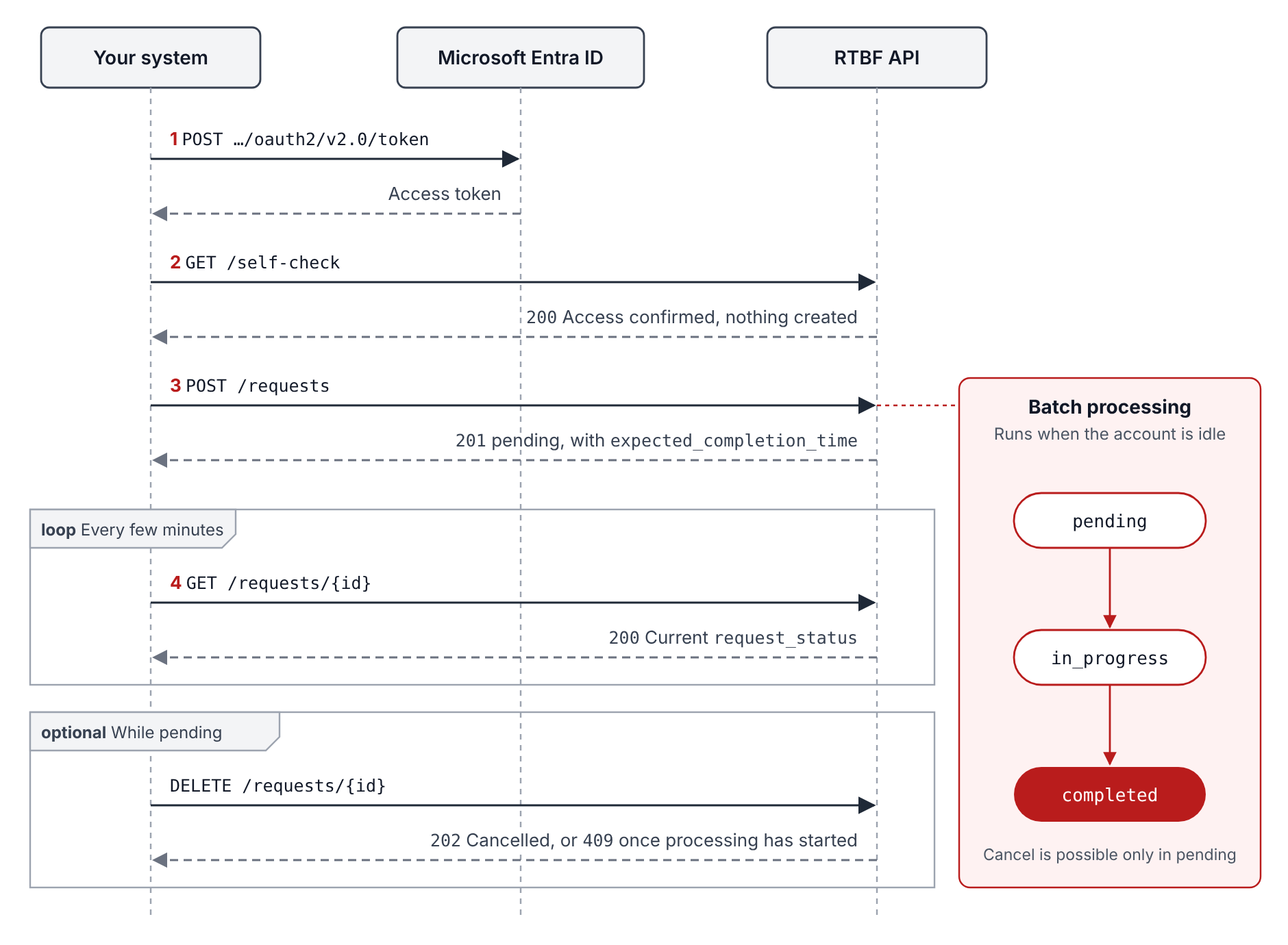
All RTBF paths are under {BASE}/api-op/v1/rtbf. Only step 3 in the diagram above starts an erasure; steps 1, 2, and 4 do not change anything.
Getting started
Getting to production requires the following steps:
-
Onboard with Redpoint. Redpoint registers your application, authorizes it for your Redpoint CDP account(s), and sends the onboarding values listed in the RTBF onboarding topic.
-
Get an access token with the OAuth2 client-credentials grant. The Connecting section of the RTBF API reference shows the call.
-
Call
GET /self-check. This is a check that doesn’t create anything; a200means your credentials and authorization work. -
Run the test scenarios in the RTBF onboarding guide, using only the test environment and synthetic subjects.
-
Pass the certification checklist at the end of the onboarding guide. Redpoint then issues production credentials, which are separate from test credentials.
Key concepts
The following concepts are important to understanding your RTBF integration.
|
Concept |
What it means for your connector |
Details |
|---|---|---|
|
Two-part access |
Your Entra token proves who is calling. Redpoint's authorization decides which accounts you can act for, and Redpoint can revoke it. |
|
|
You own the request ID |
You generate |
|
|
One person per request |
Identifiers in a request are matched with OR, so an email shared by two profiles erases both. |
|
|
Asynchronous batches |
A request waits as |
|
|
The 30-day clock |
It starts at |
|
|
Cancel only while pending |
Once processing starts, the erasure can't be stopped. |
|
|
Errors reveal little (intentionally) |
Most credential problems return the same |
Designing your connector
The RTBF onboarding guide checklist covers the behaviors your connector must show: token caching, safe retries, error parsing, and 503 back-off. These are the design decisions around them.
|
Decision |
Recommendation |
|---|---|
|
Request IDs |
Store each |
|
Identity verification |
Verify the requester before you submit. Redpoint CDP carries out the request but doesn't check who asked. |
|
Which identifiers to send |
Send only identifiers you're confident belong to the requester; each one is matched on its own. Include |
|
Grace periods |
If your process lets a requester change their mind, hold the request in your system until that window closes. Don't rely on cancelling, because |
|
Overdue requests |
There is no failure status, so alert your team if a request nears |
|
Credentials |
Keep the client secret or certificate in a secrets manager. Track its expiry date and plan the renewal with Redpoint. |
|
Environments |
Keep test and production configuration separate: base URL, credentials and account IDs all differ. |
|
Network |
If Redpoint allow-lists your IPs, send traffic from stable egress addresses, and tell Redpoint before they change. |
OpenDSR alignment
The API uses the OpenDSR field names, statuses, cancel rules, and error object. These are the differences a generic OpenDSR connector needs to handle:
|
Area |
Redpoint behavior |
|---|---|
|
|
Limited to |
|
|
Optional, defaults to |
|
|
A Redpoint addition, required with |
|
|
Not read. Which regulation applies is set up per account with Redpoint. |
|
Status callbacks |
Not supported. Poll |
|
Cancelling a request that has started |
Returns |
|
Error object |
Adds |
|
|
Never returned; status checks don't carry personal data. |
|
|
A Redpoint addition for testing your access. |
FAQ
Can I submit several people in one request?
No. Send one request per person. All identifiers in a request are treated as the same person.
Will I be notified when a request completes?
No. The API has no callbacks, so poll GET every few minutes.
How long does processing take?
Processing time is based on system activity and can vary (refer to the RTBF onboarding “What to expect about status progression” section for details). Each request has an expected_completion_time 30 days after submitted_time.
What’s in scope: which data stores, etc.?
In scope are strictly the default CDP database tables. If custom tables were used as part of your initial implementation, a small add-on to the RTBF process needs to be provisioned by Redpoint. Currently not in scope: data in RPI, data that has previously been extracted from RPI, and data that has been sent by RPI to third parties (e.g., connectors); quarantined files; archived files; and database backups.
Is data deleted or masked?
Either one, depending on how Redpoint configured your account. Ask your Redpoint contact which applies to you.
What does Redpoint keep after a request completes?
Any email address stored with the request is deleted on completion. Redpoint keeps a record of each status change as proof the request was fulfilled.
How long are audit records kept?
Audit records are kept permanently.
How do I receive the results of an access request?
The API returns only the request's status. The results are delivered as CSV files in the /outgoing/rtbf/<UniqueRequestId> folder of the SFTP site that was provisioned as part of your initial onboarding just prior to the request status being set to completed. The <UniqueRequestId> correlates with the subject_request_id.
Who do I contact?
Your Redpoint onboarding contact handles credentials, account authorization, and test processing. For a failed call, include the correlation_id, the time, and the endpoint.