

Overview
Starting with RPI v7.8.20261113.1905, the Twilio connector doesn't call Twilio directly. Instead, RPI prepares each message and hands it to the Twilio Messaging Service, a separate Redpoint service deployed alongside RPI. The Twilio Messaging Service sends the message through Twilio, receives Twilio's delivery and reply notifications, and passes them back to RPI. RPI and the Twilio Messaging Service communicate through a message broker. This implementation significantly improves performance, resolving delays in reporting metrics that resulted from the previous polling-style implementation. RPI now publishes and receives as fast as Twilio and your K8s budget allows.
To help you find all relevant content in the same place, this connector guide replaces the Twilio content that was previously located in the Best Practices section (including the Functional guide), the External configuration guide, and the Reference guide channel configuration (Channel specific tab section).
If you’re using an earlier version of the Twilio connector, refer to Twilio connector guide (RPI v7.8.20261104.2001 and earlier) instead.
Key capabilities
-
Send SMS, MMS, and RCS messages from an offer activity in an interaction workflow, or from a queue listener.
-
Track delivery states for each contact, including read receipts for RCS. States update automatically in the background.
-
Capture opt-out, opt-in, and help keywords, and suppress opted-out numbers automatically for each Messaging Service.
-
Capture survey responses based on keywords you define in the offer.
-
Use the resulting states as inputs to downstream workflow activities and reporting.
What's new in v7.8.20261113.1905
-
Twilio Messaging Service: Twilio credentials and webhooks now belong to the Twilio Messaging Service, not to each RPI channel.
-
RCS and content templates: insert a Twilio Content Template SID in an offer to send RCS rich content.
-
New states: Read (RCS read receipts) and Canceled.
-
Near real-time states: delivery and reply states are processed continuously, not when channel synchronization runs.
-
Resumable sends: an interrupted send resumes from the last contact processed, without sending duplicates.
-
Reply attribution: a reply is attributed to the most recent message sent to that number.
-
Test mode: route a channel's sends through the Twilio Messaging Service without delivering them to real phones.
-
Removed:
-
The Account SID, Authorization token, Callback service URL, retry, retrieval period, event import batch size, historical import, and bulk export email fields.
-
The Enable trace and personalized content queue options on the Advanced tab.
-
Support for document (NoSQL) data warehouses.
-
-
Deprecated: the Twilio Inbound SMS channel. See Replies.
Architecture
Components
|
Component |
Role |
|---|---|
|
Execution Service |
Sends batch, seed, and test messages, and processes every event that comes back. |
|
Queue Reader |
Sends queue listener messages. It doesn't receive events. |
|
Interaction API |
Loads the list of Messaging Services for the channel configuration screen, and runs the channel's connectivity test. |
|
Twilio Messaging Service |
Holds the Twilio account credentials, calls the Twilio API, and receives Twilio's webhooks. Runs in the RPI namespace, with its own PostgreSQL database and Redis. |
|
Message broker |
Carries messages from RPI to the Twilio Messaging Service, and events back. One of Azure Event Hubs, Amazon SNS and SQS, or Google Cloud Pub/Sub. |
|
Twilio |
Delivers messages to carriers and reports the results through webhooks. |
One Twilio Messaging Service serves the whole RPI cluster, with one Twilio account. Every tenant and every Twilio channel shares that account. To separate traffic, give each channel its own Messaging Service within the account.
How data flows
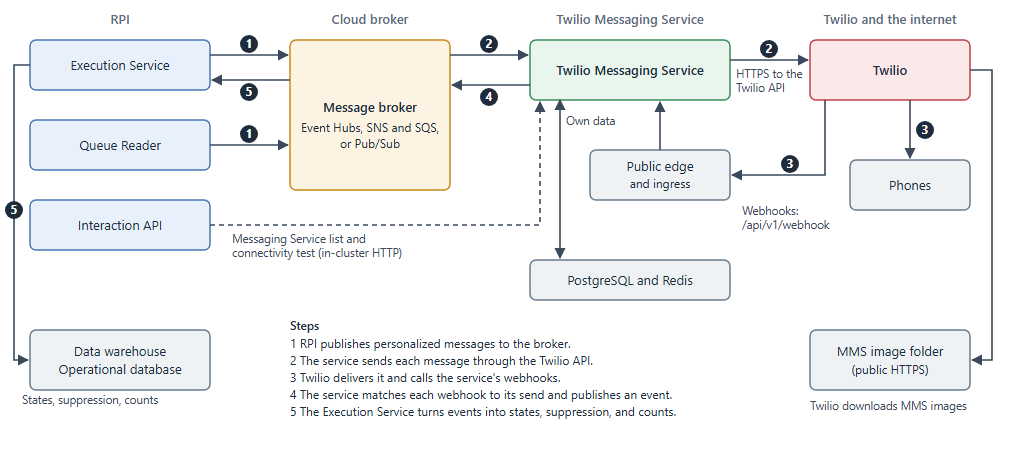
-
RPI (the Execution Service, or the Queue Reader for queue listener sends) personalizes each message and publishes it to the broker.
-
The Twilio Messaging Service reads the message from the broker and sends it through the Twilio API.
-
Twilio delivers the message, then calls the Twilio Messaging Service's webhooks with delivery statuses, replies, and link clicks.
-
The Twilio Messaging Service matches each webhook to the send that caused it and publishes it to the broker as an event.
-
The Execution Service reads the events, stores them in your data warehouse, and turns them into states, suppression records, and counts.
The send and the results are independent. If the Twilio Messaging Service is briefly unavailable, messages wait in the broker, and a running send isn't affected.
Network paths
|
From |
To |
Purpose |
|---|---|---|
|
RPI services and the Twilio Messaging Service |
The message broker |
Messages and events. Each service signs in with its cloud identity. |
|
The Interaction API |
The Twilio Messaging Service, inside the cluster |
The Messaging Service list and the connectivity test. Not exposed publicly. |
|
The Twilio Messaging Service |
The Twilio API ( |
Sending messages. |
|
Twilio |
The Twilio Messaging Service's public webhook address, over HTTPS |
Delivery statuses, replies, and link clicks. Only the |
|
Twilio |
Your MMS image folder, over HTTPS |
Twilio downloads each MMS image from its public URL. |
Set up Twilio messaging
When Redpoint hosts RPI (Redpoint CDP), choose who manages the Twilio account that the Twilio Messaging Service uses:
-
Redpoint created and client managed (recommended): Redpoint creates a Twilio subaccount for you and gives you its login, so you can finish the setup in Twilio.
-
Redpoint managed: Redpoint does all of the Twilio setup, and you don't have access to Twilio.
-
Client managed: you bring your own Twilio account.
Setup happens in this order:
-
You prepare your Twilio account: the Account SID and Auth token, sender numbers, and a Messaging Service.
-
A Kubernetes administrator deploys the Twilio Messaging Service with your Account SID and Auth token, and a network administrator publishes its webhook address.
-
You point the Messaging Service's webhooks at the Twilio Messaging Service, and set up RCS if you send it.
-
You configure the Twilio channel in RPI.
Twilio Console labels change over time. If a menu has moved, refer to Twilio's own documentation.
Get the Account SID and Auth token
The Twilio Messaging Service signs in to Twilio with an Account SID and Auth token. You don't enter them in RPI: give them to the Kubernetes administrator who deploys the Twilio Messaging Service.
-
Sign up for a Twilio account and log in.
-
Once your account is verified and has a phone number, go to your Account management page.
-
In the submenu, select API keys & tokens. Scroll down to Auth Tokens to see your live credentials (Account SID and Auth Token).
-
Select the lock icon to show the Auth token.
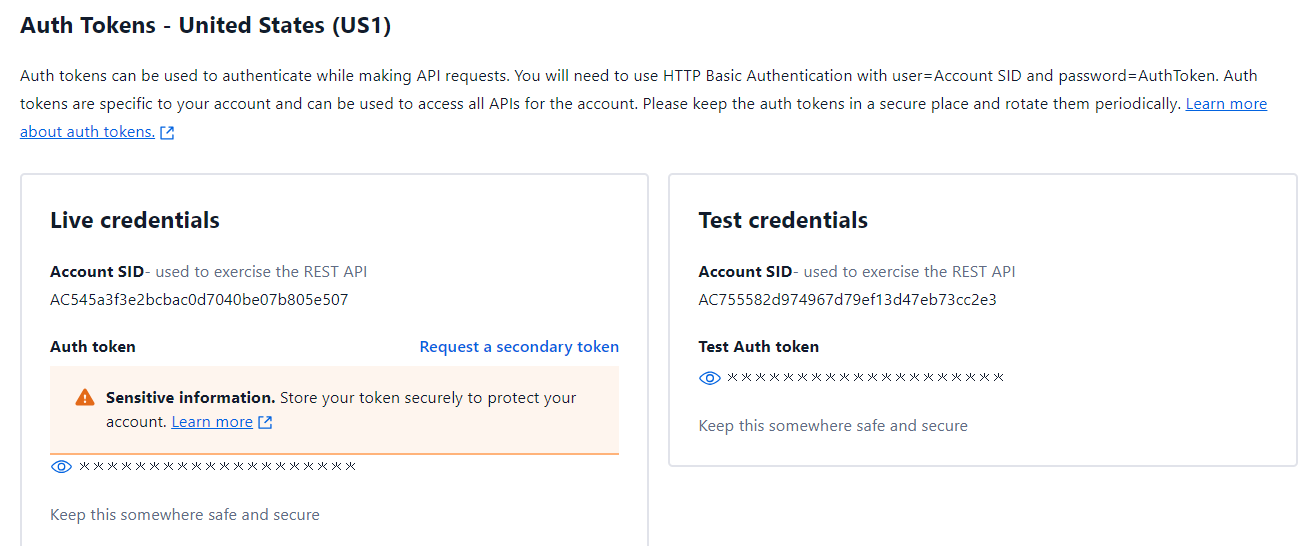
If you change the Auth token, the Kubernetes administrator must update it in the deployment and restart the Twilio Messaging Service, which reads the token when it starts.
Create a subaccount (optional)
Subaccounts are like accounts, but they're owned and managed by a parent account. A subaccount has its own Auth tokens. If a subaccount's token is compromised, it can't be used to reach the parent account or other subaccounts.
-
From the Account menu, select Subaccounts.
-
Select Create subaccount.
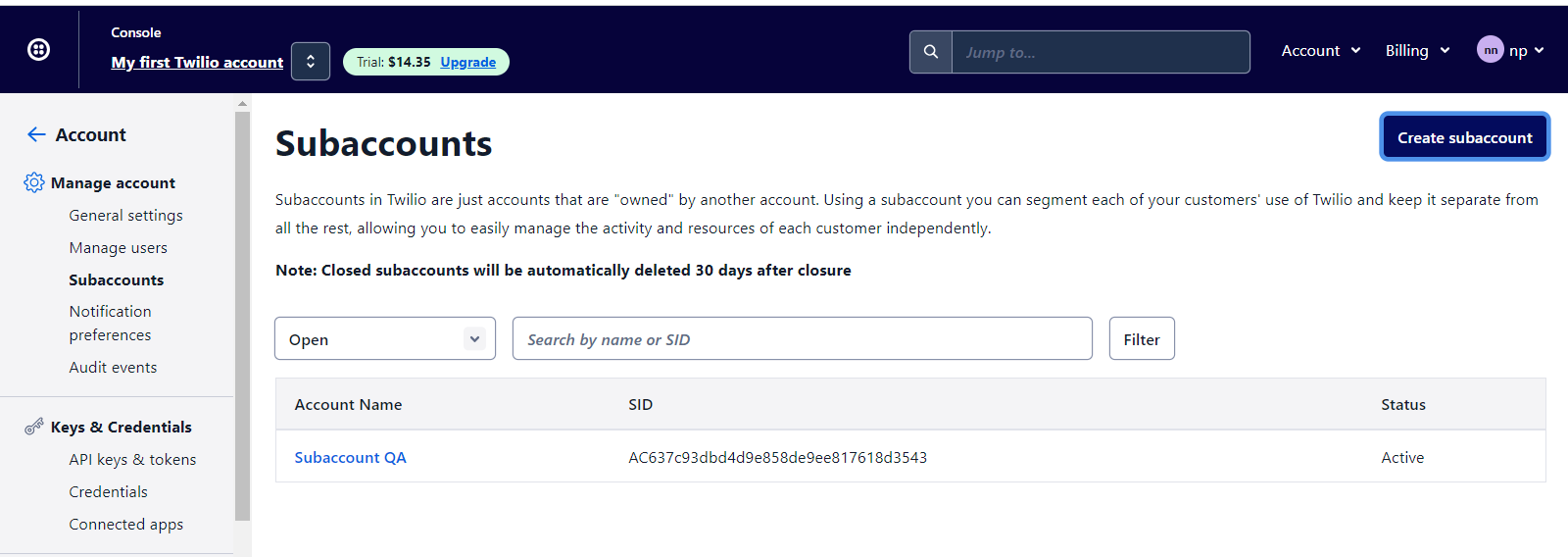
-
Enter a friendly name for the subaccount, then select Create subaccount.
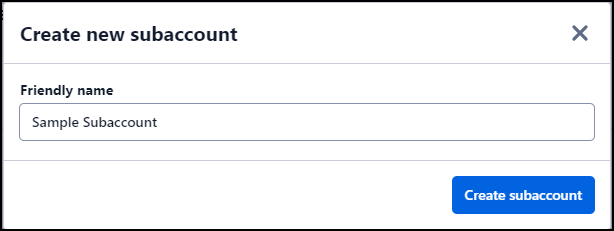
-
Select the new subaccount, so that the numbers and Messaging Service you create next belong to it.
To use a subaccount, give its Account SID and Auth token to the Kubernetes administrator instead of the parent account's info, and create your numbers and Messaging Services in it.
Get sender numbers
-
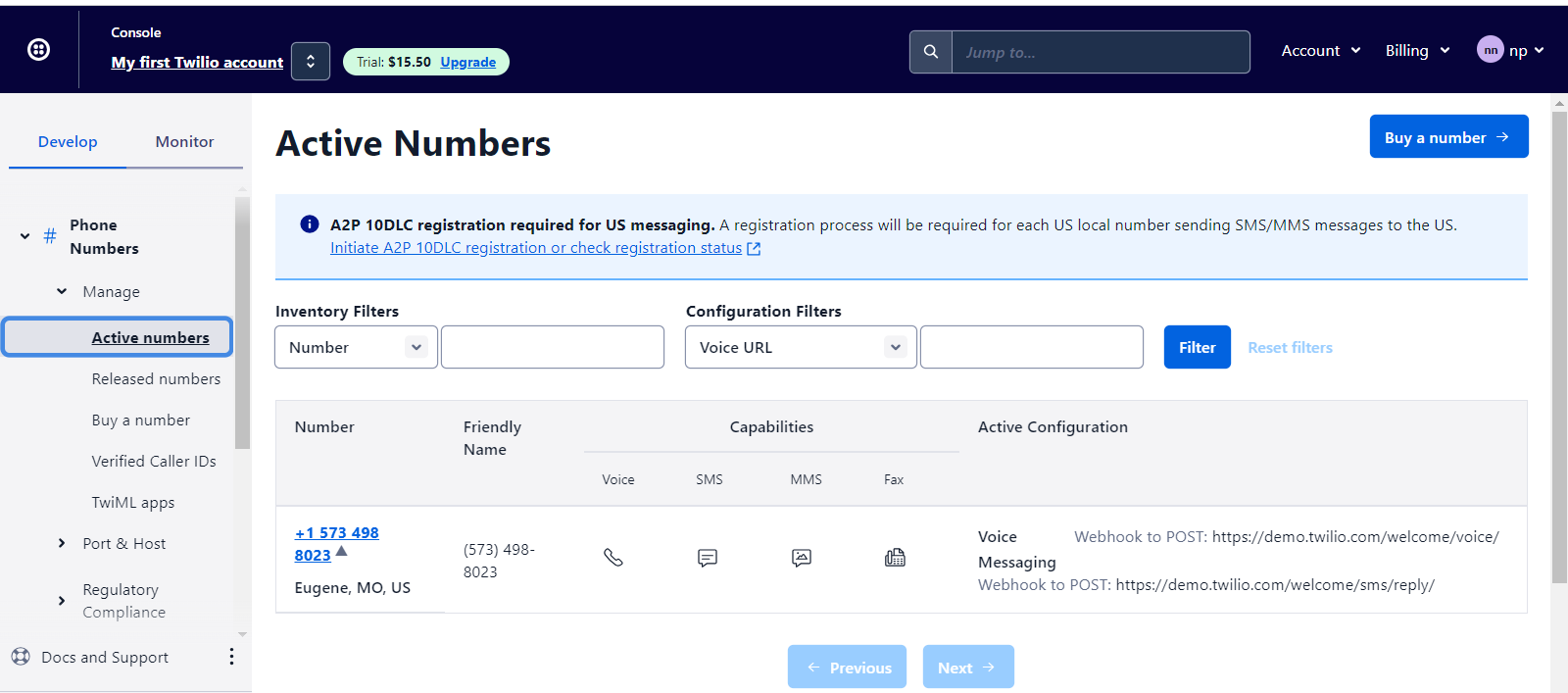
On the Develop tab, select Phone Numbers > Manage > Active numbers to see the numbers you have.
-
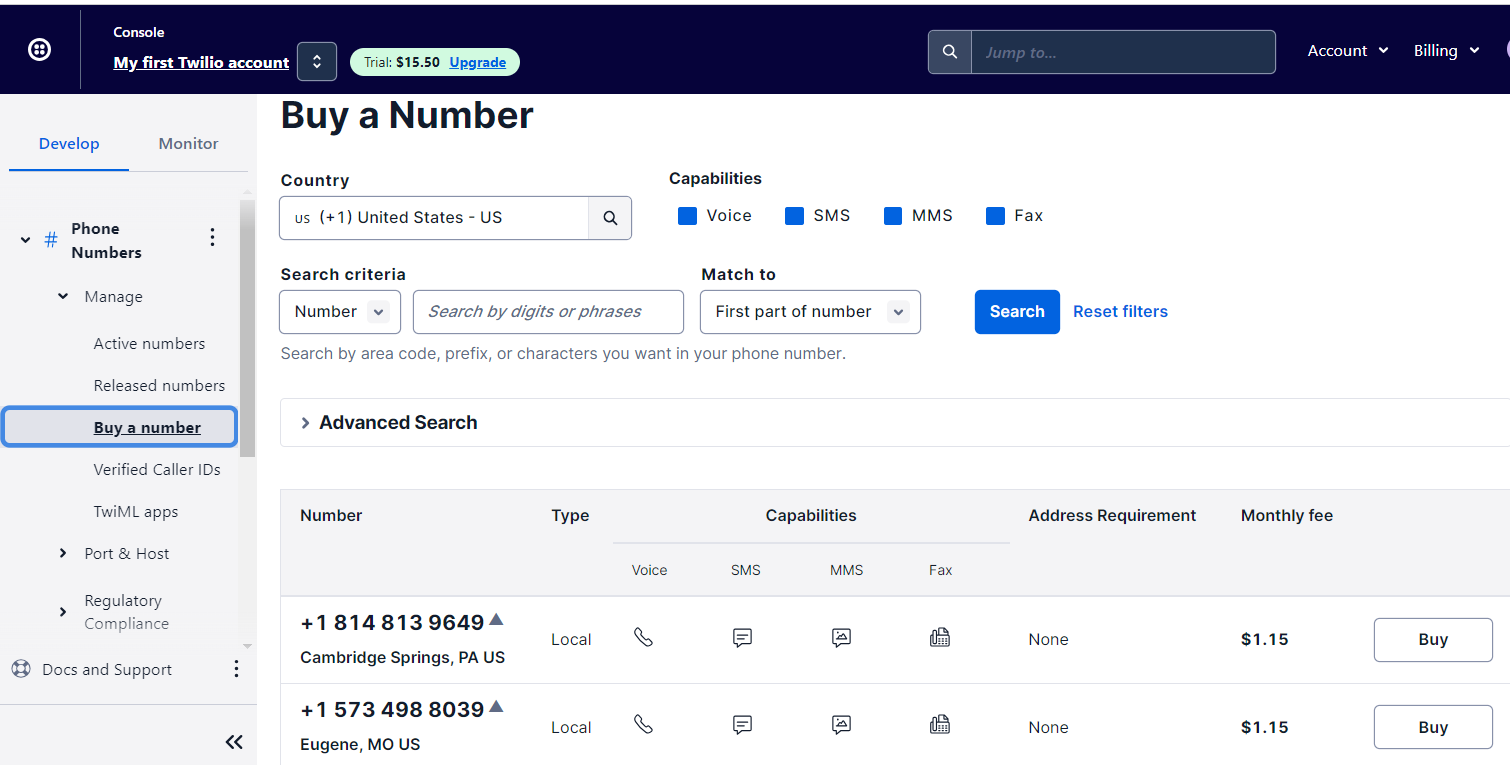
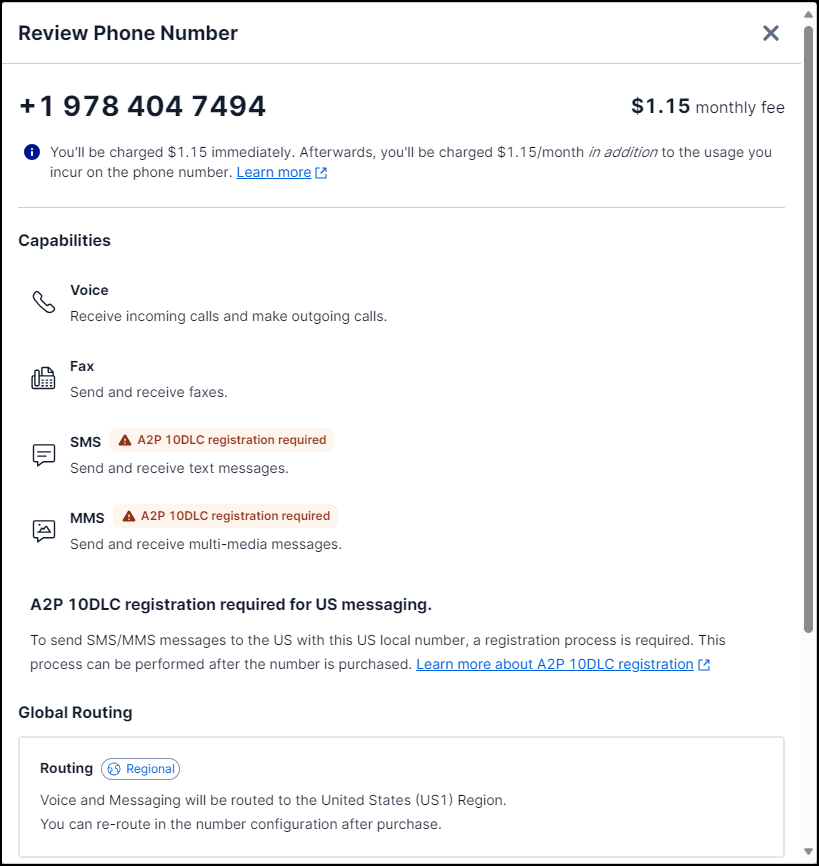
To add a number, select Phone Numbers > Manage > Buy a number, then select Buy on the number you want.
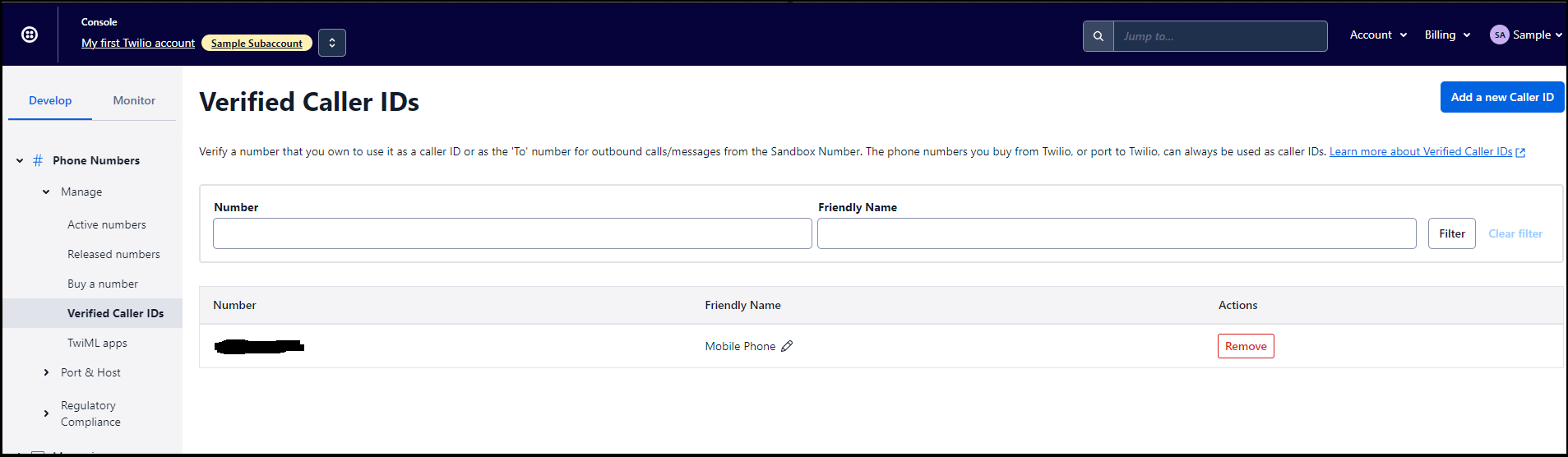
On a Twilio trial account, Twilio sends messages only to verified phone numbers. To test from a trial account, add your test phones under Phone Numbers > Manage > Verified Caller IDs. Twilio verifies each one with a one-time passcode.
In the U.S., Twilio requires A2P 10DLC registration for long codes and verification for toll-free numbers before they can send messages. Unregistered numbers fail to send.
Create a Messaging Service
A Messaging Service bundles sender numbers and messaging settings, which helps with high-volume sending. Every Twilio channel in RPI sends through a Messaging Service.
-
In the Console, from the Develop tab, select Messaging, then Services.
-
Select Create Messaging Service, add your sender numbers to its sender pool, and finish the setup.
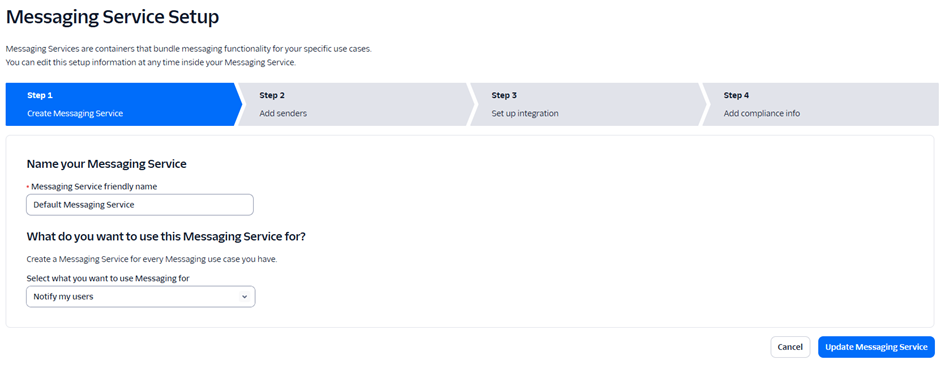
You don't copy the Messaging Service SID into RPI. You select the Messaging Service by name on the channel (see Configure the channel in RPI). A new Messaging Service can take up to 30 minutes to appear in that list.
Deploy the Twilio Messaging Service
The Twilio Messaging Service is deployed with the RPI Helm chart. Follow the RPI Helm chart documentation at github.com/RedpointGlobal/redpoint-rpi and the Configure the Twilio Messaging Service topic.
When the deployment is done, the administrator gives you the webhook host, the public address Twilio uses to reach the Twilio Messaging Service.
The ingress configuration should strictly conform to the directions given in the deployment documentation. Only Twilio Messaging Service webhooks should be exposed to traffic outside of the Kubernetes (K8s) cluster (internal, public internet, or otherwise).
Set the Messaging Service webhooks
-
In the Console, open the Messaging Service and select Integration.
-
Set:
-
Delivery status callback:
https://<webhook-host>/api/v1/webhook/status -
Incoming messages: send a webhook to
https://<webhook-host>/api/v1/webhook/inbound
-
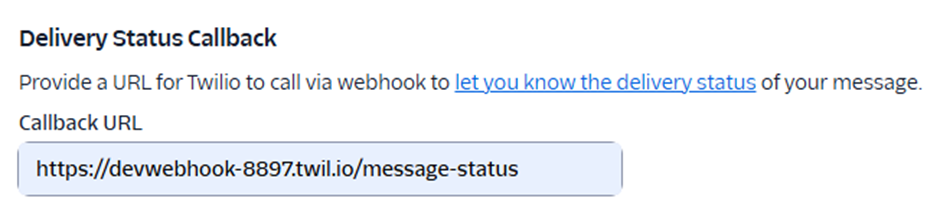
Both webhooks are required. Without the delivery status webhook, messages stop at Sent. Without the incoming messages webhook, RPI doesn't record opt-outs, survey responses, or other replies.
The Twilio Messaging Service also accepts link-click webhooks at https://<webhook-host>/api/v1/webhook/link-click and passes them to RPI, which stores them but doesn't use them. Twilio reports clicks only on links it shortens, and the Twilio Messaging Service doesn't ask Twilio to shorten links, so Twilio sends none today. You don't need to set this webhook up. To track clicks, use an RPI URL shortener web adapter.
Set up RCS (optional)
To send RCS, create an RCS sender, register it for carrier approval, add it to the Messaging Service, and configure Advanced Opt-Out. Carrier approval can take several weeks. Before approval, Twilio delivers RCS only to the test devices you register on the sender.
Configure the channel in RPI
-
Go to Configuration > Channels.
-
Select the green plus button, then Mobile > Add new Twilio SMS channel.
-
On the General tab, name the channel for your client or resolution level.
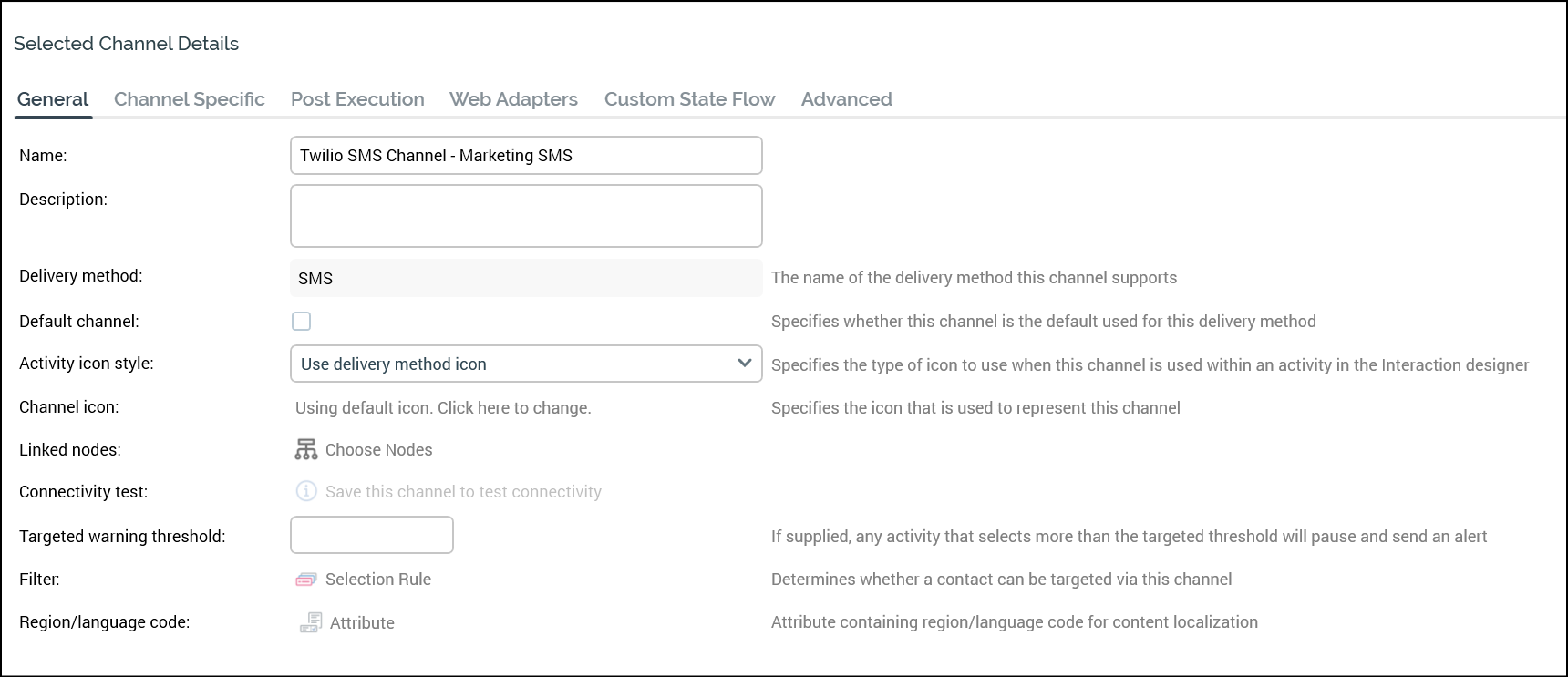
-
On the Channel Specific tab, set the fields in the following table.
|
Field |
Description |
Default and limits |
|---|---|---|
|
Recipient phone |
The attribute that holds each contact's mobile number. Browse for it with the recent items chooser or the File System Dialog, or drag it from the toolbox. |
Required. Must hold text in E.164 format (for example, |
|
Message Service ID |
The Twilio Messaging Service used for every message sent from this channel. The list shows each service's name and number of phone numbers. |
Required. The list loads only when you select Refresh, and stays empty until the channel has been saved once: save a new channel first, then select Refresh. |
|
Auto-suppress |
Exclude contacts listed in the channel's suppression table from the audience. This is separate from Twilio opt-outs, which RPI always checks (see Outbound fulfillment). |
On. |
|
Custom suppression table |
Use your own suppression table instead of the one named by the |
Off. |
|
Suppression table name |
The name of your custom suppression table. Available only when Custom suppression table is selected. |
Required when available. Maximum 50 characters. Must be a valid table name that doesn't start with a number. Can't be |
|
Allow survey responses |
Allow offers on this channel to use survey keywords. |
Off. |
|
Use test mode |
Send through the Twilio Messaging Service in test mode. Nothing is delivered to real phones, and the Sent, Delivered, and Read states are simulated. |
Off. |
|
Image folder |
The external content provider folder that RPI uploads MMS images to. Select Choose image folder to pick a folder from your configured external content providers. Must be publicly readable over HTTPS (see Send MMS). |
Required if offers include image assets. |
-
On the Web Adapters tab, you can add URL shortener web adapters only, such as Bitly or Rebrandly. Twilio warns that shortened links, especially on shared public shortener domains, can increase carrier filtering. Use a branded domain where you can, and monitor delivery rates.
-
When you create a channel, or change its Recipient phone or suppression table settings, RPI shows "The database will be validated when these channels are saved." When you save, RPI starts a Validate channels job, which you can follow in My Jobs.
Send messages
Send SMS from an interaction
-
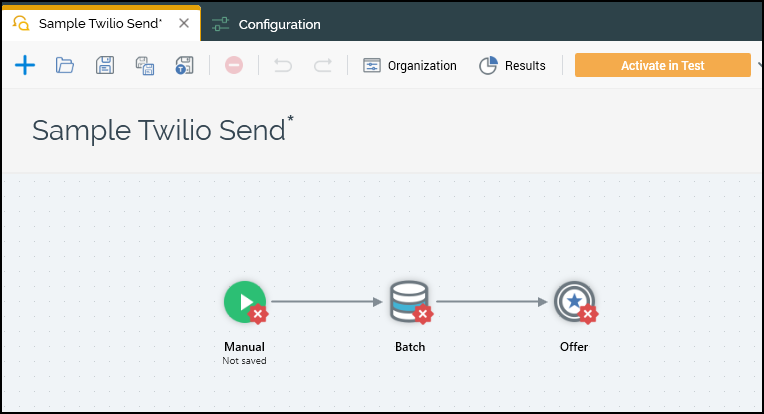
Create an interaction (Orchestration > Interactions > Create New Interaction) and name it.
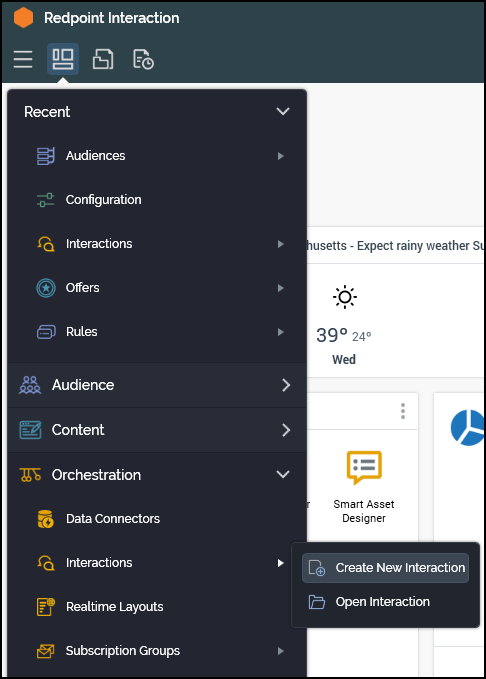
-
Add a workflow control (for example, a manual control), a targeting activity (for example, a batch audience), and an offer activity.
-
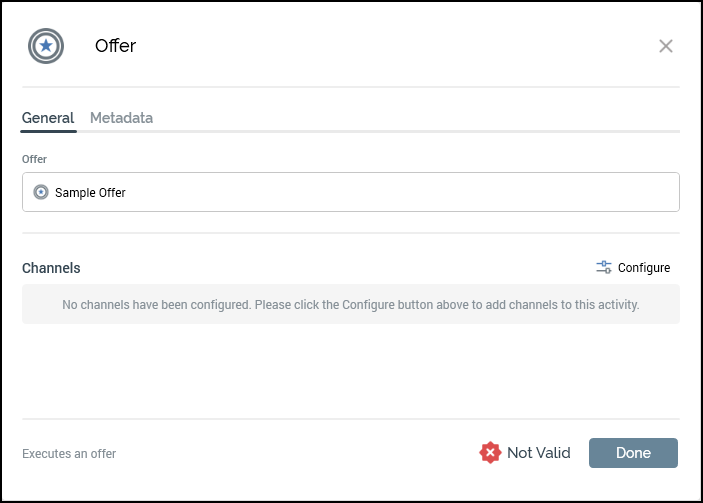
In the offer activity, assign a mobile offer.
-
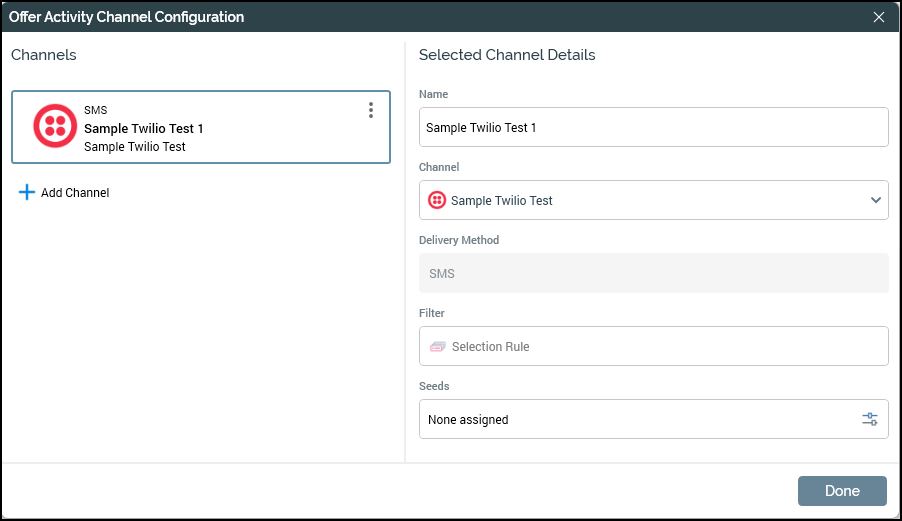
Under Channels, select Configure, then Add Channel, and choose your Twilio channel.
-
Select Done in the dialog, then Done on the offer activity, and save the interaction.
-
Seeds attached to the offer are sent after the audience.
To check an offer before sending, select Send Test SMS Message in the mobile offer designer. Test messages aren't included in states or counts (see Outbound fulfillment).
Send MMS
-
In the mobile offer, set Mobile Messaging Type to MMS.
-
Add images to the offer.
-
If the offer uses RPI image assets, make sure the channel has an Image folder.
How RPI gets each image to Twilio depends on where the image comes from:
-
RPI image assets: RPI uploads the image to the channel's image folder and sends Twilio the uploaded file's URL.
-
Files from an external content provider: RPI sends Twilio the file's own URL and doesn't upload it.
Either way, Twilio downloads the image from its URL, so the URL must be publicly reachable over HTTPS without signing in. A message can include up to 10 images; RPI drops a message with more.
Send RCS
RCS messages go through the same Messaging Service as SMS and MMS. When the Messaging Service has an RCS sender and the recipient's phone supports RCS, Twilio delivers the message as RCS. Otherwise, Twilio falls back to SMS or MMS. You can't force RCS-only delivery from RPI.
-
Text and images: an MMS offer with one image is delivered as an RCS rich card on an RCS-capable phone. A rich card shows one image; for several images or a carousel, use a content template.
-
Rich content (cards, carousels, suggested replies): build a content template in Twilio, then insert Content Template SID in the mobile offer and enter the template's SID (it starts with
HX, up to 100 characters).
When a message uses a content template, RPI sends only the template: any text and images in the offer are left out, because Twilio doesn't accept both together. For SMS fallback to work, the content template must also include a twilio/text content type.
Delivery and opt-out tracking
Outbound fulfillment
-
Connectivity test: RPI checks that the Twilio Messaging Service is ready. The test fails if the service doesn't respond successfully within 10 seconds.
-
Deduplication: RPI removes duplicate contacts by contact key, which for SMS channels is the Recipient phone.
-
Suppression: if Auto-suppress is selected, RPI excludes contacts listed in the channel's suppression table (the
SMSUnsubscribersTabletable, or your custom table). -
Opt-out check: whatever the Auto-suppress setting, RPI skips numbers that have opted out of the channel's Messaging Service, based on
TwilioSMS_Suppression. A number is opted out if its most recent keyword was an opt-out keyword. -
Number check: RPI skips recipient numbers that aren't valid E.164 numbers and records them with the Invalid Numbers state.
-
Hand-off: RPI personalizes each message and publishes it to the broker in batches. The Twilio Messaging Service sends each message through Twilio.
-
Progress: RPI records the last contact processed. If the send is interrupted, it resumes from that point, and the Twilio Messaging Service ignores any message it has already sent.
Seed and test sends go through the same path but aren't included in states, counts, or suppression.
State processing
The Twilio Messaging Service sends RPI four kinds of event: send results, delivery statuses, replies, and link clicks. RPI stores them in the RPI_TwilioEvents table in your data warehouse. Every 10 seconds, the Execution Service checks for new events and:
-
Writes delivery and reply states to the offer history states table.
-
Records opt-out and opt-in keywords in
TwilioSMS_Suppression. A keyword reply that's matched to a send but not to a contact still updates suppression, without creating a state. -
Recalculates the channel execution result counts shown in RPI. Counts are funnel counts: a contact that was queued, sent, and delivered is counted in all three.
-
Deletes processed events (see Where data is stored).
If Twilio never reports a delivery status for a message, the send result still records the message as Sent or Failed.
The channel synchronization task is still available. It only clears out send progress records older than 7 days. By default it runs every 60 seconds. To change the schedule, open Operations > System Tasks, edit the channel's data synchronization task to poll at a different interval or run at a fixed time each day, and save.
How long replies and statuses are matched
The Twilio Messaging Service matches each delivery status and reply to the send that caused it. It can do this until 7 days after the send's campaign completes (7 days is the default; the Kubernetes administrator can change it). A campaign completes 12 hours after its last message. For a queue listener, that's 12 hours after the listener's last send. When several sends reached the same number, a reply is attributed to the most recent one.
After that, RPI doesn't record the send's delivery statuses or replies, including opt-out keywords. Twilio's own opt-out list still applies, and RPI records messages Twilio refuses as Failed (see States and keywords).
Replies
Replies to messages RPI sent reach the Twilio Messaging Service through the incoming messages webhook and are passed to RPI, which records them as it did in earlier builds:
-
Opt-out, opt-in, and help keywords: recorded as states, and opt-outs and opt-ins update suppression.
-
Survey responses: recorded as Survey Response states when the channel allows survey responses.
-
Other replies: recorded as Mobile Originated states, with the reply text as the event name.
Two things differ from earlier builds:
-
RPI records only replies that the Twilio Messaging Service can match to a send (see How long replies and statuses are matched). A message from a number RPI never sent to isn't recorded, even if it's an opt-out keyword. Earlier builds read every message sent to the channel's numbers.
-
The Twilio Inbound SMS channel, which counted messages received on a Twilio number, is deprecated and has no replacement.
Where data is stored
|
Table |
Database |
Contents |
|---|---|---|
|
|
Data warehouse |
Events received from the Twilio Messaging Service. Processed rows are deleted after 24 hours; link-click events are kept. |
|
Offer history states table |
Data warehouse |
Per-contact states used by reporting and downstream activities. |
|
|
Data warehouse |
Opt-out and opt-in keyword activity per phone number and Messaging Service. Twilio opt-outs are always recorded here, even when the channel uses a custom suppression table. |
|
|
Operational database |
The last contact processed for each send, used to resume. Rows older than 7 days are deleted when the channel synchronization task runs (see State processing). No contact data is stored. |
RPI creates these tables automatically when it first needs them.
States and keywords
|
State |
Type |
Meaning |
|---|---|---|
|
Queued |
Delivery |
Twilio reported the message as queued. |
|
Sent |
Delivery |
Twilio accepted the message, or passed it to the carrier. |
|
Delivered |
Delivery |
The carrier confirmed delivery. |
|
Read |
Delivery |
The recipient read the message (RCS only). |
|
Undelivered |
Delivery |
The carrier couldn't deliver the message. The event name holds the Twilio error code and message. |
|
Failed |
Delivery |
The message couldn't be sent. The event name holds the reason. |
|
Canceled |
Delivery |
The message was canceled before it was sent. |
|
Invalid Numbers |
Delivery |
The recipient number isn't a valid E.164 number, either because RPI skipped it or because Twilio rejected it. |
|
Stop, StopAll, Unsubscribe, Cancel, End, Quit, OptOut, Revoke |
Opt-out keyword |
The recipient opted out. RPI suppresses the number for this Messaging Service. |
|
Start, Yes, Unstop |
Opt-in keyword |
The recipient opted back in. RPI removes the suppression. |
|
Help, Info |
Help keyword |
Recorded only. |
|
Survey Response |
Survey |
The reply contained the offer's primary survey keyword and at least one additional keyword. The event name holds the matched additional keyword. |
|
Mobile Originated |
Reply |
Any other reply. The event name holds the reply text. |
Opt-out, opt-in, and help keywords match only when the whole reply is the keyword (ignoring case and surrounding spaces). Twilio keeps its own opt-out list and lifts its block only for START and UNSTOP: after a contact replies YES, RPI removes the suppression, but Twilio still refuses messages to that number (error 21610). Survey keywords match anywhere in the reply. A reply that contains only the primary survey keyword isn't recorded.
State timestamps
RPI writes each state row against the contact the message was sent to, with a timestamp in UTC:
|
State comes from |
Timestamp |
|---|---|
|
A Twilio delivery status (for example, Delivered or Undelivered) |
When the carrier reported the status, if Twilio passes on the carrier's delivery receipt (accurate to the minute). Otherwise, when the Twilio Messaging Service received the status from Twilio. |
|
The send result (Twilio accepted or rejected the message), or a number RPI skipped as invalid |
When RPI processed the event. |
|
A reply (keywords, Survey Response, Mobile Originated) |
When RPI processed the reply. |
Because RPI processes events every 10 seconds (see State processing), "when RPI processed" is usually within seconds of the event, but it's later if the Execution Service was stopped or catching up.
Deployment settings
The RPI Helm chart sets these cluster settings under Plugins:Twilio. There are no Twilio System Configuration settings.
|
Setting |
Purpose |
Default |
|---|---|---|
|
|
The broker type: |
None. |
|
|
The address of the Twilio Messaging Service inside the cluster. |
Set by the Helm chart. |
|
|
The path of the Twilio Messaging Service's Messaging Service list. |
|
|
|
Connection details for the selected broker. |
None. |
|
|
Skip the Twilio Messaging Service check in the connectivity test. |
|
|
|
Stop every Twilio send: audience, seed, test, and queue listener. Activities complete without sending. |
|
The Execution Service needs all of these settings. The Queue Reader needs MessagingProvider and the broker settings for publishing. The Interaction API needs TmsBaseUrl.
Refer to Configure the Twilio Messaging Service for information about configuring the service.
Upgrading from an earlier build
-
Webhooks: in each Messaging Service, change the delivery status callback from the RPI Callback Service address (
https://<callback server>:<port>/api/postevents?channelLabel=...) to the Twilio Messaging Service, and add the incoming messages webhook. See Set the Messaging Service webhooks. -
Channel fields: the removed fields are ignored, and their values are discarded the next time you save the channel. Check Message Service ID on each channel.
-
Events table:
RPI_TwilioEventshas a new structure. The first time RPI uses it after the upgrade, RPI drops and recreates the table, so any events from the earlier build are lost. Let channel synchronization finish before you upgrade. -
In-flight messages: the Twilio Messaging Service can't match delivery statuses or replies to messages sent before the upgrade, so RPI doesn't record them. See How long replies and statuses are matched.
-
Old tables:
Twilio_MessageIDsandTwilio_FailedSmsSendsare no longer used. -
Twilio Inbound SMS channel: remove it from your configuration. See Replies.
Limitations
-
Document data warehouses: the channel can't be configured for a tenant whose data warehouse is a document (NoSQL) database.
-
Short codes: RPI can't send to short-code recipients, because recipient numbers must be E.164.
-
Opt-out wording: RPI doesn't add opt-out instructions to Twilio messages, even when the offer's Purpose is Marketing. Include them in the offer.
-
Queue overflow: when Twilio reports a queue overflow (error 30001) on a Messaging Service, the Twilio Messaging Service pauses sends through that Messaging Service for 15 minutes. Messages sent during the pause fail with error 30001.
Activity log
At the end of a send, the activity log shows a summary like this:
-
Audience rows read: {n} (invalid contacts: {n}). -
Sent to Twilio: {n}. Skipped pre-publish: invalid number={n}, unsubscribed={n}, already processed on resume={n}. -
Delivery results will be reported as Twilio confirms them; campaign metrics update as the carrier reports back.
Other messages you may see include Resuming send: skipping contacts with RPContactID <= {n}, Contact list is empty., Dropped message to {phone}: {n} media attachments exceed the per-message limit., and SMS campaign is currently disabled. No messages were sent.
Troubleshooting
|
Message or symptom |
What to do |
|---|---|
|
Messages show as Delivered, but nobody received them |
Check whether Use test mode is selected on the channel. |
|
|
|
|
|
The Twilio Messaging Service is running but not ready. Ask the Kubernetes administrator to check it. |
|
|
RPI can't reach the Twilio Messaging Service. Check |
|
|
Correct the |
|
Queue listener sends fail with |
The Queue Reader has no broker settings. Ask the Kubernetes administrator to add them. |
|
|
Select a Messaging Service on the channel. |
|
|
Remove any web adapter that isn't a URL shortener from the channel's Web Adapters tab. |
|
|
Choose a different Suppression table name. |
|
|
Choose a Recipient phone attribute that maps to a database column. Model project attributes and parameter attributes can't be used. |
|
|
Base the channel's filter on a resolution level in the main database, or remove the filter. |
|
The Messaging Service list is empty after Refresh |
Check that the channel is saved and that the Twilio Messaging Service is reachable (run the connectivity test). A new Messaging Service can take up to 30 minutes to appear. |
|
|
Select Allow survey responses on the channel, or remove keywords from the offer. |
|
|
Reduce the number of images in the offer. |
|
|
Set Image folder on the channel. |
|
MMS messages fail with Twilio error 11200 |
Twilio can't download an image. Make sure the image folder, or the external file, is publicly readable over HTTPS. |
|
Content template messages fail with Twilio error 19023 when the phone doesn't support RCS |
The content template has no fallback for SMS. Add a |
|
RCS messages always arrive as SMS |
Check that the Messaging Service's RCS sender is carrier-approved, or that the phone is registered as a test device on the sender. |
|
An opt-out reply isn't recorded in RPI |
The reply arrived after the matching window, or came from a number RPI never sent to. See How long replies and statuses are matched. |
|
States stay at Sent and never reach Delivered |
Twilio's delivery status webhook isn't reaching the Twilio Messaging Service. Check the Messaging Service's delivery status callback. |
|
Replies, opt-outs, and survey responses aren't recorded |
Twilio's incoming messages webhook isn't reaching the Twilio Messaging Service. Check the Messaging Service's incoming messages setting. |
|
No states at all, even Sent |
The Execution Service isn't receiving events. Ask the Kubernetes administrator to check the Execution Service log for broker errors. |
|
|
Remove the Twilio Inbound SMS channel from your configuration. |
FAQs
-
Twilio shows error 30007 "Message filtered". What can I do?
Twilio's filtering or a carrier blocked the message as spam or unwanted. Make sure your messaging complies with Twilio's Messaging Policy, that your sender numbers are registered (see Get sender numbers), and that your shortened links follow Configure the channel in RPI. If you believe the messages comply, send Twilio Support three or more message SIDs that failed with 30007. See Twilio's 30007 error page.