

Overview
The Configure Pulses Widget configuration overlay contains the following:
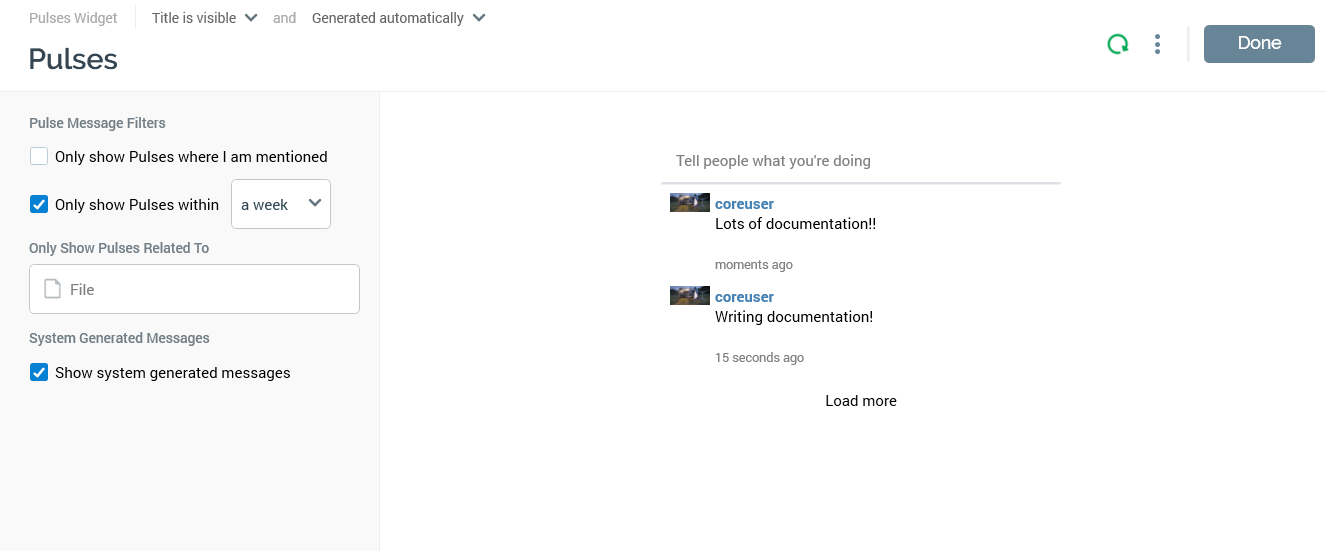
Properties Toolbox
-
Pulse Message Filters section: containing two checkboxes, both unchecked by default:
-
Only show pulses where I am mentioned: if checked, only pulses where you are mentioned are shown. These include pulses that you posted, and pulses created in reply to your postings.
-
Only show pulses within: if checked, you must select a time period (from a drop-down list that ranges from a day to a week). Pulses are limited to only those posted within this time.
-
-
Only Show Pulses Related To: you can select a file from the accessible folders within the RPI file system, using the File System Dialog. Pulses are filtered to only those related to the file you select. Having selected a file, you can clear it. You can also open the related file, which is shown in an appropriate designer. Not checked by default.
-
System Generated Messages: this checkbox is unchecked by default. If unchecked, only user-posted pulses are shown. If checked, both user-posted and system-generated pulses are listed.
Preview
A preview of the widget, based on its current settings, is displayed to the right.