

Overview
This document describes the experiment review process in Redpoint Identity Studio (RIS). Experiment review is the human quality-control step in the RIS experiment cycle. Data stewards evaluate whether an experimental change to matching rules actually improved or worsened the grouping of customer records compared to the current production rules.
Complete cycle
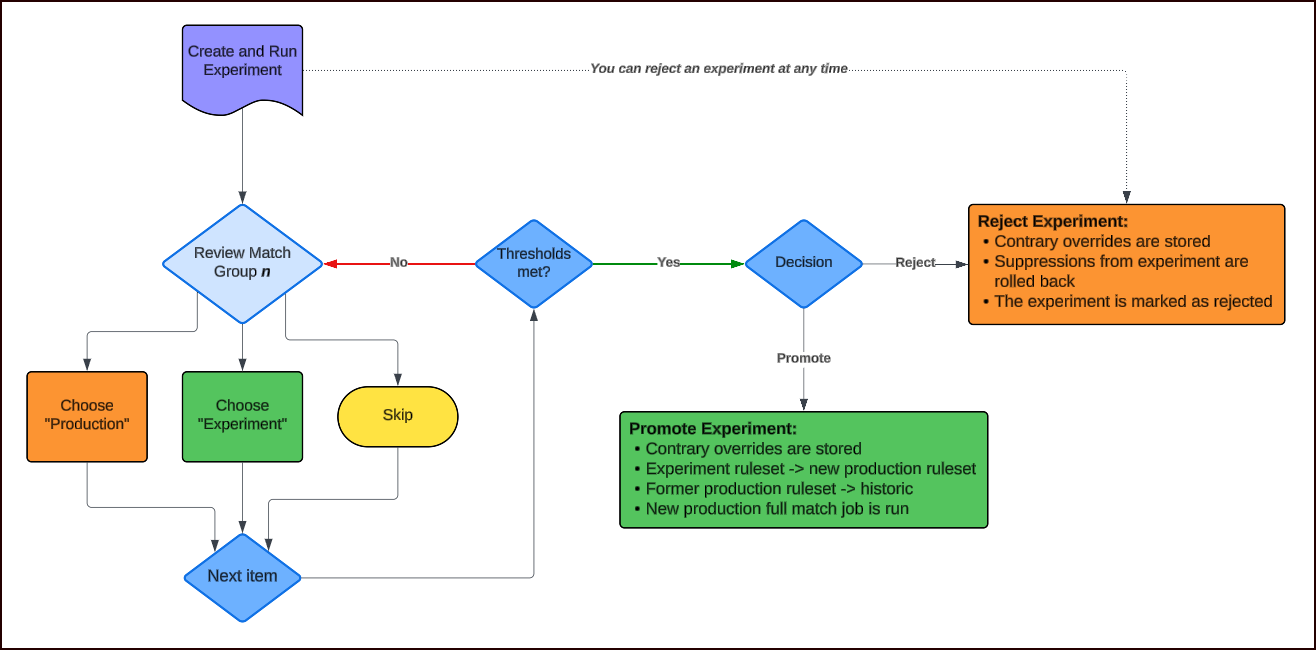
The system supports a continuous improvement loop. That is, you propose experiments, compare to production, review for quality, and either promote (with safeguard overrides for disagreements) or reject (with improvement overrides preserved) these experiments. The overrides accumulate over time, encoding domain expertise that the matching rules alone cannot capture.
Core concept: A/B comparison
When an experiment runs, the system executes both rulesets against a snapshot of the data:
-
"A" (Production): The current production ruleset's grouping of records
-
"B" (Experiment): The experimental ruleset's grouping of the same records
The system compares the results and generates review items: places where the two rulesets produced different groupings. Each review item represents a set of records whose group membership changed between A and B.
Types of Changes Detected
|
Action |
Meaning |
|---|---|
|
Created |
Singletons in A became a group in B (new matches found) |
|
Deleted |
A group in A became singletons in B (matches broken) |
|
Split |
One group in A became multiple groups in B |
|
Merged |
Multiple groups in A became one group in B |
|
Shuffled |
Members moved between groups in both A and B |
|
Unchanged |
Same group, no change |
User Workflow
1. Experiment creation and execution
When you create an experiment (modifying rules, adding suppressions, etc.) and run it, the system:
-
Takes a snapshot of the data
-
Runs production rules ("A" match) against the snapshot
-
Runs experiment rules ("B" match) against the snapshot
-
Generates a comparison report identifying all differences
-
Creates review items for each difference
2. Claim/commit model
The system uses a claim/commit model designed for multi-user teamwork:
-
Multiple reviewers can work in parallel without collisions
-
Each reviewer "claims" one review item at a time
-
If a user already has a claimed item, it returns that item
-
Otherwise, the system assigns the next unclaimed item from a randomized sequence
-
Items can be filtered by action type (Created, Split, Merged, etc.) and minimum group size; however this is not recommended since it can bias the review process
3. Review decision
For each review item, the user sees two tables showing the same records grouped differently:
-
Production: Records shown with their production grouping (groupA)
-
Experiment: The same records shown with their experiment grouping (groupB)
Records are color-coded by group membership so you can visually see how records cluster differently under each ruleset.
To compare using standardized addresses, click the View drop-down menu and select one of the following options:
-
Show Standardized: Displays the addresses that have been standardized through the hygiene process.
-
Show Components: Displays the standardized addresses broken down into more granular pieces (e.g., address number separated from street name).
Show Original displays the addresses as they appear in the original input table.
You make a judgment call: "Which grouping is better?"
|
Choice |
Meaning |
|---|---|
|
Select Production |
"I prefer how production grouped these records. The experiment's change here was not an improvement." |
|
Select Experiment |
"I prefer how the experiment grouped these records. This change is an improvement." |
|
Skip This Set |
"I cannot determine which is better, or I have no preference." |
|
Manual Override |
"Neither grouping is correct; here's my own custom grouping." |
4. After each decision
-
The review item's state is updated as accepted (where the experiment grouping was selected), rejected (where the production grouping was selected), or skipped
-
The item is added to pending review activity for metrics tracking
-
The next review item is automatically claimed and presented to the user
Feedback mechanisms
Experiment review does NOT train a model or directly modify matching rules. Instead, it serves three feedback mechanisms:
1. Override generation (direct feedback)
When the review is finished (promoted or rejected), the system generates match overrides from the contrary review choices:
-
If experiment is promoted (accepted): The experiment ruleset becomes the new production ruleset. But for review items where the user chose "Production" (rejected), overrides are stored to preserve the production grouping for those specific records.
-
If experiment is rejected: The production ruleset stays unchanged. But for review items where the user chose "Experiment" (accepted), overrides are stored to apply the experiment's improvements for those specific records.
In either case, the minority opinion is preserved as overrides. The override system stores pairs of record IDs as:
-
Positive overrides (force-match): these records MUST be in the same group
-
Negative overrides (force-break): these records MUST NOT be in the same group
These overrides are fed into the matching engine during the next production run, forcing specific record groupings regardless of what the rules alone would produce.
2. Promotion gating: Review constraints
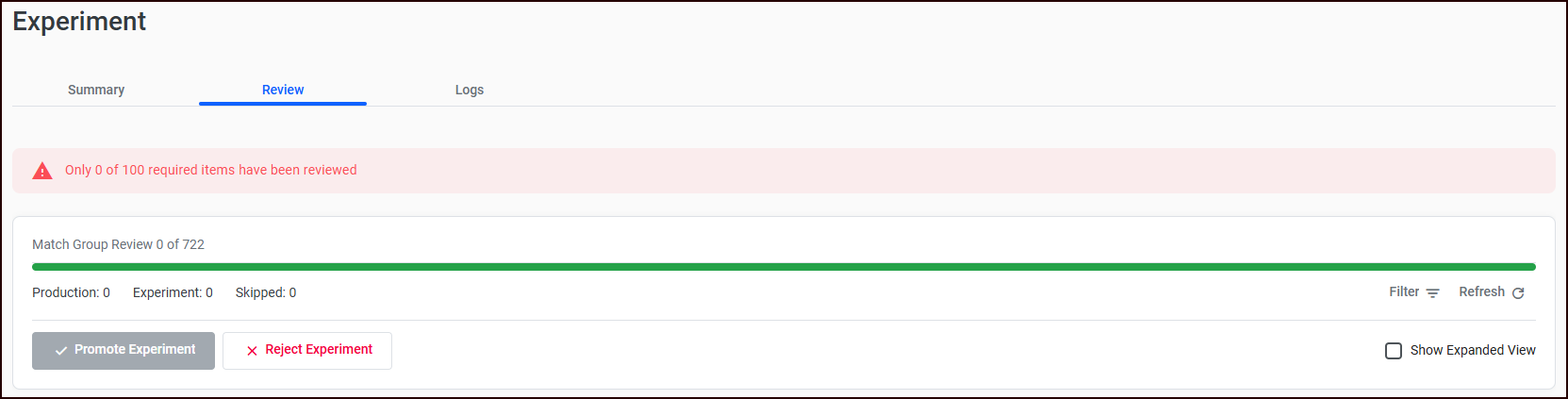
The review results determine whether the experiment can be promoted. These thresholds are configured in Settings > Review Constraints and enforced server-side before promotion is allowed.
Minimum review items
-
Default: 100
-
Range: 10 to 1,000
-
Purpose: Ensures the reviewer has seen enough differences to make a statistically meaningful judgment about the experiment's overall quality.
The system counts only completed reviews (accepted + rejected + skipped). The reviewer must meet this minimum before the "Promote" action becomes available.
Minimum Acceptance Ratio
The calculations in this section are based on Review Constraint settings; you can modify these constraints as needed in Settings.
-
Default: 0.8 (80%)
-
Range: 0.25 (25%) to 1.0 (100%), in 0.05 increments
-
Purpose: Ensures a clear majority of reviewed items favor the experiment before it replaces the production ruleset.
The ratio is calculated as:
acceptance_ratio = accepted_count / (accepted_count + rejected_count)
Skipped items are excluded from the ratio calculation. This means:
-
16 accepted, 4 rejected, 10 skipped → ratio = 16/20 = 0.80 (meets 80% threshold)
-
15 accepted, 5 rejected, 10 skipped → ratio = 15/20 = 0.75 (does NOT meet 80% threshold)
A higher ratio means more confidence that the experiment is broadly better. A lower threshold (e.g., 0.5) would allow more controversial experiments to be promoted, while a higher threshold (e.g., 0.95) would require near-unanimous agreement.
Who can promote
Only users with the Operator role can promote or reject experiments. Regular reviewers can evaluate items but cannot make the final promotion decision. Reviewers will be able to see where they are in the review process.
3. Manual override mode (third path)
Users can bypass the A/B choice entirely and manually define their own grouping. The user assigns records to groups by selection:
-
Manual overrides are stored as force-match/force-break pairs
-
The review item is committed as skipped
-
The next review item is claimed
Promotion outcome
When the experiment is promoted
-
Contrary overrides are stored (for items that the reviewer selected “Production”)
-
The experiment ruleset is promoted to become the new current production ruleset
-
The old production ruleset becomes historic
-
The experiment is deleted
-
A new production full match job is automatically started
When the experiment is rejected
-
Contrary overrides are stored (for items that the reviewer selected “Experiment”)
-
Suppression changes from the experiment are rolled back
-
The experiment is marked as rejected
-
User is navigated back to experiment creation
Your overrides will become part of production once you’ve run a new production match job.