

Overview
The Character Filter macro lets you filter the data stream to selectively remove or retain defined character sets, including:
-
ASCII (letters, digits, printable, whitespace, uppercase, lowercase, punctuation).
-
Unicode (letters, numeric symbols, non-printable, whitespace, punctuation, symbols).
-
Hexadecimal digits.
Character Filter macro configuration parameters
The Character Filter macro has a single set of configuration parameters:
|
Parameter |
Description |
|---|---|
|
Operation |
Operation to perform on data stream, either Remove or Keep only.
|
|
Characters |
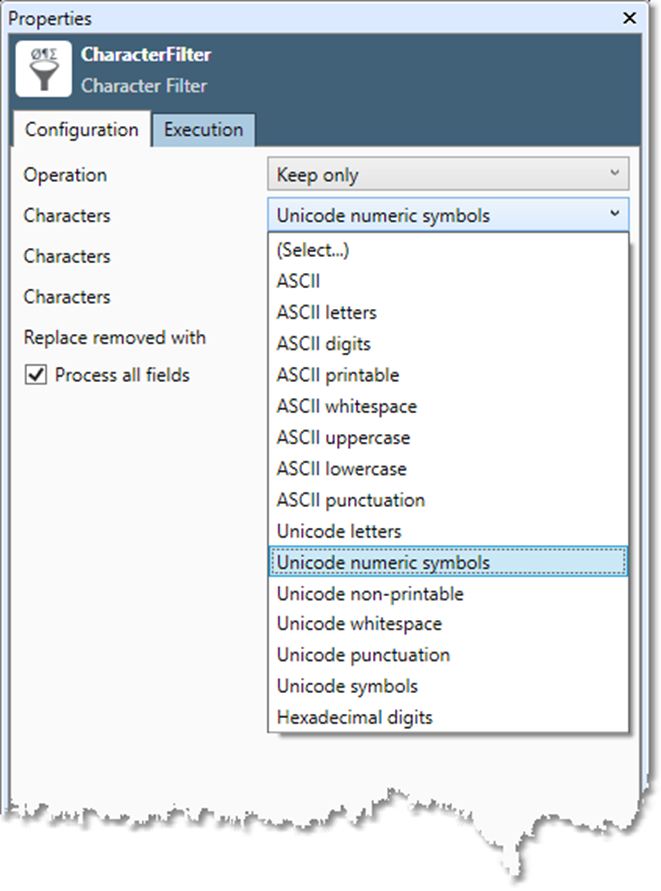
Characters to remove or keep. You may select up to three sets.
|
|
Replace removed with |
Optional. Replace removed characters with selected character, either Nothing, ?, or Space.
|
|
Process all fields |
If selected, process all input fields in data stream.
|
|
Field 1...10 |
If Process all fields is off, input fields to be processed.
|
Configure the Character Filter macro
-
Select the Character Filter icon.
-
Go to the Configuration tab on the Properties pane.
-
Select Operation, and choose whether to Remove or Keep only specified characters.
-
Select Characters, and choose the desired character set to keep or remove. You may specify up to three character sets.
-
Optionally, select Replace removed with and choose a character with which to replace removed characters: Nothing, ? or Space.
-
Select Process all fields to filter the entire data stream OR clear Process all fields and select Field 1...10 to specify one or more fields to be filtered.
-
Optionally, go to the Execution tab, and then set Web service options.