

This section describes how to configure an AzureSQL connection for a specific Redpoint Interaction tenant running within a container application. Please follow the steps below:
-
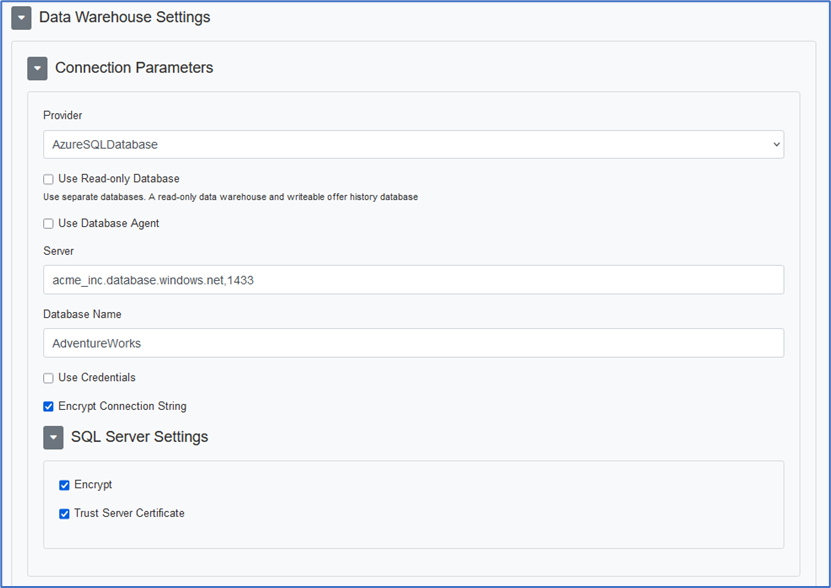
In the Configuration Editor’s Data Warehouse Settings section, select the AzureSQLDatabase provider.
-
Enter the required parameters such as Server, Database Name, Username and Password.
-
Specify optional parameters (e.g., per the SQL Server Settings section if required).
-
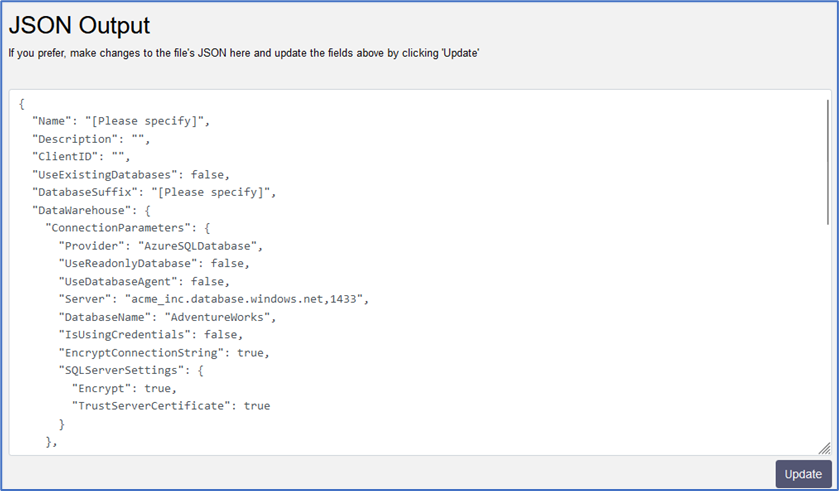
Copy the JSON text template to provision the new tenant.
-
Once the tenant has been provisioned, a sample connection string is generated.
Server=acme_inc.database.windows.net,1433;Database=AdventureWorks;User ID=sa;
Password=*****;Trusted_Connection=False;Encrypt=True;Connection Timeout=0;
ConnectRetryCount=3;ConnectRetryInterval=10;TrustServerCertificate=True
-
For more information about AzureSQL connection string parameters, please see https://learn.microsoft.com/en-us/azure/azure-sql/database/connect-query-content-reference-guide?view=azuresql.