

Overview
This tab lets you enable and configure external tools to use for content generation in text and HTML assets, email offers, and landing pages.
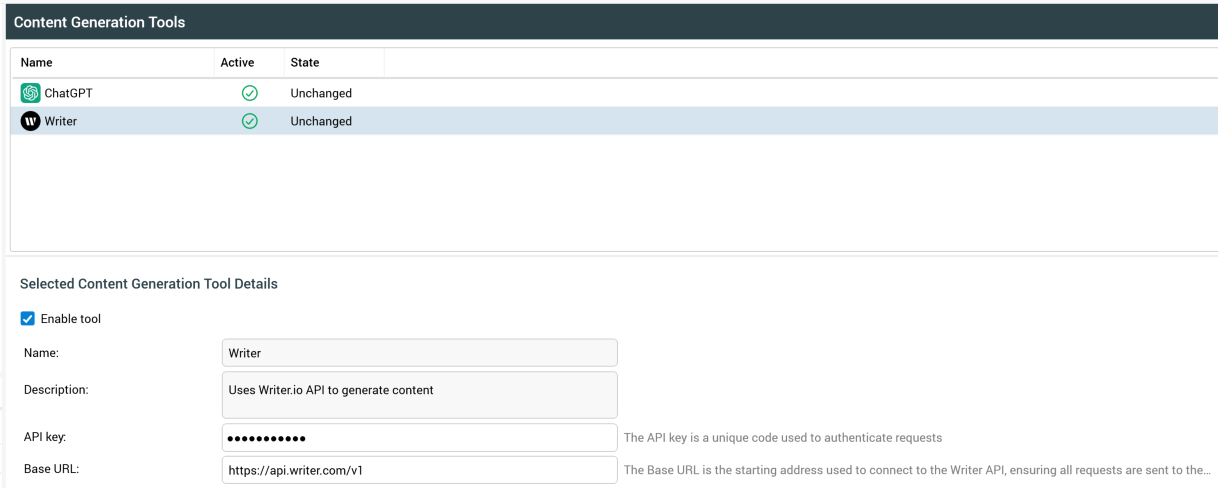
The interface consists of a list of supported tools and a Selected Content Creation Tool Details section.
List
Contains the following read-only columns:
-
Name: the name of the content generation tool.
-
Active: a checkmark indicates whether the tool is currently active in RPI.
-
State: indicates whether the tool configuration has changed or not.
Selected Content Creation Tool Details
The contents of this section depend on the selected tool. The following read-only properties are displayed for all tools:
-
Enable tool: this checkbox is unchecked by default. When checked, the selected tool is made available at the RPI Content Editor.
-
Name: name of the selected tool.
-
Description: description of the selected tool.
The following are tool-specific:
ChatGPT
Using the ChatGPT option requires that you configure the redpointAI.naturalLanguage values in your Helm overrides as detailed in the Admin: Basic selection rule AI integration topic.
When ChatGPT is selected, the following text appears:
-
Read-only text: “The 'NLP' application settings must be configured to use this external content generation tool”.
Writer
-
API key: this property allows you to specify the API key to be used to authenticate requests made to Writer. It is mandatory if turned on.
-
Base URL: this property represents the starting address used to connect to the Writer API. It is mandatory if displayed, and defaults to the value
https://api.writer.com/v1.
Additional resources
Use generative AI to create content