

Overview
This guide describes the capabilities of Alchemer within Redpoint Interaction (RPI) and how surveys can be utilized.
Key capabilities
The Alchemer connector providers the following key capabilities:
-
Channel Configuration
-
Insert links to Alchemer Surveys into content
-
Receiving responder data via the Channel Synchronization Task
-
Receiving state/disposition data via the Channel Synchronization Task
-
Storing responder data and survey responses in staging tables so they can be processed outside of RPI
-
Track the number of responses to an existing Alchemer survey, and optionally transfer survey and respondent detail back into the data warehouse.
Process flow
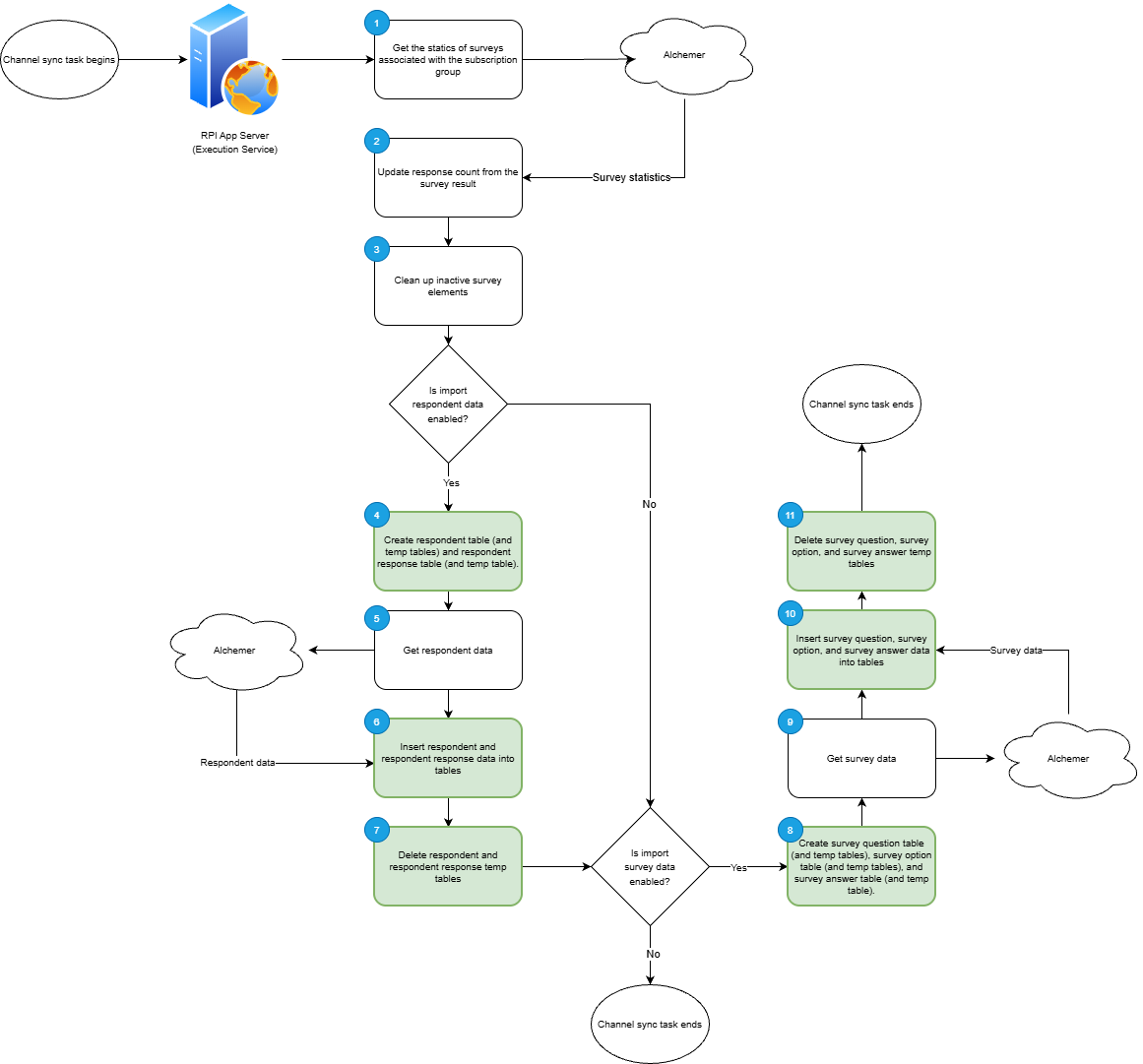
Subscription group & outbound fulfillment
The integration begins by targeting a specific survey using its unique ID to establish a connection. Once the survey is identified, RPI records a "last sync" timestamp to track the integration window and updates the total response count based on current Alchemer data. This part concludes with a maintenance step where any inactive survey elements are purged to ensure the local dataset remains lean and accurate.
If the Respondent Data Import is enabled in the channel configuration, RPI initiates data ingestion. It first constructs the necessary infrastructure by creating both permanent and temporary tables for Respondents and Respondent Responses. Once these tables are staged, RPI executes a call to fetch the survey response results from Alchemer, populating the temporary tables before merging them into the final respondent database.
Finally, if the Survey Data Import is enabled in the channel configuration, RPI builds out the core data architecture to house the survey results. This involves generating primary and temporary tables for Survey Questions, Answers, and Options.
State data synchronization
Not applicable.
Limitations
The Alchemer connector has the following known limitations and cautions:
Rate limits and throttling
Alchemer enforces rate limits based on your account level. If you exceed these, you will receive a 429 (Too Many Requests) error.
-
Enterprise/Professional Accounts: Generally limited to 240 requests per minute.
-
Trial Accounts: Restricted to 60 requests per minute.
-
Concurrency Block: You cannot make identical API requests within a 60-second window. If you do, Alchemer will block the second request to prevent redundant processing.
Response and data limits
-
Results Per Page: By default, the API returns 50 records per call. You can increase this using the
resultsperpageparameter, but it is hard-capped at 500 records per request. -
Timeouts: Requests have a maximum execution time of 30 seconds. If a query (like fetching a massive amount of survey data without filters) takes longer, it will return a 500 error.
-
Data Availability Delay: There is often a "processing delay." Data submitted by a respondent may not be available via the API for up to 5 minutes while the system indexes the response.
Truncation
-
Responses received from Alchemer are truncated to 4000 characters for database injection. This applies to survey questions, options, and answers.
Additional resources