

Overview
This guide describes the capabilities of Google Ads Customer Match data onboarding within Redpoint Interaction (RPI) and how sending records/synchronizing state data works.
Key capabilities
The Google Ads Customer Match connector providers the following key capabilities:
-
Channel configuration
-
The ability to onboard records via an interaction using an offer activity
Unique Features
Compared to the other Data Onboarding connectors that RPI supports, the Google Ads Customer Match connector supports the following features:
-
Upload different types of customer data (email address, phone numbers, physical addresses, etc.) to create audience lists
-
Google hashes customer data for security
Process Flow
The following flow chart shows how the Google Ads Customer Match channel works within both outbound fulfillment and inbound state synchronization.
Outbound Processing
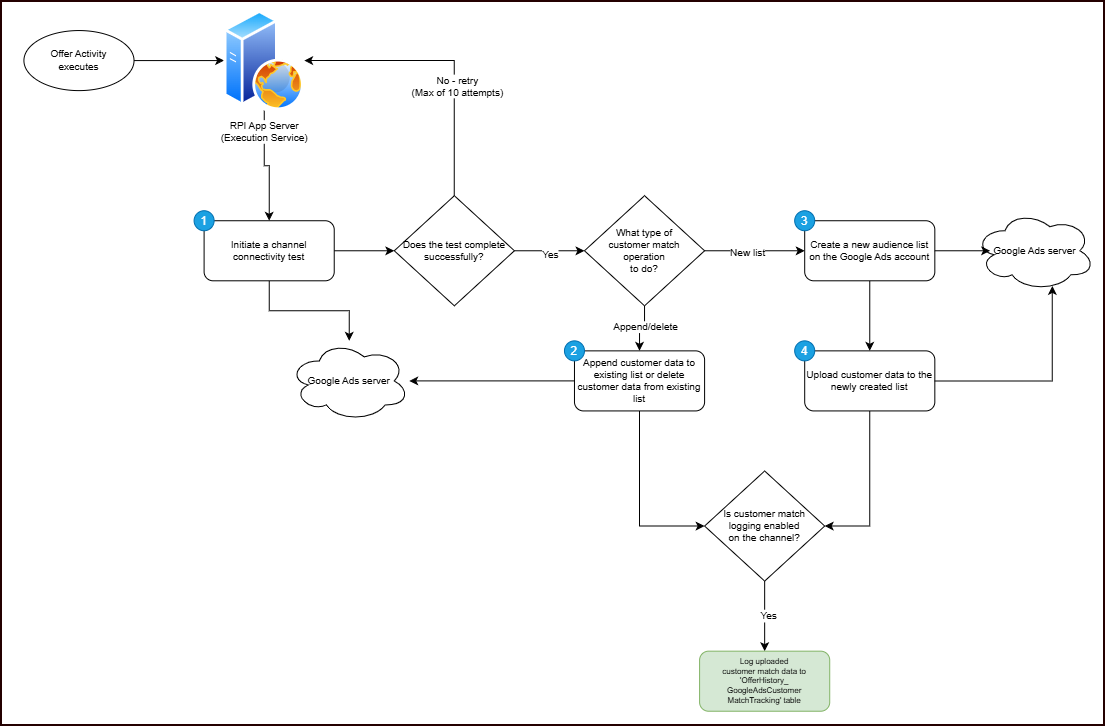
Outbound Fulfillment
The Google Ads Customer Match connector performs the following steps when it is used as part of an outbound offer activity:
Step 1
Initiate a connectivity test to validate the access token is valid. If the response returns an error message, call refresh token to generate a new access token.
Validate Access Token
Method
GET
Endpoint
https://www.googleapis.com/oauth2/v3/tokeninfo?accesstoken=<access token>
Headers
Authorization: Bearer <access token>
Refresh Token: generate new access token
Method
POST
Endpoint
https://www.googleapis.com/oauth2/v4/tokeninfo?accesstoken=<access token>
Request Body
{
  "refresh_token": "<refresh_token>",
  "grant_type": "refresh_token",
  "client_id": "<client_id>",
  "client_secret": "<client_secret>"
}
Step 2
If the connectivity fails, it will retry up to 10 attempts with an interval of every 1 minute. Re-initiate the call to validate the access token (same endpoint from above, Step 1).
Step 3
Generates the JSON format data file from the offer data and saves in the outgoing directory. Loops through offer data and adds to list of JSON object and saves to a JSON formatted data file; if the amount of data in the list reaches 1000 then it generates a new batch of JSON formatted data file.
-
If configuration "pre-hashed data" is enabled, then hashing of data is skipped, by default data is hashed.
-
If configuration “Save data files” is enabled, copy the generated JSON file to
GoogleAdsCustomerMatchDataFileFolderPath.
Step 4
If Mode of operation is “Append to existing list” or “Delete from existing list”, Audience List Id is assigned to the selected offer “Audience list to use”.
Step 5
If Mode of operation is “Create new list”, retrieves all Google Audience List, then finds a match for the template Audience list name; if no match is found, then creates a Google Audience Campaign.
Google Ads API SearchStream - retrieves audience list
Method
POST
Endpoint
https://googleads.googleapis.com/v15/customers/<customer Id>/googleAds
Headers
Authorization: Bearer <access token>
DeveloperToken: <developer token>
Request Body
{
  "pageSize": 1000,
  "query": "SELECT user_list.size_for_display, user_list.size_for_search, user_list.id, user_list.name FROM user_list"
}
Google Ads API Mutate - create campaign
Method
POST
Endpoint
https://googleads.googleapis.com/v15/customers/<customer Id>/campaigns:mutate
Headers
Authorization: Bearer <access token>
DeveloperToken: <developer token>
Request Body
{
  "operations": [
    {
      "create": {
        "crmBasedUserList": {
          "uploadKeyType": "CONTACT_INFO"
        },
        "name": "test000"
      }
    }
  ]
}
Step 6
Counts previously uploaded data, and lists the files with extension (.jsonrpi) on the outgoing directory. Opens the files and counts the number of items inside the JSON file.
Step 7
Lists the files with extension (.json) on the outgoing directory. If there is at least one file to upload, then calls Google service to create an offline user data job.
Google Ads API Mutate - create offline user data job
Method
POST
Endpoint
https://googleads.googleapis.com/v15/customers/<customer Id>/offlineUserDataJobs:create
Headers
Authorization: Bearer <access token>
DeveloperToken: <developer token>
Request Body
{
  "operations": [
    {
      "create": {
        "type": "CUSTOMER_MATCH_USER_LIST",
        "customer_match_user_list_metadata": {
          "userList": "customers/9135866403/userLists/8604337578",
          "consent": {
            "adUserData": "GRANTED",
            "adPersonalization": "GRANTED"
          }
        }
      }
    }
  ]
}
Step 8
Loops through the files and calls Google service to add user data on job operation on each file.
If mode of operation is “Delete from existing list”, the service call will remove the data instead.
There is a batch limit of 1000 files per call on Google Add User Data Job.
Mode of Operation: "Create new list or Append to existing list"
Google Ads API Mutate - create offline user data job
Method
POST
Endpoint
https://googleads.googleapis.com/v14/customers/<customerId>/offlineUserDataJobs/<jobId>}:addOperations
Headers
Authorization: Bearer <access token>
DeveloperToken: <developer token>
Request Body
{
  "operations": [
    {
      "create": {
        "userIdentifiers": [
          {
            "hashedEmail": "69349B05FC5245504703EA61035E0BDC52D789CC5DD380607E5A7F42CE07CB5B"
          }
        ]
      }
    }
  ]
}
Mode of Operation: "Delete from existing list"
Google Ads API Mutate - remove offline user data job
Method
POST
Endpoint
https://googleads.googleapis.com/v14/{resourceName=customers/*/offlineUserDataJobs/*}:addOperations
Headers
Authorization: Bearer <access token>
Request Body
{
  "operations": [
    {
      "remove": {
        "userIdentifiers": [
          {
            "hashedEmail": "69349B05FC5245504703EA61035E0BDC52D789CC5DD380607E5A7F42CE07CB5B"
          }
        ]
      }
    }
  ]
}
Step 9
If IsCustomerMatchLoggingEnabled configuration is enabled, each data is inserted in the database with table OfferHistory_GoogleAdsCustomerMatchTracking. Run SQL query on Main database to check and create table OfferHistory_GoogleAdsCustomerMatchTracking, then perform SQLBulkcopy to insert data inside the table.
SQL Query
IF NOT EXISTS (
    SELECT 1
    FROM INFORMATION_SCHEMA.TABLES WITH (NOLOCK)
    WHERE TABLE_SCHEMA = 'dbo'
      AND TABLE_NAME = 'OfferHistory_GoogleAdsCustomerMatchTracking'
)
BEGIN
    CREATE TABLE dbo.OfferHistory_GoogleAdsCustomerMatchTracking (
        AudienceListID        NVARCHAR(100) NOT NULL,
        ChannelExecutionID    INT           NOT NULL,
        DateSent              DATETIME      NOT NULL,
        ChannelID             NVARCHAR(100) NOT NULL,
        ContactInfo           NVARCHAR(100) NULL,
        FirstName             NVARCHAR(100) NULL,
        LastName              NVARCHAR(100) NULL,
        CountryCode           NVARCHAR(100) NULL,
        PostalCode            NVARCHAR(100) NULL,
        City                  NVARCHAR(100) NULL,
        State                 NVARCHAR(100) NULL
    );
END;
Step 10
Once all files are iterated, call Google service to run offline user data job. This issues an asynchronous request to run the offline user data job for executing all added operations. Then delete all files on outgoingDirectory.
Google Ads API RunOfflineUserDataJob - create offline user data job
Method
POST
Endpoint
https://googleads.googleapis.com/v14/customers/<customerId>/offlineUserDataJobs/<jobId>}:run
Headers
Authorization: Bearer <access token>
DeveloperToken: <developer token>
Request Body
{
   "validateOnly": false
}
Step 11
If Disable Offer history is no, then update state result on operational database table op_ChannelExecutionHistoricResult; if yes, do nothing.
Database tables created during outbound execution
The following are the database tables created during the outbound execution:
|
Table Name |
Description |
|---|---|
|
|
Contains details of customer contact data with date sent. |
RPI Channel Configuration
The following channel-specific fields are shown for the Google Ads Customer Match channel:
|
Configuration Field |
Details |
|---|---|
|
Project ID |
Mandatory text property accepts a maximum of 200 characters and represents the Google Ads project ID. |
|
Client ID |
Mandatory text property accepts a maximum of 200 characters and represents the Google Ads client ID. |
|
Client Secret |
Mandatory, password-masked text field accepts a maximum of 100 characters. It allows you specify the client secret. |
|
Customer ID |
Numeric property. It represents the customer ID of the Google Ads account to upload data to. |
|
Log-in customer ID |
Numeric property. This is the customer ID of the authorized customer to use in the request, without hyphens ( |
|
Developer Token |
Mandatory, password-masked text field accepts a maximum of 100 characters. It allows you specify the developer token of the Google Ads account. |
|
Redirect URI |
Mandatory text property accepts a maximum of 200 characters. It allows you specify the authorized redirect URI associated with the Client ID. |
|
Pre-hashed data |
If this option is set, it indicates that data warehouse is using pre-hashed data and hashing data should be skipped when uploading to Google Ads. |
|
Authorization |
Mandatory step to allow authorization to access your Google account.
|
|
Audience list limit |
Numeric property defaults to 100 and accepts a range of values from 25 to 10000. It represents the maximum number of Google Ads Audiences that can be displayed in an offer. |
|
Save data files |
If this option is set, it indicates that Google Ads Customer Match data files will be moved to Checking this option will potentially persist Personally Identifiable Information (PII) on an RPI server. |
|
Minimum API call retry delay |
Numeric property defaults to 1 and accepts a range of values from 1 to 99999999. It represents the minimum number of seconds between API call retries. |
|
Maximum API call retry delay |
Numeric property defaults to 10 and accepts a range of values from 1 to 99999999. It represents the maximum number of seconds between API call retries. |
|
Maximum API call retry attempts |
Numeric property defaults to 10 and accepts a range of values from 1 to 99999999. It represents the maximum number of attempts to retry Google Ads operation in case of failure. |
|
Enable customer match logging |
If this option is set, it indicates that uploaded customer match is logged to data warehouse. |
Limitations
-
Don't attempt to use multiple accounts to modify a single user list. A user list can only be modified by the Google Ads or data partner account that created it.
-
Avoid simultaneously running multiple Google Ads Customer Match workflows that modify the same user list (that is, multiple jobs whose user list point to the same resource name). Doing so can result in a
CONCURRENT_MODIFICATIONerror, since multiple jobs are not permitted to operate on the same list at the same time. This error can also occur if attempting to simultaneously modify a list through the Google Ads UI and the Google Ads API. -
Hashing information, phone number should be in E164 format, which represents a phone number as a number up to fifteen digits in length starting with a
+sign, for example,+12125650000or+442070313000. The leading+sign can optionally be omitted. The API still accepts an incorrectly formatted phone number, but it can't be matched with a customer. -
It can take up to 24 hours for a list to be populated with members, if you upload to an audience list more frequently than once every 12 hours, you might see an “In Progress” status in the Google Ads UI.
-
Starting on March 6, 2024 if consent is missing for EEA users, then the consent value is determined as not consented. Data from unconsented EEA users won't be processed and cannot be used for ad personalization using Customer Match.
Logging
Below is an example of the Interaction log for an offer using the Google Ads Customer Match channel:
|
Log |
Log Entry Descriptions |
|---|---|
|
2024/03/12 21:50:57 Fulfillment Action complete
|
Build Customer Match data. Save the match data to new file. Check Audience list, if not existing, create audience list. Upload file to Google Ads.
|
Troubleshooting
Enable Trace Option
When the "Enable trace" option is selected within the Advanced tab of the Google Ads Match channel configuration, the following samples of trace HTTP request/response log messages are generated:
|
Description |
HTTP Request |
|---|---|
|
Connectivity Test |
Google Ads Customer Match Channel Trace HTTP Request
Version :6.7.0.0
Category: Plugin Trace
|
|
Issue request to get Google Ads Match audience lists |
Google Ads Customer Match Channel Trace HTTP Request
Version :6.7.0.0
Category: Plugin Trace
|
|
Issues request to add new Audience |
Google Ads Customer Match Channel Trace HTTP Request
Category: Plugin Trace
|
Additional resources