

Details Tab
This tab displays the details of the attribute list selected currently in the grid. If no attribute lists have been configured, an advisory message is displayed.
The section contains the following properties.

-
Name: the unique name used to identify the attribute list. Name is mandatory, can be a maximum of 100 characters in length, and must be unique across all attribute lists.
-
Description: an optional property that can be a maximum of 1000 characters in length.
-
Use for placeholders: this checkbox, which is unchecked by default, allows you to specify that the attribute list is to be used to define placeholder attributes for use within standard selection rules. For more information on placeholders, please see the Standard Selection Rules documentation. When checked, the Placeholder attribute folder property is shown.
-
Placeholder attribute folder: this RPI file system folder property, which is mandatory when shown, is displayed when Use for placeholders is checked. It allows you to select a folder in which to store attributes that allow for the use of placeholders within standard selection rules.
Attributes Tab
This tab allows you to define the attributes within the attribute list.
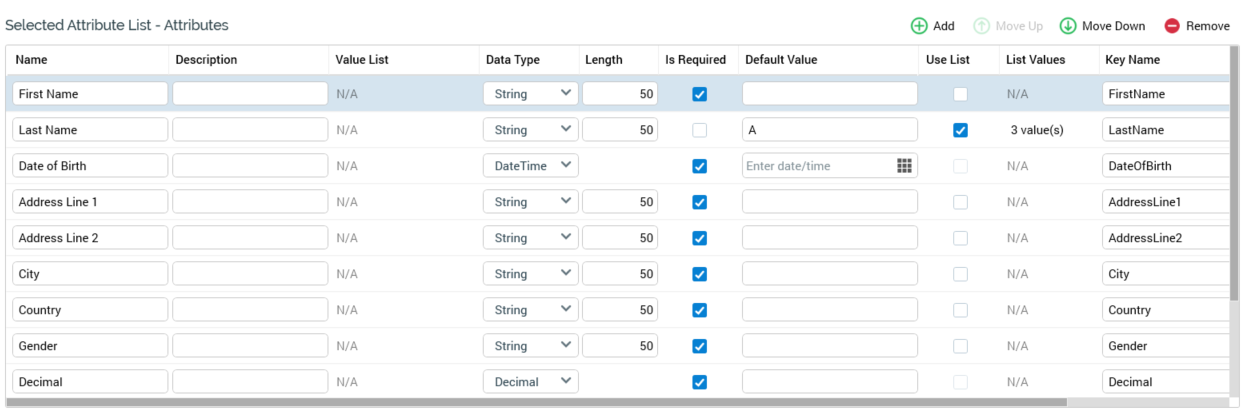
The tab’s behavior is very similar to the Metadata tab within the Audience Definitions configuration interface (for more information, please see that section’s documentation); the only difference is that the Metadata tab’s Offer History Meta Name property is replaced by a Key Name property. Note that multiple attributes can share the same Key Name.
An attribute list must contain at least one attribute before being saved.