

The following interface is displayed when configuring a Parameter attribute.
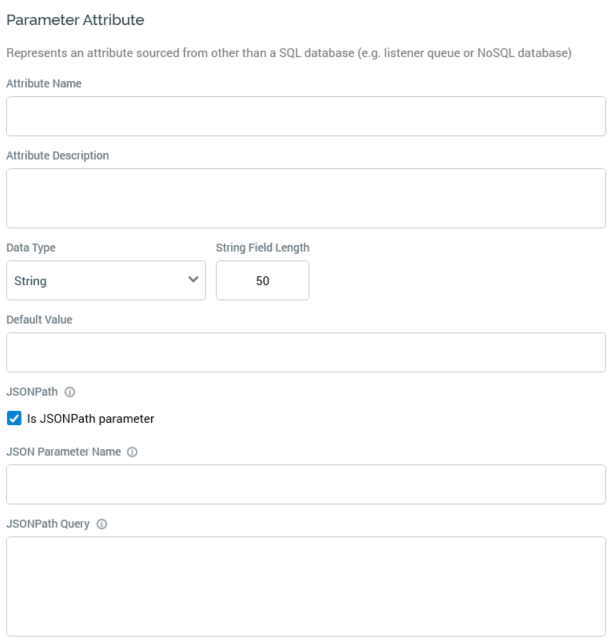
A parameter attribute has the following specific properties:
-
Data Type: a dropdown field, exposing the following values:
-
BigInt
-
Date
-
DateTime
-
Decimal
-
Integer
-
Money
-
String (the default)
-
-
String Field Length: this property is only displayed if Data type is set to String. Its default value is 50, and the value provided must be greater than 0. A validation error is raised if the length of a provided string Default value exceeds the String field length specified.
-
Default Value: it is mandatory to provide a default value for a parameter attribute. A data entry mask, accordant with the selected Data type, is provided.
-
JSONPath: this section allows you to specify that the parameter attribute should source its values from JSON using a JSONPath query.
-
Is JSONPath parameter: check this checkbox to indicate that the parameter attribute is a JSONPath parameter. When checked, the JSON Parameter Name and Query properties are shown.
-
JSON Parameter Name: this property represents a visitor parameter storing JSON, from which attribute's value is to be sourced. It is displayed when Is JSONPath parameter is checked. A text field, it is empty by default, and is mandatory when shown.
-
JSONPath Query: this property allows you to specify a JSONPath query, which will be used to source the attribute's value from the supplied JSON parameter. It is displayed when Is JSONPath parameter is checked. A multi-line text field, it is empty by default, and is mandatory when shown.
If a parameter attribute references a collection, it returns by default the most frequent value within the same.