

Offer Activity Execution
When an offer activity runs, fulfillment occurs in accordance with the offer activity’s specified channels.
Where an individual qualifies to be contacted by more than one channel, contact is made via the first applicable channel for which he or she qualifies. Channel applicability is determined by the channel’s filter. The filter is defined as a selection rule; if a record is targeted by a selection rule associated as a channel filter, that channel is deemed to be applicable for the record.
Results of the execution of an offer activity are written to the permanent offer history and offer history meta tables (the actual table names are defined by audiences’ audience definitions).
In addition, fulfillment activities take place in accordance with the channels’ delivery method. Each delivery method is documented separately.
Following execution of an offer activity, a results bubble is displayed to the top right of the offer activity icon. It shows a rounded summary of the number of records in the results set. Results are shown to a single decimal place, e.g.:
1,203,492 = 1.2M
75,854 = 75.9K
Full results are available in the Results Window.
Contacts made through a particular channel may be further restricted if the channel used has been associated with a filter. In this case, fulfillment will only take place in respect of those records that are targeted by the filter’s selection rule.
You can invoke Stop or Pause at an executing email, push notification, SMS, data onboarding or CRM offer. Having done so, you can Play the activity again. Any records previously targeted by the offer will not be targeted upon resumption of execution.
When the number of records targeted by an offer activity (or export activity configured to use a data extract channel) exceeds its channel's Targeted warning threshold, the activity enters a Paused state. This applies in both Test and Production mode. Log messages are written to advise as to why this occurred. If required, Channel Targeted Threshold Exceeded email alerts are sent. You can click Play at the activity to resume its execution. Note that a threshold check is applied per individual fulfilment occurrence - e.g. one specific email send within a recurring trigger.
If the offer's channel's Fail if no merge files property is checked, the workflow will fail when zero records are targeted, with the message 'No mail merge has been generated; sending will be terminated' being shown in the log.
If the channel is configured to call an external service post-execution, that service is invoked immediately upon channel execution. If an invalid service address was supplied at channel configuration, execution continues without failing.
If a channel is configured to call a Redpoint Data Management job post-execution, not that the job will be called when executed in both Test and Production mode.
Following production execution of an offer activity when offer approval is enabled, if you view the Completed offer’s configuration panel and drill through to the offer’s template, the version displayed is always the latest – even if a prior version was used at interaction execution.
If executing an offer against a Google BigQuery data warehouse, and having applied offer metadata overrides at the interaction, the potential exists for lengthy delays to occur.
Data Extract
During data extract offer execution, files are created as per execution of an export activity and are made available at the RPI server, via FTP, or at an external content provider root folder.
A data extract offer produces files when executed in Production mode, or in Test mode when its channel’s Create files in Test mode property is checked.
By default, data extract files are created in accordance with system configuration setting FileExportLocation. Writing of files to a server folder, FTP site or external content provider root folder is supported.
If files are generated at the server, they are by default created in a sub-folder named in accordance with the following:
‘[(Global)FileOutputDirectory]\WFAI[WorkflowInstanceID]\Export files\[Export name]’
Where (Global)FileOutputDirectory is accordant with the configuration setting value defined at the cluster or client, Workflow Instance ID is the unique numerical identifier assigned to the workflow instance at its creation, and Export name is the name by which the data extract offer is known within the interaction.
The default folder may be overridden if configured accordingly at the data extract channel.
When created at an FTP site or external content provider, ‘(Global)FileOutputDirectory’ is replaced by an ‘Export’ folder.
If configured to write to an external content provider, and no default file export provider has been identified, files are written to the RPI application server instead.
The resultant data and sample files are accordant with the export template with which the channel is configured; in addition, any extra attributes specified within the Offer Designer are appended within the output files.
If the data extract channel through which the offer is fulfilled is configured to allow duplicates on resolution, if the channel’s export template and/or the activity's offer is configured with any cross-resolution attributes, deduplication is ignored, and multiple records for a single resolution key can be output in the export file. Note that the activity's bubble count continues to reflect its deduplicated count.
On generation of an extract file in Test mode, Offer History and Offer History Meta attribute values are replaced with sandbox equivalents. Note that when the same tables are referenced as aggregation tables, sandbox values are not substituted.
If the channel’s export template is configured with a custom header, it is displayed in accordance with its definition. Any Record Count text parts reflect the full export file count.
Filenames are generated as GUIDs (Globally Unique IDs) unless explicitly defined at the channel.
Behavior of a data extract offer downstream from an interactive activity configured with an audience depends on its and its channel’s configuration. If the file to which data is to be written is local to the RPI server, rows are appended to the output file dynamically as they are targeted by the audience. If the export path has been specified, a new file is written at the arrival of new records.
If configuration setting InteractionDaysToPersistExportTempTables is greater than 0, the temporary table generated during offer activity execution is persisted for a number of days specified by the setting. This occurs both in Production mode, and in Test mode when Create files... is checked at data extract channel configuration. Persisted temporary tables can be tracked in the ExportTempTableLookup table, which can be found in the Interaction Audit database. The Dataflow housekeeper removes temporary tables, and matching rows from the table, after the specified number of days.
When PGP encryption is configured at a data extract channel, full export files generated using the channel are encrypted. Sample and summary files are not encrypted. PGP encryption is also applied when files are generated in Test mode, and when file compression is enabled.
If the offer uses the Database Table extract location, data is persisted within a data warehouse table in accordance the data extract channel’s settings. If using default channel settings, the table will be named ‘RPI_Export_[GUID]’ (the actual table name may be discerned within the offer’s execution log). If the table already exists, it is dropped and re-created. If a lengthy custom table name has been specified, it is truncated in accordance with the maximum number of characters permitted by the database. The table is deleted by RPI Housekeeping in accordance with the relevant Days To Persist Table setting.
Outbound Delivery
At Production execution of an outbound delivery offer, if Generate export file is checked at the channel, an export file will be generated in accordance with the channel and its export template settings. Note that values RPContactID and ChannelExecutionID are added at the beginning of each row in the export file. If Generate export file is unchecked, an export file is not generated. However, offer history records are written as expected.
If Use content was checked at the channel through which the offer is executed, additional files are created in accordance with the offer's content:
-
RPI_Export_[CHANNELEXECUTION_ID]_Content.txt
-
RPI_Export_[CHANNELEXECUTION_ID]_Source.txt)
Any pre-processed dynamic content is added at the end of each row in the export file, using the channel's configured Start and End tag delimiters.
The table used to import and process channel states data will be automatically created during execution of the channel sync task, with the following prefix:
RPI_ CDS_<GUID>
Once the import of states data is complete, the table will be dropped.
If the channel's Import state results via DM property is checked, channel state results can be collated as per the following:
A file containing state results can be placed in the folder defined by the channel's State results folder property, in order to be processed by the Redpoint Data Management job defined at the channel's RPDM Repository path. .txt and .csv file types are supported, and the structure of the state results file to be imported must match that defined at the Redpoint Data Management project. A header row is also required. Channel results are processed on execution of the Outbound Delivery channel's synchronization task, which is responsible for reading in delivery state data (in accordance with definition of the same at the channel). Once channel results have been processed, the file is deleted.
If Import state results via DM is unchecked, execution of the Outbound Delivery channel sync task does not result in collation of state results.
A sample Redpoint Data Management project is available at:
DeploymentFiles\DataManagement Macros\Channel Synch Loads\OutboundDelivery_v4.dlp.
The project can be customized to clients' specific requirements.
If configured, Realtime in Outbound can be used to vary delivered content served by an outbound delivery channel.
Email
During email offer execution emails are sent to qualifying individuals only where a valid email address exists. Textual and HTML content are consistent with that defined within the Offer Designer, and any attributes included within the email template are resolved for inclusion within the body of the email.
The emails to be sent will depend on the email offer’s Content mode setting:
-
If set to Multi-part, both HTML and text emails will be sent.
-
If set to Text only, only text emails will be sent.
-
If set to HTML only, only HTML emails will be sent.
If an email offer has been defined to perform fulfillment at a specific scheduled time, on executing the offer in Production mode in advance of that time, it immediately assumes a Completed status. Emails are delivered later in accordance with the offer channel’s settings.
If the email offer’s channel's Recipient email field is populated with an attribute with a target table that is incompatible with any of its workflow's audiences , a warning message is displayed at workflow activation. For each email offer in the workflow, the following message is shown:
'An issue was encountered validating offer activity [activity name], Join not found between [audience table] and [email attribute table]'
When email execution takes place using an email channel, the system automatically de-duplicates on email address. One row is added to the Offer History table per pre-deduplication record. The Selected field in the Offer History table indicates whether a given record survived the deduplication exercise.
An external email service provider (ESP – Salesforce Marketing Cloud, SendGrid, CheetahMail, Acoustic, SparkPost, Instiller, Responsys, Dotdigital, Listrak, Mailchimp, Cordial, LuxSci, Paubox, Amazon SES or Amazon Pinpoint) is responsible for sending the emails. If the channel has been defined as auto-suppressing, email addresses present in the email suppression table are not contacted.
If the connection to the ESP’s email service cannot be made, RPI repeats its attempt to connect every minute for 10 minutes before failing.
When an email offer contains an embedded asset, during recurring execution (in a recurring workflow or following an interactive activity), when the asset is updated, the latest version of the asset is included in delivered email content. The same applies at nested embedded assets.
You cannot execute an email offer in Production mode if it contains an image asset that is larger than the maximum permissible size defined by system configuration setting MaxEmailImageSize. Note that this setting does not apply if the images used are hosted (privately or publicly) at an external content provider.
If configured, Realtime in Outbound can be used to vary delivered content served by an email channel. For more information, please see the Smart Asset Designer documentation.
Use of the RPI Realtime service to personalize outbound messages is supported at the following email providers:
-
CheetahMail
-
Cordial
-
dotdigital
-
Acoustic
-
Amazon Pinpoint
-
Amazon Simple Email Service (SES)
-
Instiller
-
Listrak
-
LuxSci
-
Mailchimp
-
Paubox
-
Responsys
-
Salesforce Marketing Cloud
-
SendGrid
-
SparkPost
If the email offer contains a URL, and the channel is configured with compatible Google Analytics, web events, Matomo or Kissmetrics adapters, on traversing the link in the posted message, website activity can be tracked and monitored. This is carried out by the appending of query string parameters to the URL.
The following parameters are appended for a Google Analytics adapter:
-
utm_source
-
utm_medium
-
utm_content
-
utm_campaign
Any supplied meta tags are rendered appropriately.
The following parameters are appended for a Web Events adapter:
-
rpcid: RPContactID
-
exid: ChannelExecutionID
The following parameters are appended for a Matomo adapter:
-
clid: ClientID
-
exid: ChannelExecutionID
-
rpcid: RPContactID
The following parameters are appended for a Kissmetrics adapter:
-
kme: DeliveryMethod
-
kmi: Contact Key
-
km_exid: ChannelExecutionID
-
km_campaign: Offer activity name
When an email offer is executed via a channel associated with one or more PURL adapters, URL parameters are appended to URLs with which web links in the email content are configured, in accordance with PURL adapter configuration.
If more than one PURL adapter is associated with channel, all URL parameters are appended. If a PURL adapter's Web Site URL is not set, parameters are appended to URLs in all links in the email content. If a PURL adapter's Web Site URL is set, parameters are only appended to URLs accordant with the setting.
Multiple parameters are appended in the order defined within the PURL adapter configuration interface. Parameter values are set to the value of the relevant attributes for the email recipient. Note that a validation error is raised at runtime if the attribute with which a URL is configured is incompatible with the audience definition used by an audience within the interaction workflow.
If a link URL is sourced from an attribute value, the personalization thereof using a PURL adapter is not supported.
Following a hard bounce due to email undeliverability, a record is added to the email suppression table; its UnsubscribedMethod is set to ‘Hard Bounce’
If you invoke Stop at a Playing workflow that contains a Playing production email offer, and email data has been uploaded to the ESP, the offer is terminated as expected. However, emails will still be delivered, and state information will continue to be monitored for.
On receipt of an email sent via an email channel, if the email offer content was defined as for Marketing purposes, the following elements are automatically included:
-
'To view this email as a web page, go here': this link is displayed above the email’s content. Clicking the link launches (a new tab within) the client application machine’s default web browser to display the contents of the email as a web page.
-
'This mail was sent to: [recipient's email address]': displayed immediately below the email’s content.
-
‘This mail was sent by [sender name and address]’
-
One-Click Unsubscribe: clicking the link launches (a new tab within) the client application machine’s default browser to display the Unsubscribe Center.
-
Update Profile: clicking the link launches (a new tab within) the client application machine’s default browser to display the Subscription Center.
-
Manage Subscriptions
A runtime validation error is raised when a non-queue listener workflow contains an email offer fulfilled using an email channel without a Recipient email property.
The following RPI email service providers support use of an email offer's Reply-to Email property:
-
Mailchimp (note that the reply-to email address needs to be verified at the Mailchimp portal before it can be used)
-
Cordial
-
Instiller
-
Listrak
-
LuxSci
-
Paubox (when replying to a secure message, Paubox always uses Sender-email as the default Reply-to email)
-
SendGrid
-
SparkPost
If an email offer sent using one of the above providers includes a Reply-to Email address, if Reply or Reply All is clicked in respect of a received email offer, the configured address will be used as the reply's 'To' address. If not configured, Sender email is used instead.
If sent using a provider that does not support Reply-to, a runtime validation error is raised at workflow execution. In the event of proceeding with execution, the default Reply-to address as configured at the email service provider account is used.
If a BCC email address has been set up at the email channel (and/or overridden at the offer), the following apply:
-
A runtime validation error is raised if the current channel provider doesn't support BCC and BCC was overridden at the offer.
-
One BCC email is sent to the BCC email address per delivered email, in accordance with the channel and offer settings.
-
Dynamic content variations are reflected in delivered BCC emails.
-
BCC emails are not sent if the supplied BCC email address is invalid.
-
If a contact is undeliverable, a BCC email is not sent.
ESP Considerations
The following considerations relate to specific ESPs. Note that additional considerations and limitations are documented in the RPI Plugin Features Matrix – please see that document for further information.
-
Salesforce Marketing Cloud:
-
When executing an email offer containing an embedded table asset in an Oracle environment, and when the channel's Import via file setting is checked, please ensure the channel's Disable field quote wrapping property is also checked.
-
The email’s Sender address must be validated at the SFMC Portal.
-
At execution of a Salesforce Marketing Cloud email offer, the data extension and email objects' names thus created are preceded with the following:
-
‘[Interaction name]-[Activity name]-‘
If the interaction name is the same as the activity name, the objects are preceded with:
‘[Interaction name]’
If Encrypt exported file was checked at the channel, the export file generated at email offer execution will be encrypted in accordance with the specified public key and encryption type. Execution will fail if the key is not valid. If encryption is successful, the encrypted file is uploaded to SFMC with the following file naming conventions:
[GUID].csv.pgp/gpg
If the channel's File transfer activity name property is valid, the file is decrypted and data loaded into the SFMC data extension.
At channel synchronization Task execution, if the channel's Decrypt imported file property is checked, the supplied Tracking extract activity name is used to generate disposition data. The supplied File transfer activity name is used to encrypt disposition data which is saved in accordance with the channel's configuration. Saved files are downloaded and decrypted using specified the Encryption private key, in accordance with the selected Encryption type. If the specified key is not valid, the file import process fails.
-
SendGrid:
-
On clicking an unsubscribe link in a SendGrid-delivered email, the recipient is redirected to the URL configured in the SendGrid account’s Apps Subscription Tracking Settings Custom Landing Page URL property.
-
No image hosting is supported. At email offer execution, if the offer contains an RPI image asset or private external content provider-supplied asset, a warning is displayed:
-
‘The channel must be configured with an external content provider in order to use image assets within the email content'
At this point, you can proceed with or cancel execution of the email offer.
-
When utilizing a table smart asset within a Text email offer, spaces within table content may be truncated upon receipt of the email message. This issue does not appear within the Offer Designer and only occurs upon email execution using SendGrid's SMTP API v2 service.
-
If configuration setting SendGridSaveEventFiles is set to False, any SendGrid JSON files are deleted after successful processing by the SendGrid callback service. If the setting is True, JSON files are moved to the ‘SendGridEmailResults\[Tenant ID]\Processed folder’ after successful processing by the SendGrid callback service.
-
CheetahMail:
-
No image hosting is supported. At email offer execution, if the offer contains an RPI image asset or private external content provider-supplied asset, a warning is displayed:
-
‘The channel must be configured with an external content provider in order to use image assets within the email content'
At this point, you can proceed with or cancel execution of the email offer.
-
Email offer execution through a CheetahMail channel can take longer than other email providers – a 15-minute delay in fulfillment is not uncommon.
-
Note that a delay of up to a day can occur prior to the availability of CheetahMail results.
-
Use of rule smart assets in email content is supported. Doing so utilizes one of the channel's data fields. If no available data fields exist, execution will fail.
-
Acoustic:
-
No image hosting is supported. At email offer execution, if the offer contains an RPI image asset or private external content provider-supplied asset, a warning is displayed:
-
‘The channel must be configured with an external content provider in order to use image assets within the email content'
At this point, you can proceed with or cancel execution of the email offer.
Links that contain a hashtag will result in link click tracking not capturing any portion of the link that precedes the hashtag.
-
SparkPost:
-
The following HTTP headers are added to emails sent using SparkPost:
-
x-userid: the SparkPost account Customer ID.
-
x-rpdateofcommunication: timestamp at which the email was sent.
-
x-rpclientid: the Redpoint client ID.
-
x-rpchannelexecutionId: the Redpoint channel execution ID.
-
-
-
Instiller:
-
During email offer execution using an Instiller channel, any existing email profile parameters remain as stet, and are not updated.
-
-
Responsys
-
Only 500 profile extensions are allowed per profile list.
-
Dynamic attributes in links are not supported.
-
-
Dotdigital
-
External dynamic content is supported, up to 20 placeholders per email body.
-
External dynamic content and dynamic content are not allowed in plain text emails.
-
It is necessary to create new Address Book for each 5000 subscribers per account.
-
New custom fields of the following type can be created:
-
Boolean allowed up to 50 per account.
-
Date/time allowed up to 49 per account.
-
Numeric allowed up to 50 per account.
-
String allowed up to 245 per account.
-
-
String or text based custom fields can only hold up to 255 characters
-
The Sender address at email offers is not used, as Dotdigital uses the default From Address for all campaigns configured at a given account.
-
-
Listrak
-
Scheduled campaign delivery is not supported
-
The Purpose property has no effect at delivered emails
-
-
Mailchimp
-
Maximum number of characters in a text field limited to 255
-
Maximum number of merge or custom fields 30
-
Table smart assets not supported
-
Attribute formatting not supported
-
Smart asset inclusion in Subject line not supported
-
Dynamic sender details not supported
-
-
Paubox
-
No unsubscribe option is available.
-
Link tracking is not supported.
-
Personalized content is generated by RPI on a recipient-by-recipient basis, which has the potential to detrimentally impact performance.
-
A known issue exists, where Open events are raised incorrectly in respect of unopened emails delivered to Gmail addresses.
-
-
Cordial
-
If a Cordial channel's Account list setting is blank, a new list will be created with the following name format:
-
'RPI_<Channel Name>_<ChannelExecutionID>'
Uploaded contacts will be grouped within this list.
If the setting is not blank, contacts will be grouped within the account list matching the provided name.
-
The following retryable error codes are supported:
-
Timeout
-
ConnectFailure
-
SecureChannelFailure
-
ConnectionClosed
-
ProtocolError
-
ReceiveFailure
-
NameResolutionFailure
-
SendFailure
-
ServerProtocolViolation
-
KeepAliveFailure
-
GatewayTimeout
-
BadGateway
-
ExpectationFailed
-
RequestTimeout
-
NotFound
-
ServiceUnavailable
-
TooManyRequest
-
-
If the Cordial channel's Custom subscriber key property is configured, Cordial sends emails using the supplied key. Deduplication has no effect on the same. Execution will fail if the Custom subscriber key's name does not exactly match that configured in Cordial.
-
Text merge data fields' lengths are defined in accordance with RPI Catalog settings.
-
Records are batched in accordance with Batch export and Max export batch size channel configuration settings.
-
LuxSci
-
Unsubscribe is not supported at the LuxSci email channel. The following states are added automatically to the email suppression table:
-
Failed (unsubscribe method = Failed)
-
Hard Fail (unsubscribe method = Failed)
-
Soft Bounce (unsubscribe method = Bounce)
-
Spam (unsubscribe method = Spam)
-
-
Offer execution will only fail when all of a batch of emails fails to send.
-
A tracking record will be inserted into the RPI_LuxSciTracking table when at least 1 email is successfully sent.
-
Luxsci supports execution in 'sandbox mode'. Sandbox mode is enabled in the Execution Service configuration file (Resonance.ExecutionService.exe.config) as per the following example:
-
<sectionGroup name="applicationSettings" type="System.Configuration.ApplicationSettingsGroup, System, Version=4.0.0.0, Culture=neutral, PublicKeyToken=b77a5c561934e089" >
    <section name="RedPoint.Resonance.ChannelPlugins.LuxSci.LuxsciSilentSettings" type="System.Configuration.ClientSettingsSection, System, Version=4.0.0.0, Culture=neutral, PublicKeyToken=b77a5c561934e089" requirePermission="false" />
</sectionGroup>
<applicationSettings>
    <RedPoint.Resonance.ChannelPlugins.LuxSci.LuxsciSilentSettings>
        <setting name="EnableSandBoxMode" serializeAs="String">
            <value>True</value>
        </setting>
    </RedPoint.Resonance.ChannelPlugins.LuxSci.LuxsciSilentSettings>
</applicationSettings>
When enabled, messages are validated, accepted, and queued for sending within LuxSci but are not sent to recipients.
-
Amazon Simple Email Service (SES)
-
When an email offer's purpose is set to 'Operational', AWS SES sends emails using the Bulk method.
-
When an email offer's purpose is set to 'Marketing':
-
If no contact list is available, AWS SES creates a contact list with the selected Topic. Only one contact list is allowed per account.
-
If a contact list is available, but the supplied topic name is not available, the topic is added to the contact list (the contact list is required so AWS can determine recipients' opt-in or opt-out status by topic).
-
AWS SES send emails using Serial Sends. Serial sends are used to facilitate the insertion of unsubscribe links (AWS SES doesn't support unsubscribe links when using the bulk method). Performance is likely to be slow when using serial sends (a single API call is made per send).
-
When 20 topics already exist, and the provided topic does not, a runtime validation error advises to use an existing topic instead.
-
BCC is not supported.
-
-
The following states are added automatically to the email suppression table:
-
Bounced (unsubscribe method = Bounce)
-
Complaint (unsubscribe method = Complaint)
-
-
Web versions of emails are not supported.
-
The Facebook Like button is not supported.
-
Sharing of email content is not supported.
-
Forward to Friend functionality is not supported.
-
Image hosting is not supported.
-
SES does not publish an 'Unsubscribe' event when a recipient unsubscribes.
-
It is not possible to determine the specific email from which a recipient unsubscribed.
-
If a reply-to name is enclosed in parentheses, it is not displayed. E.g. '[John] Doe' will be displayed as 'Doe'.
-
-
Amazon Pinpoint Email
-
During execution of an email offer using an Amazon Pinpoint channel, one or more CSV files are uploaded into the specified AWS S3 bucket. Each file contains up to a maximum number of records defined by the channel's Max. recipients per file property. Each file is named 'RPI_[Channel name]_[ChannelExecutionID]_Export_[yyyyMMdd]_[GUID].csv', where [Channel name] is the first 6 characters of the channel's name, and GUID is the first 6 characters of a GUID (excluding hyphens). An Amazon Pinpoint segment is created and named '[Channel name]_[ChannelExecutionID]_Segment'. Segment import jobs are initiated to load files from the defined AWS S3 CSV bucket, with files being deleted once import is complete. An email campaign is created at Amazon Pinpoint, named '[Channel name]_[ChannelExecutionID]_Campaign'. Finally, Amazon Pinpoint sends the emails.
-
A record will be counted as invalid when one or more of its attributes contains a value exceeding 100 characters.
-
A maximum of 40 custom attributes can be created.
-
Each custom attribute's value must not exceed 100 characters.
-
BCC is not supported.
-
Dynamic sender address is not supported.
-
Reply-to address is not supported.
-
Share Content is not supported.
-
Forward to Friend is not supported.
-
The use of table smart assets in email content is not supported.
-
Number formatting withing email content is not supported.
-
URL shorteners are not supported.
-
URLs are not trackable when personalized.
-
Forward to a Friend Button
When viewed in delivered email, a Forward to a Friend button is shown using the image configured via system configuration setting ButtonImageForwardToFriend. Clicking the button displays a Forward to a Friend page, tailored for your organization, in your default web browser.
The page contains the following:
-
'Forward your email to a friend...'
-
'Recipients' Information'
-
8 sets of: Name, Email
-
Type your message here, Your name, Your email address ([Email address to which mail originally sent)
-
Submit button: invocation sends mail to recipients in list.
On receipt, a forwarded mail contains the following:
'Hello [Recipient Name]
[Sender Name] has forwarded the following email to you with this message:
[Message]
To view this email as a web page, go here.
[Original message content]
Facebook Like Button
On receipt of an email containing a Facebook Like button, the button displayed is as per system configuration setting ButtonImageFacebookLike.
Clicking the button displays a web page in which is shown the content defined by the button’s Share property. The recipient may choose to Like the content at this point.
Facebook Page Button
On receipt of an email containing a Facebook Page button, the button displayed is as per system configuration setting ButtonImageFacebookVisit.
Clicking the button displays the Facebook page with which it is configured in the recipient’s default browser. He or she may then choose to Like or Comment as they see fit.
LINE Button
On receipt of an email containing a LINE button, the image displayed is accordant with the element’s configuration.
When the button is clicked, if the LINE application is not installed, the LINE website is opened in the default browser. If the application is installed, it is launched.
The content defined at the LINE button’s configuration (LINE text and Link URL) are then available for sending to friends or publishing to the email recipient’s timeline.
Reddit Button
On receipt of an email containing a Reddit button, the button displayed is as per system configuration setting ButtonImageReddit.
Clicking the button displays the subreddit with which the button was configured in your default web browser.
Quora Button
On receipt of an email containing a Quora button, you can click the name of the Quora user with which the button was configured to view his or her Quora page in your default web browser. You can also click the Quora link to navigate to the Quora home page.
SurveyMonkey Page Button
On receipt of an email containing a SurveyMonkey page button, the button displayed is as per system configuration setting ButtonImageSurveyMonkey.
Clicking the button displays the survey with which the button was configured in your default web browser.
Alchemer Page Button
On receipt of an email containing an Alchemer page button, the button displayed is as per system configuration setting ButtonImageAlchemer.
Clicking the button displays the survey with which the button was configured in your default web browser.
Twitter Follow Page Button
On receipt of an email containing a Twitter Follow Page button, the button displayed is as per system configuration setting ButtonImageTwitterFollow.
Clicking the button displays the Twitter feed with which it is configured in the recipient’s default browser. He or she may then choose to Follow the Twitter user in question.
Twitter Tweet Button
On receipt of an email containing a Twitter Tweet Page button, the button displayed is as per system configuration setting ButtonImageTwitterFollow.
Clicking the button displays a Twitter login page in the recipient’s default browser. Having successfully provided credentials, a Post a Tweet on Twitter page, configured with the button’s tweet message and link URL, is displayed.
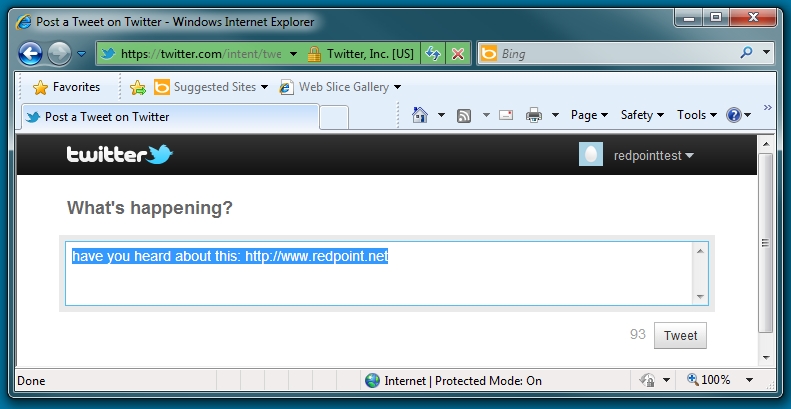
The recipient can click Tweet to post the tweet in question to his or her Twitter followers.
Facebook Share Button
On receipt of an email containing a Facebook Share button, the button displayed is provided by Salesforce Marketing Cloud.
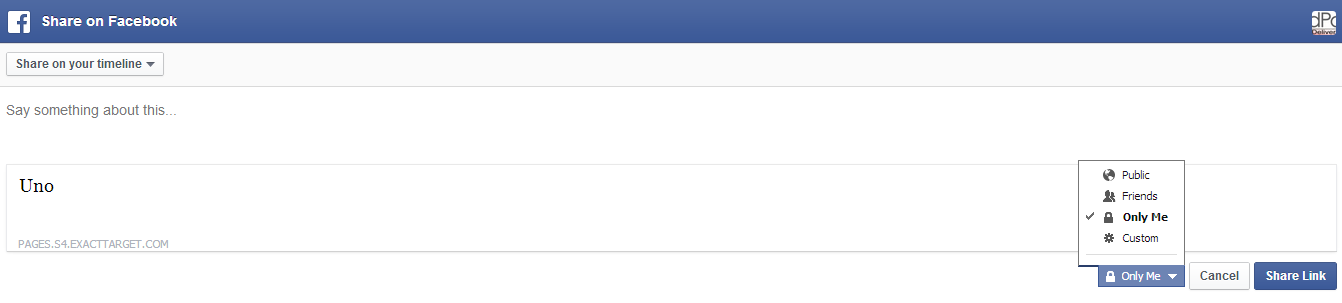
Clicking the button displays a Facebook login page in the recipient’s default browser; having successfully provided credentials, a Share on Facebook page is displayed, allowing you to share the email content with your Facebook friends.
Twitter Share Button
On receipt of an email containing a Twitter Share button, the button displayed is provided by Salesforce Marketing Cloud.
Clicking the button displays a Twitter login page; having successfully provided login credentials, a Share a link on Twitter page is shown.
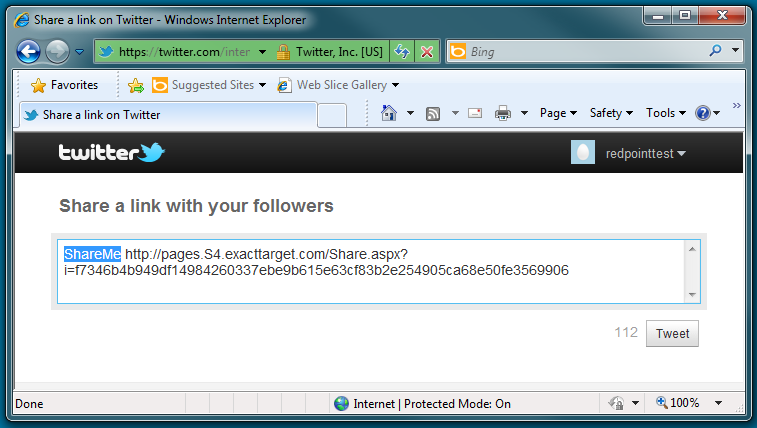
The tweet contents are set to a Salesforce Marketing Cloud URL; on clicking Tweet, a message advises that your tweet has been posted, and provides the opportunity to view it on Twitter.
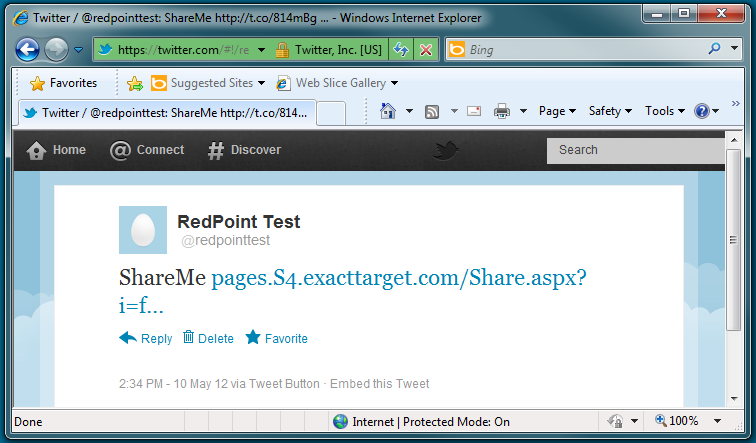
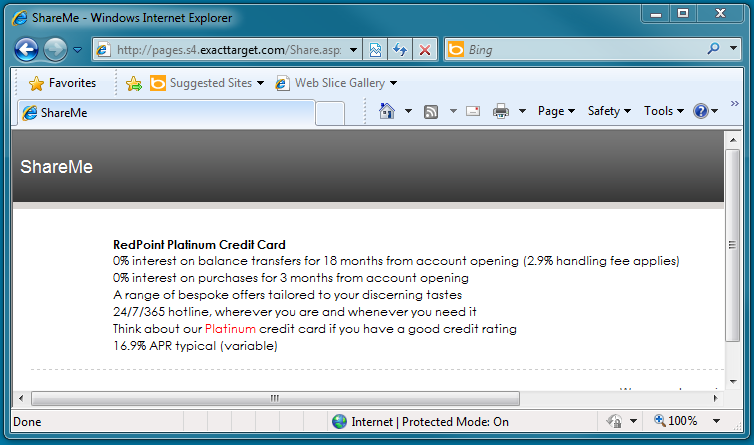
Clicking the Salesforce Marketing Cloud link displays the shared cell or entire email in a separate browser instance.
Salesforce Marketing Cloud Data Transfer
At execution of a Salesforce Marketing Cloud data transfer offer, details of the individuals selected in upstream audiences are passed to Salesforce Marketing Cloud. For each such contact, the attributes configured at the Email Data Transfer offer are transferred.
If Append to existing was not checked at the offer, a new data extension, named as per the offer, is created at Salesforce Marketing Cloud. If the offer is executed within a recurring workflow, an incrementing integer is appended to the data extension’s name, ensuring its uniqueness.
If Append to existing was checked at the offer, behavior is dependent on the offer’s Update type setting:
-
Add only – only adds new records and does not update the data of existing records.
-
Add and update – add new records and updates data of existing records.
-
Update only –updates data of existing records, does not add new records.
-
Overwrite – deletes any existing records and then adds new records.
If Encrypt exported file was checked at the channel used by a Salesforce Marketing Cloud Data Transfer offer, the exported file will be encrypted using the specified public key, using the selected encryption type. If the specified public key is not valid, the workflow will fail.
If encryption is successful, the encrypted file is uploaded into the Enhanced FTP location with the following file naming convention:
'{guid}.csv.pgp/gpg'
If the Salesforce File transfer activity is valid, the file decryption process is initiated, and data imported data into the data extension specified in the Salesforce Marketing Cloud Data Transfer offer. Otherwise, the workflow fails.
You can then log into the Salesforce Marketing Cloud user interface in order to execute a campaign using the data provided by RPI.
At channel synchronization task execution, if the channel's Decrypt imported file option was checked, the value supplied at Tracking extract activity name is used generate disposition data. The channel's File transfer activity name is used to encrypt disposition data and save into SFTP Export directory. Files available therein will be downloaded and decrypted using the specified Encryption private key, in accordance with the selected Encryption type. If the supplied key isn't valid, the file import process will fail.
Please note the following limitations:
-
No option exists to create the automation via the SFMC API so it will need to be created manually (it will be called using the external key).
-
No option exists to override the date range on the data extract activity using an automation, so it will need to default to a set period. Data will thereafter be deduplicated at insert.
SMS
Realtime in Outbound
If configured, Realtime in Outbound can be used to vary delivered content served by an SMS channel.
Use of the RPI Realtime service to personalize outbound messages is supported at the following SMS providers:
-
Salesforce Marketing Cloud
-
Messente
-
Twilio
-
Salesforce Marketing Cloud Mobile Connect
Salesforce Marketing Cloud MobileConnect SMS
The SMS message as defined within an SMS offer is sent to recipients when executed in production mode. SMS messages are not sent in Test mode.
SMS messages are delivered by the Salesforce Marketing Cloud MobileConnect provider.
Post-execution, SMS results are displayed at the offer’s results bubble and are available at the Results Window. The fulfillment states supported by the channel are:
-
Targeted: targeted prior to de-duplication
-
Delivered: SMS message delivered successfully
-
Failed: SMS could not be delivered
The result shown at the offer’s bubble and in the Count column in the Results Window reflects the count of records prior to de-duplication (duplicate numbers are not sent to Salesforce Marketing Cloud MobileConnect).
If the connection to the Salesforce Marketing Cloud MobileConnect service cannot be made, RPI repeats its attempt to connect every minute for 10 minutes before failing.
SMS results reflect the number of records sent to Salesforce Marketing Cloud MobileConnect, rather than the number of SMS messages that are ultimately sent successfully. Records with null phone numbers are not sent to Salesforce Marketing Cloud MobileConnect. SMS messages are not sent to phone numbers in the SMS suppression table.
If a URL shortener web adapter is associated with the SMS offer or channel, any URLs in offer content are shortened appropriately.
Messages that exceed the 160-character maximum length limit are split into 160-character chunks, with a separate SMS message being delivered for each chunk.
Messente SMS
The SMS message as defined within an SMS offer is sent to recipients when executed in production mode. SMS messages are not sent in Test mode.
SMS messages are delivered by the Messente SMS provider.
Post-execution, SMS results are displayed at the offer’s results bubble and are available at the Results Window. The fulfillment states supported by the channel are:
-
Targeted: targeted prior to de-duplication
-
Delivered: SMS message delivered successfully
-
Failed: SMS could not be delivered
The result shown at the offer’s bubble and in the Count column in the Results Window reflects the count of records prior to de-duplication (duplicate numbers are not sent to Messente).
If the connection to the Messente SMS service cannot be made, RPI repeats its attempt to connect every minute for 10 minutes before failing.
SMS results reflect the number of records sent to Messente, rather than the number of SMS messages that are ultimately sent successfully. Records with null phone numbers are not sent to Messente. SMS messages are not sent to phone numbers in the SMS suppression table.
If a URL shortener web adapter is associated with the SMS offer or channel, any URLs in offer content are shortened appropriately.
Messages that exceed the 160-character maximum length limit are split into 160-character chunks, with a separate SMS message being delivered for each chunk.
Vibes SMS
The SMS message as defined within an SMS offer is sent to recipients when executed in production mode. SMS messages are not sent in Test mode.
SMS messages are sent in batches of 100 per call to the Vibes API.
Amazon Pinpoint SMS
During execution of an SMS offer using an Amazon Pinpoint channel, one or more CSV files are uploaded into the specified AWS S3 bucket. Each file contains up to a maximum number of records defined by the channel's Max. recipients per file property. Each file is named 'RPI_[Channel name]_[ChannelExecutionID]_Export_[yyyyMMdd]_[GUID].csv', where [Channel name] is the first 6 characters of the channel's name, and GUID is the first 8 characters of a GUID (excluding hyphens). An Amazon Pinpoint segment is created and named 'RPI_[Channel name]_[ChannelExecutionID]_[Channel ID]_Segment', where [Channel name] is the first 6 characters of the channel name, and [Channel ID] the first 5 characters of the channel ID. Segment import jobs are initiated to load files from the defined AWS S3 CSV bucket, with files being deleted once import is complete. An SMS campaign is created at Amazon Pinpoint, named 'RPI_[Channel name]_[ChannelExecutionID]_[Channel Id]_Campaign'. An SMS message template is created at Amazon Pinpoint, named 'RPI_[SMS Offer name]_[ChannelExecutionID]_[SMS Offer ID]_SMS'. Finally, Amazon Pinpoint sends the SMS messages.
Note the following:
-
A record will be counted as invalid when its recipient phone number is null or empty.
-
A maximum number of 40 custom attributes are supported.
-
If the SMS offer's Use URL shortener property is checked, a runtime validation error is raised when SMS content contains one or more links with configured with database column attributes.
Twilio SMS
The SMS message as defined within an SMS offer is sent to recipients when executed in production mode. SMS messages are not sent in Test mode.
SMS messages are delivered by the Twilio SMS provider. Any invalid numbers are ignored.
If a URL shortener web adapter is associated with the SMS offer or channel, any URLs in offer content are shortened appropriately.
Post-execution, SMS results are displayed at the offer’s results bubble and are available at the Results Window. The fulfillment states supported by the channel are:
-
Duplicates: the number of duplicate records
-
Targeted: the number of records sent to Twilio, rather than number of SMS messages sent successfully
-
Queued: the number of records that are queued for sending. When all messages have been sent, this value is returned as 0.
-
Sending: the number of records dispatched to the nearest upstream carrier in the network. Provision of this metric is dependent on the count being returned by the carrier.
-
Sent: the number of records successfully accepted by the nearest upstream carrier. Provision of this metric is dependent on the count being returned by the carrier.
-
Delivered: the number of records confirmed as delivered by the upstream carrier. Provision of this metric is dependent on the count being returned by the carrier.
-
Undelivered: the number of records not delivered to recipients.
-
Failed: the number of records not sent and not charged to the account. Provision of this metric is dependent on the count being returned by the carrier.
-
Invalid Numbers: the number of invalid numbers, which were not contacted during SMS offer execution.
The result shown at the offer’s bubble and in the Count column in the Results Window reflects the count of records prior to de-duplication (duplicate numbers are not sent to Twilio).
If the connection to the Twilio SMS service cannot be made, RPI repeats its attempt to connect every minute for 10 minutes before failing.
Records with null phone numbers are not sent to Twilio. Records with invalid phone numbers are sent to Twilio but will not be sent to recipients. Note that country codes should be included with phone numbers when sending an SMS offer using a Twilio SMS channel.
Any messages intended for phone numbers in the SMS suppression table are not sent.
Note that Twilio does not support an opt-out capability.
On receipt of an SMS message delivered via Twilio, any attributes in the message are substituted with their appropriate values.
Twitter Direct
When you execute a Twitter Direct offer, the message content configured in the Twitter offer is sent directly to those Twitter users with screen names matching the values for the attribute defined at Recipient screen name at the Twitter Direct channel. Note that recipients of Twitter Direct messages must be followers of the account with which the channel has been configured.
If the offer was configured with a Picture, the same is included in the message delivered to its recipient(s).
Note also that an additional parameter – rpcid (RPContactID) – is appended to any appropriate URL content if a Matomo adapter is attached to a Twitter Direct channel.
Salesforce.com
When you execute an offer activity based on an offer that supports the Salesforce.com delivery method, the actions undertaken at Salesforce.com largely depend on whether the offer was defined as creating a new Salesforce campaign.
If the offer was configured to create a new campaign, a new Salesforce campaign is created using the Salesforce credentials defined at the channel. Its default properties are as follows:
-
Campaign Name: the campaign’s name is as defined at the offer. If an identically-named campaign already exists at Salesforce.com, a new one with the same name is created alongside the original.
-
Active: checked
-
Type: ‘Other’
-
Status: as per the offer
-
Start Date: as per the offer
-
End Date: as per the offer
The campaign’s other properties are not set.
The leads or contacts targeted by the offer are uploaded to the new Salesforce campaign.
RPI checks as to whether the targeted leads/contacts already exists in Salesforce using the lookup keys configured at the Salesforce channel. Any records that do not match are created as new leads/contacts at Salesforce.
Lead/contact properties are accordant with the Field parameters mapped at the Salesforce.com channel. Note that raw database values only, and not translated values, are uploaded. Note also that Lead status and Lead source values are provided by offer content, not by the channel.
If the offer was configured to upload leads or contacts in respect of an existing Salesforce campaign, they are uploaded to the campaign selected at the offer.
A system pulse is generated on successful execution of a Salesforce.com offer:
'[n] lead(s)/contact(s) has | have been uploaded via channel [Channel Name] as part of offer 'Offer Name' by activity 'Activity Name' in interaction 'Interaction Name'
If Allow updates is checked at the channel, behavior at execution of the channel’s synchronization system task is accordant with the channel’s Update behavior setting.
-
If set to Sync from Salesforce to RPI Data Warehouse, at every channel synchronization, RPI updates the data warehouse using data from the Salesforce lead/contact records.
-
If set to Sync from RPI Data Warehouse to Salesforce, at every synchronization, RPI updates Salesforce Lead/Contact records with data from the data warehouse.
If Salesforce data to sync was set to ‘Leads’, a system-generated table is created for leads with the naming convention RPI_SFLEAD[Lead_table _name][ChannelID], and new Salesforce leads’ details are stored therein.
If Salesforce data to sync was set to ‘Contacts’, a system-generated table is created for contacts with the naming convention RPI_SFCONTACT[Contact_table_name][ChannelID], and new Salesforce contacts’ details are stored therein.
Column definitions are based on the channel’s Field parameters mapping configuration.
If, when synchronizing Salesforce changes back to RPI, data truncation occurs (for example, if a value entered into a field in Salesforce.com is of such an excessive length that it will not fit in its mapped field in the data warehouse), the data in question is not written to the data warehouse, and a server error is raised.
Also at channel synchronization occurs the writing of RPI contact history data to Salesforce.com. Initial invocation of the task post-execution of a Salesforce offer writes details of all other contacts made with leads since the initial Salesforce channel execution to Salesforce.com. Subsequent invocation writes any new contact history to Salesforce.com. Contact history records are visible at Salesforce as Activity History. Note that this applies to email, SMS and data extract offer execution only.
When a Salesforce activity history record is created in this way, it has the following properties:
-
Subject: ‘Email’, ‘SMS’ or ‘Data Extract’
-
Email: the lead or contact’s email address (if fulfillment occurred via an email channel and the Email field parameter was mapped and also configured at the Salesforce.com user interface).
-
Phone: the lead or contact’s cellphone number (if fulfillment occurred via an SMS channel and the MobilePhone field parameter was mapped and also configured at the Salesforce.com user interface).
-
Comments: ‘[OfferName] via Channel [OfferChannelSubName] on [TimeStamp]’
-
Status: ‘Completed’
Accounts
When a Salesforce.com offer is executed using a channel at which the Data to Synchronize property is set to Accounts, the following apply:
-
One or more Accounts are added as Campaign members.
-
Salesforce data fields are created at the following Salesforce objects:
-
Account
-
AddressKey__c
-
ChannelExecutionID__c
-
ClientID__c
-
ExecutionID__c
-
RPContactId__c
-
CampaignMember
-
RPIAcctRefID__c
-
RPIExtID__c
-
-
The following additional offer activity log messages are generated:
-
'{x} Accounts out of {y} in file '{file_name}.xml' have been uploaded as Campaign Members on campaign with ID 'z''
-
'Uploading 'Account' Campaign Members'
-
'Preparing for 'Account' Bulk Upload'
-
'Setting custom fields default permissions'
-
'Creating custom fields for 'CampaignMember' object'
-
'Creating custom fields for 'Account' object'
-
Microsoft Dynamics CRM
When you execute an offer activity based on an offer that supports the Microsoft Dynamics CRM delivery method, the actions undertaken at Microsoft Dynamics CRM largely depend on whether the offer was defined as creating a new Microsoft Dynamics CRM campaign.
If the offer was configured to create a new campaign, a new Microsoft Dynamics CRM campaign is created using the Microsoft Dynamics CRM credentials defined at the channel. Its properties are accordant with the offer’s settings.
If the offer was configured to use an existing campaign, an existing Microsoft Dynamics CRM campaign is used.
If the Microsoft Dynamics CRM channel’s Data to synchronize property is set to Lead, RPI records targeted by the Microsoft Dynamics CRM offer are created as leads in Microsoft Dynamics CRM, and associated with the new campaign.
Additional custom data fields ChannelExecutionID and RPContactID are created in campaign, contact and lead data objects at Microsoft Dynamics CRM only if they do not already exist.
When a new value was specified at an offer’s Lead Source, the value is created either at the Lead or Contact lead source lookup at Microsoft Dynamics CRM.
When creating a lead, the offer's Lead Status value will be used in preference to any Lead Status mapping as defined at the channel’s Field Parameters.
When campaign members are created, they will be reflected as Lead and Contact data objects at Microsoft Dynamics CRM
For campaign members only raw database, and not translated, values are used.
A system pulse is generated on the successful upload of data to Microsoft Dynamics CRM:
'[n] lead(s) | contact(s) has | have been uploaded via channel [Channel Name] as part of offer 'Offer Name' by activity 'Activity Name' in interaction 'Interaction Name'.
At execution of at Microsoft Dynamics CRM channel synchronization system task:
-
A new table called RPI_MSCRM[LD|CT]_<TableName>_<CRM Account hash code>is created on in the client's data warehouse. Its table definition is based on the channel’s Field parameters column mapping.
-
Only records that were created by Microsoft Dynamics CRM are written to the table.
-
Each time the task runs, the table is dropped and re-recreated if a table with the same name exists. Prior to the original table being dropped, a latest copy of the records from Microsoft Dynamics CRM are downloaded first.
-
If Allow update is checked at the channel configuration, only records created via RPI are used to facilitate the write back of updates to the data warehouse.
LiveRamp
At execution of a LiveRamp offer, the exported file will be formatted in accordance with the channel's selected File type. Additional columns are added at the exported file:
-
[SEGMENT_NAME]: set to the value '1'
-
RPIEXECUTIONID: set to the value '[CLIENTID]_[CHANNELEXECUTIONID]_[YYYYMMDDhhmmss]'.
Channel execution fails if fewer than 25, or more than 500 million, records are exported. Execution also fails if the offer's channel does not match that at the interaction's offer activity.
A 'LiveRampUploadTracking' table is used to track segment data distributed to destination account(s).
Segment data is distributed to the selected destination accounts at channel synchronization.
Note that segments may only become available at the selected destination(s) upon successful completion of the data onboarding by LiveRamp, typically 3 to 5 days post file upload.
When PGP encryption is configured at a LiveRamp channel, export files generated using the channel are encrypted.
Twitter Tailored Audience
On execution of a Twitter Tailored Audience offer, if the offer's Mode of operation was set to one of Update or Delete, the specified action is performed in respect of the Tailored Audience selected at the offer. A runtime validation error is raised in the event of attempting to execute using a channel other than the channel specified at the offer.
If the offer's Mode of operation was set to Add, a new Twitter Tailored Audience is created. The new Tailored Audience's name is accordant with the offer's Tailored audience custom name property. Users, sourced from RPI, are uploaded to the new Twitter Tailored Audience.
Realtime Cache
When you execute a Realtime cache offer in Test mode, data is not posted to the RPI Realtime cache.
When you do so in Production mode, the data output by the offer is stored as cached attributes in the Realtime cache. If multiple data values are returned for an attribute, only one value is persisted in the cache. NULL values are not persisted in the cache. Any attributes that appear more than once in the offer are ignored. If an attribute already has a value in the cache, it is refreshed with the latest value.
The Realtime cache channel's Key attribute is used as a lookup to a visitor's ID. If a visitor was identified at the time of the offer's execution, cached attribute values are merged into the existing visitor profile. If the visitor was not identified, cached attribute values are written to a new profile. This profile can be merged with a visitor's existing profile at the point of their being identified by RPI.
You can execute a Realtime cache offer in a queue activity. When you do so in Production mode, data is posted to Realtime cache, with the key being identified either using a parameter attribute with a name matching that of the Realtime cache channel's Key attribute being contained within the JSON packet or using the packet's SendAddress property.
Note that, if a Realtime cache offer is executed in a queue activity in in Test mode, data is posted to the Realtime cache.
Note also that rolling back a production Realtime cache offer workflow does not remove its data from the Realtime cache.
Facebook Audience
On execution of a Facebook Audience offer, the activity undertaken depends on the offer’s Facebook action setting.
If set to Custom Audience:
-
Facebook users are sourced from the RPI data warehouse.
-
If the offer’s Mode of operation is set to Create new list, users are added to a new custom audience. If the name of the new custom audience already exists, a new audience is not created.
-
If the offer’s Mode of operation is set to Append to existing list, users are added to the existing custom audience.
-
If the offer’s Mode of operation is set to Delete from existing list, users are deleted from the existing custom audience.
Note that it may take a number of days for Facebook to complete matching for the uploaded custom audience.
If set to Offline Event:
-
On execution of a Facebook Offline Event offer, if Use existing is unchecked at the Facebook Offline Event offer, a new offline event is only created when a matching event does not already exist.
-
When Assign to Ad account is checked at the offer, the event is updated to assign tracking and read permissions to the Ad Account specified at channel configuration.
-
Users are then added to the specified event.
-
Note that a Facebook Offline Event channel’s User ID property is not required if executing a Facebook Offline Event offer using a queue activity.
-
If using Limited Data Use mode, the following data processing options parameters are added to the event data uploaded to Facebook:
-
"data_processing_options": ["LDU"],
-
"data_processing_options_country": 1,
-
"data_processing_options_state": [Equivalent US states data processing code]
-
If not, the following parameter is uploaded:
"data_processing_options": []
Note that any temporary files generated during execution are written to the folder defined by system configuration setting FileOutputDirectory.
Note also that RPI will only hash data when uploading data to Facebook when the channel's Pre-hashed data option is unchecked.
Azure Direct Push Notification
When an Azure Push Direct Notification offer is executed in production mode, the message as defined within the offer is sent to the Azure Notification Hub for dissemination to recipients' devices. The message is not sent in Test mode. One row is added to Offer History per contact, and messages are de-duplicated by Recipient address. Post-execution, results are displayed at the results bubble and are available in the Results Window.
Twilio Notify Direct
At production execution of a Twilio Notify Direct offer, its defined content is sent to the Twilio Notification Hub for dissemination to recipients within the current audience with appropriate identities and/or tags.
Overridden content can be substituted if applicable. For non-SMS devices that are offline, Twilio will attempt to resend the notification within the timeframe defined by the offer's Notification lifetime property. Also for non-SMS devices, if High priority is checked at the offer, Twilio will send the notification immediately.
Note that batch send is capped at 20 identities or 5 tags in one single call. Calls to Twilio are made in in batches including a maximum of 20 identities or 5 tags, even if a shared message is to be sent to a greater number of recipients.
Airship Push Notification
Upon execution of an Airship Push Notification offer within a Production interaction workflow; a push notification is sent to targeted users. Note that devices will only receive notifications when configured at the offer's Targeted devices property.
Note the following Airship Push Notification runtime validation errors:
-
'Windows device is not supported when used with channel id and other targeted devices. Use target All or Windows only': raised when the channel's Audience selector value is 'Channel ID' and the offer is configured to target Windows and other devices.
-
'Windows device is not supported when using named user': raised when the channel's Audience selector value is 'Named user' and the offer is configured to target Windows devices.
-
'Notification exceeds 4000 characters. Notification message will be truncated': raised when the notification content exceeds 4000 characters (notification content length is the total count of Summary, Title and Notification characters).
Google Firebase Direct
A runtime validation error is raised for when an offer contains attributes or dynamic text assets, advising that issues might occur at if the total message content exceeds 2000 characters. Otherwise, Firebase Direct notifications are sent to appropriate devices.
Amazon Pinpoint
Upon execution of an Amazon Pinpoint push direct offer, one or more CSV files is uploaded to the channel's Amazon S3 bucket folder. Each CSV file contains recipient records (up to a number defined by the channel's Max. recipients per file property. Each CSV file name is formatted as follows:
RPI_[Channel name]_[ChannelExecutionID]_Export_[yyyyMMdd]_[Guid].csv
(Where [Channel name] is the first 6 characters of the channel's configured name, and [Guid] is the first 6 characters of a GUID (excluding hyphens).
An Amazon Pinpoint segment is created with a name formatted as follows:
[Channel name]_[ChannelExecutionID]_Segment
Segments are imported from the AWS s3 folder, with the files therein being deleted afterwards. A push notification campaign is created at Amazon Pinpoint with the campaign's name formatted as follows:
[Channel name]_[ChannelExecutionID]_Campaign. Finally, push notifications are sent to the intended recipients.
The following considerations apply when executing an Amazon Pinpoint push direct offer:
-
SMS and Facebook Messenger overrides are not supported.
-
The following message actions are not supported:
-
Home
-
Landing page
-
Share
-
Other Push Direct offer features are supported.
-
A runtime validation is raised when the offer's message body contains one or more rule smart assets, or when the message's body exceeds more than 200 characters when Send message as JSON payload is unchecked at the channel.
-
A record is counted as invalid when:
-
One or more attributes contains a value more than 100 characters in length.
-
The channel type does not contain the values 'APNS'/'GCM'.
-
Registration token is null or empty.
-
-
If the channel's Send message as JSON payload property is checked, the message body is as JSON. If unchecked, it is sent as text.
-
Up to 40 custom attributes can be created. Each custom attribute's value must not exceed 100 characters long.
Google Ads Customer Match
At Google Ads Customer Match offer execution, if the offer's Mode of operation is set to 'Create new list', a new audience list with the specified name is created in the Google Ads account. If a list with the same name already exists, it is used instead of creating a new one. Records are then added to the list. When Mode of operation is set to 'Append to existing list', records are added to the audience list specified at the offer. Google Ads ignores records that are already in the list. When Mode of operation is set to 'Delete from existing list', records are removed from the audience list specified at the offer. Google Ads ignores records that are not in the list.
Successful uploads will add rows to the OfferHistory_GoogleAdsCustomerMatchTracking data warehouse table. Its structure is as follows:
-
Audience List ID: the ID of the audience list where the record was inserted/removed
-
Channel Execution ID
-
Date Sent
-
Channel ID
-
Contact Info: pre-hashed value of the email or phone number, or non-pre-hashed value of third-party ID or mobile device ID
-
First Name
-
Last Name
-
Country Code
-
Postal Code
-
City
-
State
Control
When an individual is targeted via a Control channel, records are created in offer history tables, but no fulfillment action occurs.
Decision Offer Activity Execution
When a decision offer is executed, the rules configured therein are used to determine which of its test offers is the winning offer.
It is important to note that it is not the raw number of records matching a given fulfillment state that determines the winning test offer. Rather, the number of records in a given state as a proportion of the records targeted by the test offer is used to decide which is the winner. This allows you to target test offers at data sets of differing sizes and use their relative efficacy as the medium through which to determine the winner.
Having determined the winning test offer, a decision offer then fulfills that offer to its own input data set (which must differ from the data sets at which its test offers were targeted).
If it was not possible to determine a winning test offer (e.g. in the event of a tie), the default test offer, as defined at the decision offer’s configuration panel, is fulfilled by the decision offer. If a default offer was not specified, a test offer is picked at random.
Seeds Execution
When a channel is configured with seed groups, seeds are applied to the channel output where seed column names match the output’s attribute names. How this comparison is made is dependent upon the context:
-
Offer data extract channel: compared against export template attributes and attributes defined at the offer.
-
Offer Email: compared against email address and attributes embedded in offer content.
-
Offer Control: seeds not supported
-
Broadcast: seeds not supported
-
Export: seeds not supported
-
Subscription group: seeds not supported
-
Control: seeds not supported
Note that matches are not case sensitive. Where an attribute name contains a character that is not database compatible, that character is replaced by an underscore when performing the comparison against the seed column name.
Seeds are inserted at regular intervals in data extract export files in accordance with the number of seeds and the number of export records.
If no records are targeted by the activity, no seed fulfillment occurs.
Seeds can also be appended at audience execution, if configured at a batch audience or interactive activity configured with an audience . Note that audience-appended seeds are overridden by any downstream fulfillment activity seed assignment.
Subscription Group Activity Execution
When you add a subscription group to an interaction you need not place it downstream from an audience to ensure the interaction’s validity. Also, no restrictions apply regarding upstream or downstream activity connectivity.
When you execute a subscription group activity in test mode, its status is set to Activated and no results are displayed.
Activated subscription groups remain in this state thereafter, with results data collated for a period of time accordant with the channel’s No. of days fulfillment active property.
SurveyMonkey
When you execute a SurveyMonkey subscription group in production mode, it enters an Activated state. Its bubble count represents the total number of respondents to the related survey.
If the channel was configured to import survey data, on retrieval of the same when executing the channel’s synchronization task, survey data is imported into the following database tables (which are created at initial data import):
-
RPI_SM_[Survey table name]_Survey
-
SurveyID
-
Title
-
DateCreated
-
QuestionCount
-
ResponseCount
-
-
RPI_[Survey table name]_SMQuestion
-
SurveyID
-
QuestionID
-
Question
-
-
RPI_[Survey table name]_SMAnswer
-
SurveyID
-
QuestionID
-
AnswerID
-
Answer
-
If the channel’s Survey table name is changed, existing tables are retained and a new set of tables are created.
If the channel was configured to import respondent data, the same stipulations around table creation apply, with data being imported into the following set of tables:
-
RPI_[Respondent table name]_SMRespondent
-
SurveyID
-
RespondentID
-
Email
-
Firstname
-
Lastname
-
CustomID
-
-
RPI_[Respondent table name]_SMResponse
-
SurveyID
-
RespondentID
-
QuestionID
-
AnswerID
-
Answer
-
If the channel was not configured to import survey and/or respondent data, the related steps are not performed at channel synchronization task execution.
Alchemer
When you execute an Alchemer subscription group in production mode, it enters an Activated state. Its bubble count represents the total number of respondents to the related survey.
If the channel was configured to import survey data, on retrieval of the same when executing the channel’s synchronization task, survey data is imported into the following database tables (which are created at initial data import):
-
RPI_SGSurvey_{Survey table name}
-
SurveyID
-
Title
-
Status
-
DateCreated
-
DateModified
-
ResponseCount
-
TestResponseCount
-
-
RPI_SGSurveyQuestion_{Survey table name}
-
SurveyId
-
QuestionId
-
Question (truncated if > 4000 characters)
-
-
RPI_SGSurveyOption_{Survey table name}
-
SurveyId
-
QuestionId
-
OptionId
-
Option (truncated if > 4000 characters)
-
If the channel’s Survey table name is changed, existing tables are retained and a new set of tables are created.
If the channel was configured to import respondent data, the same stipulations around table creation apply, with data being imported into the following set of tables:
-
RPI_SGRespondent_{Respondent table name}
-
ResponseId
-
SurveyId
-
Status
-
RPContactId
-
ChannelExecutionId
-
DateSubmitted
-
STD_Referer
-
STD_UserAgent
-
STD_IP
-
STD_Long
-
STD_Lat
-
STD_GeoCountry
-
STD_GeoCity
-
STD_GeoRegion
-
-
RPI_SGResponse_{Respondent table name}
-
ResponseId
-
SurveyId
-
QuestionId
-
OptionId
-
Answer (truncated if > 4000 characters)
-
If the channel was not configured to import survey and/or respondent data, the related steps are not performed at channel synchronization task execution.
Twilio Inbound SMS
When you execute a Twilio Inbound SMS subscription group in production mode, it enters an Activated state. Its bubble count represents the total number of messages received by the Twilio Inbound SMS number with which it is configured.
LiveRamp RampID
At execution of a LiveRamp RampID subscription group, a file is exported in accordance with channel and subscription group settings. The exported file is formatted as RampID data. The following additional columns are available at the exported file:
-
[SEGMENT_NAME]: value '1'
-
RPIEXECUTIONID: value '[CLIENTID]_[CHANNELEXECUTIONID]_[YYYYMMDDhhmmss]'
Execution fails if the number of records exported is less than 25, or more than 500 million.
Segment records are distributed to the destination accounts selected at the subscription group upon execution of the channel's synchronization task.
Note that segments may only become available at the selected destination(s) upon successful completion of the data onboarding by LiveRamp, typically 3 to 5 days post file upload.
Broadcast Activity Execution
Twitter
If a Twitter channel is configured within a broadcast, its selected offer supports the Twitter delivery method and the offer contains valid Twitter content not posted most recently using Twitter account, the Twitter message is posted using the account credentials defined within the Twitter channel. Any Pictures included in the offer are also posted.
If the Twitter message contains a URL, and the channel is configured with Google Analytics, web events or Matomo adapters, on following the link in the posted message, website activity can be tracked and monitored. This is carried out by the appending of query string parameters to the URL.
The following parameters are appended for a Google Analytics adapter:
-
utm_source
-
utm_medium
-
utm_content
-
utm_campaign
The following parameters are appended for a Web Events adapter:
-
exid: ChannelExecutionID
The following parameters are appended for a Matomo adapter:
-
clid: ClientID
-
exid: ChannelExecutionID
The following parameters are appended for a Kissmetrics adapter:
-
kme: DeliveryMethod
-
km_exid: ChannelExecutionID
-
km_campaign: Offer activity name
At Twitter broadcast execution via a channel to which one or more shortener (Bitly or Rebrandly) adapters are attached, each URL in the offer content accordant with the attached shorteners is shortened. If a Web site URL is provided at a shortener adapter, only instances of the URL quoted (and sub-addresses thereof) are shortened. If Web site URL is not provided, all URLs are shortened. All other attached web adapters are applied prior to shortening URLs. If more than one shortener adapter is attached to the channel, all are applied. Previously-shortened URLs are not shortened.
A warning message is displayed at execution of a workflow containing a broadcast if configured with a lengthy Twitter offer that contains a URL such that appending web analytics parameters in accordance with the channel setting will exceed the 140-character Twitter message limit. You can click OK to proceed with execution; however, the Twitter message posting will fail if too long. Note that shortened URLs are taken into account when determining the message’s length, if one or more shortener adapters is attached to the channel.
Having posted a Twitter message, RPI will report the following results, which are accessible in the Results Window:
-
Replies
-
Retweets
Additionally, if the channel was associated with one or more shortener adapters, the following result is available:
-
Click count: if Append execution ID was checked at the shortener adapter, an 'exid' parameter is appended to any shortened link. When this is the case, only clicks of shortened URLs made from the offer content are counted. If exid is not appended, all clicks of shortened URLs are counted.
Facebook
You can post a message via a Facebook app to your company’s (or another) Facebook wall via a broadcast activity, using a standard post. You can also post an offer for business, which allows you to post a discount or promotion to a Facebook page. The message is posted in accordance with settings at the Facebook offer and channel.
If you attempt to execute a Facebook broadcast using a Facebook channel that has not been configured with a web publish site, a runtime validation error is raised.
If an incorrect account name is specified in the channel, broadcast execution fails.
A standard post message contains:
-
Company image and name
-
Message
-
Picture
-
Link
-
Post action
An offer for business message is accordant with the offer’s settings.

If the Facebook post contains a URL (in the message, link or post action), and the channel is configured with Google Analytics, web events or Matomo adapters, on following the link in the posted message, website activity can be tracked and monitored. This is carried out by the appending of query string parameters to the URL.
The following parameters are appended for a Google Analytics adapter:
-
utm_source
-
utm_medium
-
utm_content
-
utm_campaign
The following parameters are appended for a Web Events adapter:
-
rpcid: RPContactID
-
exid: ChannelExecutionID
The following parameters are appended for a Matomo adapter:
-
clid: ClientID
-
exid: ChannelExecutionID
The following parameters are appended for a Kissmetrics adapter:
-
kme: DeliveryMethod
-
kmi: Contact Key
-
km_exid: ChannelExecutionID
-
km_campaign: Offer activity name
At Facebook broadcast execution via a channel to which one or more Bitly adapters are attached, each URL in the offer content accordant with the attached Bitly adapters is shortened. If a Web site URL is provided at a Bitly adapter, only instances of the URL quoted (and sub-addresses thereof) are shortened. If Web site URL is not provided, all URLs are shortened. All other attached web adapters are applied prior to shortening URLs. If more than one Bitly adapter is attached to the channel, all are applied. Previously-shortened URLs are not shortened.
Having posted a Facebook message, RPI will report the following results, which are accessible in the Results Window:
-
Likes
-
Comments
-
Angrys
-
Hahas
-
Loves
-
Sads
-
Wows
Additionally, if the channel was associated with one or more Bitly adapters, the following result is available:
-
Click count: if Append execution ID was checked at the Bitly adapter, an 'exid' parameter is appended to any shortened linked. When this is the case, only clicks of shortened URLs made from the offer content are counted. If exid is not appended, all clicks of shortened URLs are counted.
Facebook Marketing
Execution of a Facebook Marketing broadcast allows you to create one or more of the following Facebook entities (based on the Facebook Marketing offer's settings):
-
Facebook campaign
-
Ad set
-
Creative
-
Ad
Facebook Marketing objects are created in accordance with the offer's settings, and with the channel's account name. If an incorrect account name is specified at the channel, broadcast execution fails.
The created Facebook Marketing objects can be found at the following locations:
https://www.facebook.com/ads/manage/home/?account_id=[Account ID]
https://developers.facebook.com > Tools & Support > Ads Manager
The actual display of ads is controlled by Facebook using their algorithm. post-broadcast execution, their existence can be confirmed using Ads Manager, where ads can be previewed by clicking within the Ad table.
Facebook Lookalike Audience
Upon execution, a Facebook Lookalike Audience is created based on the offer’s settings. Execution will fail if there are fewer than 100 seed audiences in a country from the selected Custom Audience.
The created Lookalike Audience objects can be found at the following locations:
https://www.facebook.com/adsmanager/audiences?act=[Account ID]
https://developers.facebook.com > More > Tools > Ads Manager > All Tools > Audience
LinkedIn
You can post a message using a LinkedIn account via a broadcast activity. The message is posted in accordance with settings at the LinkedIn offer and channel.
The message is shared with all LinkedIn members, or just connections, as per the offer’s definition.
The message includes a company image and name, derived from the account with which the channel is configured. Clicking either navigates to the company’s information page.
If the message included a link, it is displayed, accordant with offer settings, below the posting.
If the message contains a URL (in the message, link or post action), and the channel is configured with Google Analytics, web events or Matomo adapters, on following the link in the posted message, website activity can be tracked and monitored. This is carried out by the appending of query string parameters to the URL.
The following parameters are appended for a Google Analytics adapter:
-
utm_source
-
utm_medium
-
utm_content
-
utm_campaign
The following parameters are appended for a Web Events adapter:
-
rpcid: RPContactID
-
exid: ChannelExecutionID
The following parameters are appended for a Matomo adapter:
-
clid: ClientID
-
exid: ChannelExecutionID
The following parameters are appended for a Kissmetrics adapter:
-
kme: DeliveryMethod
-
kmi: Contact Key
-
km_exid: ChannelExecutionID
-
km_campaign: Offer activity name
Note that only metric, and not state results, are returned by web events adapters in a LinkedIn broadcast.
At LinkedIn broadcast execution via a channel to which one or more Bitly adapters are attached, each URL in the offer content accordant with the attached Bitly adapters is shortened. If a Web site URL is provided at a Bitly adapter, only instances of the URL quoted (and sub-addresses thereof) are shortened. If Web site URL is not provided, all URLs are shortened. All other attached web adapters are applied prior to shortening URLs. If more than one Bitly adapter is attached to the channel, all are applied. Previously-shortened URLs are not shortened.
If the channel was associated with one or more Bitly adapters, the following additional result is available:
-
Click count: if Append execution ID was checked at the Bitly adapter, an 'exid' parameter is appended to any shortened linked. When this is the case, only clicks of shortened URLs made from the offer content are counted. If exid is not appended, all clicks of shortened URLs are counted.
YouTube
When you execute a broadcast activity configured with a YouTube offer in production mode, any videos that were added to the offer are uploaded and are available to view at the YouTube account’s channel.
Thereafter, metrics pertaining to videos’ being viewed are tracked, and are available at the Results Window.
RSS
When you execute a broadcast activity configured with RSS offer in production mode, the RSS feed that it defines is published to its channel’s web publish site.
When a new feed is created, you must update its settings in FeedPress to facilitate its push notification to RSS readers, and to track metrics in respect thereof.
Details of how this can be carried out are provided in the RPI External Configuration documentation.
After successful execution of an RSS broadcast, the activity’s logs will display
‘FeedPress feed URL: https://feedpress.com/[FEED_ALIAS]’
This URL must be used by subscribers wishing to subscribe to the RSS feed. The links in the RSS content in the URL will have already been marked up by FeedPress to track subscribes and reads; this information is used by RPI to update the Subscribers and Reads metrics, which are displayed in the Results Window.
FeedPress is used to track the count of the subscriptions to and reads of the RSS document. This is done by replacing the document's links with tracking links when the original RSS URL is passed to FeedPress. By using the feed alias, RPI can request subscriber and read counts from FeedPress.
Azure Notification
When you execute a broadcast activity configured with an Azure Notification offer in production mode, the message therein is pushed to all devices (Apple iOS, Windows and Android) registered with the channel’s Azure notification hub via a custom app.
If the offer is configured with one or more tags, and devices registered using a tag from the list will receive the notification. If a device is not registered with a tag, it does not receive the notification.
The set-up of custom mobile applications to support the receipt of Azure Notification push messages is beyond the scope of this documentation. For further guidance, please contact Redpoint Support.
Twilio Notify
Upon activating a Twilio Notify broadcast in Production mode, Twilio broadcasts a notification using the selected channel to recipients associated with the offer’s specified identities, and/or tags. Overridden content can be substituted if applicable
Google Firebase
A runtime validation error is raised for when an offer contains attributes or dynamic text assets, advising that issues might occur at if the total message content exceeds 2000 characters. Otherwise, Firebase notifications are sent to appropriate devices.
Above The Line
To collate Above The Line channel results using a fulfillment state flow, add a broadcast to your interaction and configure it using an Above The Line channel. Note that configuration of the broadcast’s offer property is not required in this context. Note also that results are collated in Production mode only.
Downstream Post-Fulfillment Activity Execution
During execution of an activity that is downstream from another fulfillment activity, any records output by the preceding activity that match the inputs selected in the current activity are targeted. These include records in the following states:
-
Targeted state: selected by default when configuring the downstream activity, Targeted represents all records output by the upstream activity.
-
Email service provider-supplied states (e.g. Click Through): note that, when a recipient clicks multiple URLs within an email, this counts as single Click Through.
-
Any custom fulfillment states defined for the channel
-
Any combination of the above
Note that, if you select multiple states, the downstream activity will occur where records satisfy state A OR state B. Also, for a record to be counted as in a state, it must also satisfy the cumulative rules associated with all ancestor states (for example, a state flow might define a state of ‘Applied’, followed by child state ‘Accepted’; for record to qualify as Accepted, it must also satisfy the rules that define Applied).
Queue Listener and Activity Execution
On activating a queue listener, it enters an Activated state (following temporary assumption of a Waiting for Trigger state). Its configuration panel's properties are read-only when Activated.
When Activated, a queue listener begins monitoring the listener queue for the arrival of JSON packages that include a reference to its Listener key. Such packages may be placed on the queue by a third party, or via the submission of an RPI web form.
The JSON package format is as per the following example:
{
'TriggerKey':'5df1c3d2-fc20-419c-8462-982e7769524a',
'SendAddress':'jim.hinder@Redpoint.net',
'Parameters':
    {
     'FirstName':'John',
     'LastName':'Smith'
     },
'RepeaterParameters':
     [
         {
         'OrderTitle':'Purchased',
         'ParamProductName':'Product X',
         'ParamProductValue':'9.99',
         'ParamProductDate':'04/07/2016 00:00:00'
         },
         {
         'OrderTitle':'Purchased',
         'ParamProductName':'Product X',
         'ParamProductValue':'9.99',
         'ParamProductDate':'04/07/2016 00:00:00'
         }
     ]
}
Please note the following:
-
TriggerKey must be set to the required queue listener's Listener key GUID value.
-
If the posting of the JSON package to the queue is to initiate the sending of an email, the recipient's email address must be supplied as the SendAddress.
The Parameters section represents data that is to be substituted at parameter attributes (e.g. contained in email offer content). The names of the passed parameters must match the names of the parameter attributes to be substituted.
The RepeaterParameters section is used to pass details of repeating entities that are to be output in offer content. For example, you might want to send a customer a confirmation email listing the products that they purchased. You can pass the products' details in the RepeaterParameters section, then include parameter assets representing the same in a table asset in the email offer they are to be sent.
Queue listener repeater parameters, as defined at a queue activity’s audience definition, are stored in a data warehouse table named ‘[Queue listener resolution table name]_RP’. For more information, please see the Audience Definition section in the Configuration documentation.
Any packages for the attention of a specific queue listener that are placed on the listener queue when the queue listener is in a Deactivated state are ignored.
The listener queue is checked every second for the arrival of JSON packages. Packages are processed in batches. The maximum number of records that can be processed in the same batch is defined by cluster system configuration setting ListenerQueueMaxBatchSize. For example, if 9 records arrive on the queue, and ListenerQueueMaxBatchSize is set to 5, 2 batches (1 of 5, 1 of 4) are processed.
Upon a queue listener's receipt of a JSON package with a matching Listener key, any downstream queue activities are executed. Such packages may be placed on the listener queue by an external system, or through submission of an RPI web form that has been configured with an interaction and queue listener.
When a queue listener's Realtime Event section has been configured, on the occurrence of a Realtime event, and subsequent execution of the Web events importer system task, the queue listener will fire if the type of event matches the listener's configuration, with any Event detail filters applied and all matches at specified event metadata. Any parameters defined in the QueueListenerConfiguration, as sourced from the visitor profile, will be available to the queue listener (these can be used e.g. to personalize content, or can be written to the queue listener resolution table). If a subsequent appropriate event occurs in respect of a specific individual within the duration defined by the Prevent repeat sends for property, the queue listener does not fire.
When you execute a queue activity in Production mode, data from the JSON package's parameters is written to the queue listener resolution table, as defined by the queue activity's audience definition. To be stored in the queue listener resolution table, the name of a passed parameter must match the name of the column in that table (in turn defined by the audience definition's Queue listener attributes. When a column value is not supplied, the parameter attribute's default value is written to the table instead. When the package contains a parameter not in the resolution table, it is ignored. When resolution table structure has been changed, any legacy column values are set to NULL.
If offer content contains a non-parameter attribute with a name matching that of a passed parameter, the parameter value is substituted.
If a queue activity's Generate offer history radio button is selected, a record is written to offer history; If Don't generate... is selected, an offer history record is not written.
If a queue activity is configured with an email offer, an email is sent to the SendAddress recipient using the selected channel's email service provider (note that this takes place after offer history has been written). Any parameter attributes are substituted in email offer content (including any RepeaterParameters to be output within embedded table assets).
If the offer with which a queue activity is configured is edited, its new version is picked up only when the queue activity's queue listener is de- and re-activated.
When you execute a queue activity in Test mode, data is not written to the queue listener resolution table. If the queue activity is configured to write data to offer history, data is written to the offer history sandbox table defined by its audience definition. If configured with an email offer, note that emails are sent when a queue activity is executed in Test mode. If configured with a data extract offer, only the full export file is generated (the channel's Create files in Test mode property being ignored).
On deactivating a queue listener, it once again enters an Inactive state. Any downstream queue activities are also Deactivated. Having deactivated a queue listener that was executing in Production mode, you can re-activate it. You can also make changes to an existing queue activity's properties, including its offer, when Deactivated. Note that you cannot add additional queue activities to a Deactivated queue listener.
If a downstream workflow uses a queue listener workflow as an input workflow, the input workflow must be executed in the same mode. Any activities in the downstream workflow act upon the records sourced from the queue listener workflow. You can execute a downstream workflow irrespective of the current queue listener workflow's status. Note that, if activities in the downstream workflow are to make use of the records gathered by the queue listener, they can make use of the appropriate queue listener resolution level to facilitate their targeting.
On submission of a web form at which a Queue listener interaction and workflow is selected, a JSON package is automatically placed on the listener queue and is picked up by the queue listener with which the web form is submitted. Any queue activities downstream from the queue listener are fulfilled.
If such a queue activity is configured with an email offer, the email is delivered to the email address as submitted in an Email form element. If any web form element parameters are included in the email offer's content, the values submitted in the web form are substituted. If the web form does not contain an Email element, emails are unable to be delivered (the queue activity's Log, as displayed in the Results Window, advises of this fact).
You can execute a Post-channel execution web service following execution of a queue activity offer. HTTP Post/JSON and RPDM Web Service calls can be made. SOAP Web Service calls are not supported in this context, and any such channel settings are ignored.
If configured, Realtime in Outbound can be used to vary delivered content served by a queue activity.
Audit Files
When a fulfillment activity that sources its data from an audience based on an audience definition that is configured to produce audit files is executed, audit files may be generated. One or more audit files are generated if the current mode of execution matches the audience definition’s audit export configuration setting. A separate audit file is generated per channel.
Audit files are generated in a subfolder at a location defined by system configuration setting FileExportLocation, within an initial ‘WFAI’ (workflow instance ID) subfolder.
Each audit file is named as follows:
‘[Fulfillment activity name]_[Channel Execution]_[Wave ID].txt’