

Overview
The RPI v7.6.20251213.955 release introduces several enhancements, including AWS Secrets Manager support, Argo Rollouts integration for GitOps workflows, and the renaming of Data Activation to Smart Activation. The update also includes configuration refinements, resource optimization improvements, and enhanced documentation.
You are not required to pull in these chart changes immediately. Existing Helm deployments can continue running with the new release image tag. The latest Helm chart can be updated and applied at a later time that is convenient for your environment.
What's new
AWS Secrets Manager
Added support for AWS Secrets Manager as a secrets management provider, complementing existing Kubernetes Secrets and Azure Key Vault options.
Refer to the README Configure Secrets Management section for the setup guide.
Argo Rollouts
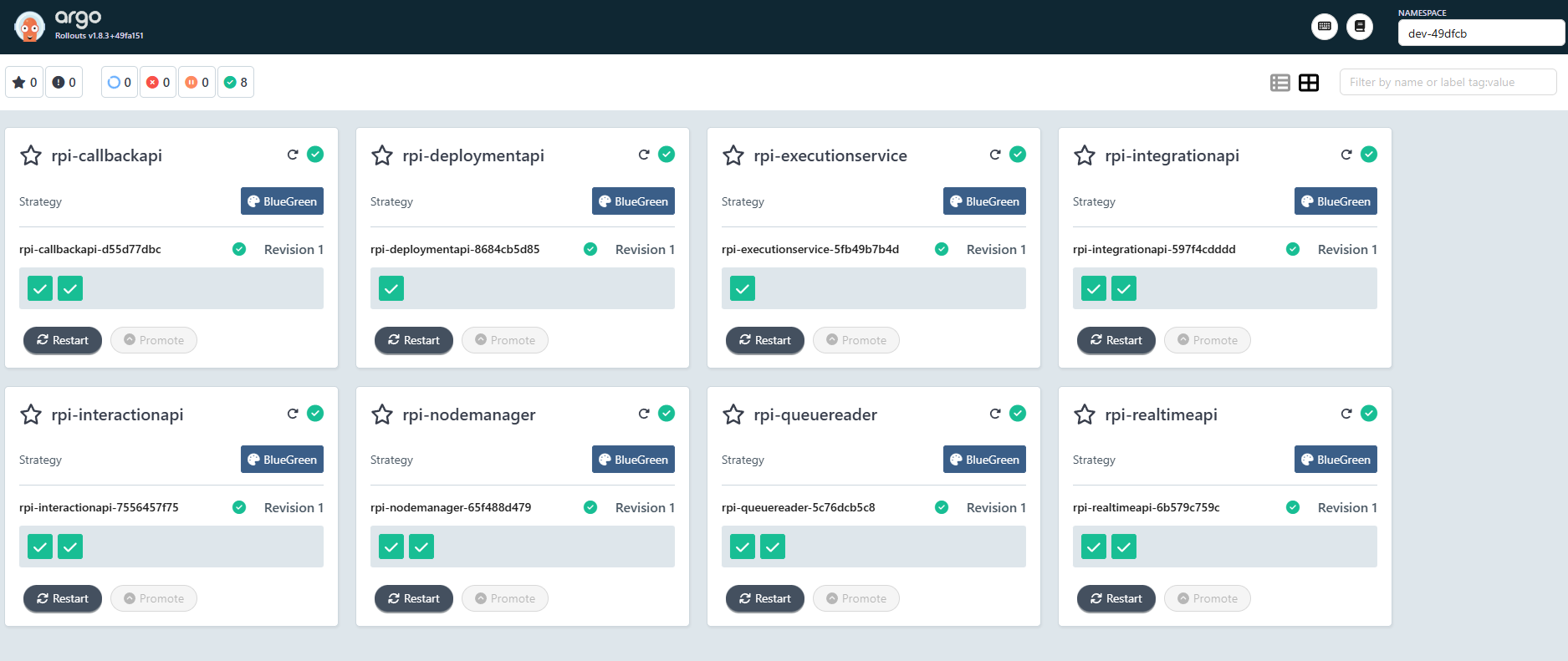
Added support for Argo Rollouts for GitOps deployments. You can now enable rollouts by setting type: rollout on any service. While RPI does not currently support full Blue/Green deployments, enabling this feature still provides benefits through the Argo Rollouts dashboard.
For example, you can:
-
Visualize your Rollouts
-
Restart services in a controlled manner
<service>:
  type: rollout  # or deployment (default)
  rollout:
    autoPromotionEnabled: true
    revisionHistoryLimit: 3
Smart Activation
Data Activation has been renamed to Smart Activation. Updated setup documentation has been moved to /docs/smartActivation.md.
Smart Activation requires a valid license. Do not enable this feature without consulting your Redpoint representative.
Service names
We’ve removed support for changing service names, as there’s no functional need for admins to modify them. This change will make log review and troubleshooting faster, and help our development teams quickly identify which service is generating log entries, eliminating confusion caused by custom naming.
If you previously overrode these values, please remove them from your configuration.
Service port configuration has also been standardized across all services using a nested service.port structure. This change improves consistency across charts, aligns with common Helm conventions, and simplifies future extensibility (for example, adding service type or additional ports).
Example
# Previous structure
keycloak:
  port: 80

# New standardized structure
keycloak:
  service:
    port: 80
Resource and configuration enhancements
Standardized CPU and memory
CPU and memory configurations have been standardized across all services to align with Kubernetes best practices.
-
CPU requests set to
500mand no limits defined -
Memory requests set equal to limits
Debug environment variables
Debug-related environment variables have been centralized under the extraEnvs section for the Execution Service.
These settings are intended for internal Dev/QA use only. Do not enable unless instructed by Redpoint Support.
Debug options include:
-
SendGrid sandbox mode
-
Twilio SMS campaign control
-
LuxSci sandbox mode
Execution service updates
Changed the autoscaling default from enabled: true to enabled: false. If you need autoscaling for the execution service, explicitly enable it:
executionservice:
  autoscaling:
    enabled: true
-
maxThreadsPerExecutionServiceincreased from50to100to improve concurrent job execution capacity -
Redis persistent volume size increased from
50Gito100Gito provide additional capacity for Redis cache usage
Pod disruption budgets
This provides more flexible and lenient behavior during rolling updates and cluster maintenance operations. This is disabled by default and can be enabled on demand.
podDisruptionBudget:
  enabled: false
Prometheus metrics
Changed default for prometheus_scrape from false to true. When custom metrics are enabled, Prometheus scraping is now active by default when customMetrics.enabled=true.
Termination grace period
Added configurable terminationGracePeriodSeconds: 120 to 8 services (realtimeapi, callbackapi, executionservice, interactionapi, integrationapi, nodemanager, deploymentapi, queuereader). This gives pods more time for graceful shutdown.
Ingress routes
Updated Queue Reader and socketio ingress routes to use configurable ports instead of hardcoded values:
-
Queue Reader: Now uses
{{ .Values.queuereader.service.port }} -
Socket.IO: Now uses
{{ .Values.socketio.service.port }}
Removed configuration
The following configuration options have been removed or disabled for Smart Activation components to align with current support.
-
Sigma Reporting: Disabled by default
-
Autoscaling: Disabled for Init and Cache services (not supported at this time)
-
Custom Metrics: Configuration removed (not supported at this time)
-
Node Selector and Tolerations: Standardized to match RPI service defaults
Documentation updates
-
Created a dedicated Smart Activation guide at /docs/smartActivation.md with UI screenshots
-
Added AWS Secrets Manager section with 73 new lines covering AWS Secrets Manager setup, including authentication methods, IAM policies, and AWS CLI commands.
-
Enhanced inline comments throughout the Helm chart with better formatting and clearer examples. Many configuration sections now have multi-line formatted examples instead of single-line comments.
-
Added detailed comments for auth configuration explaining when to use HTTP vs HTTPS for OpenID discovery:
-
Interaction API uses internal HTTP for metadata resolution
-
Integration API uses external HTTPS for Swagger UI compatibility
-
-
Updated deployment API comments with clearer explanations for template tenant configuration.
Template changes
Modified 23 out of 24 template files. The largest change is hpa.yaml which grew 81% to support targeting both Deployments and Rollouts. Other significant updates:
-
deploy-redis.yaml: +17% for enhanced configuration options -
deploy-realtimeapi.yaml: +3% for rollout support -
deploy-interactionapi.yaml: +6% for rollout support
All deployment templates now conditionally render either Deployment or Rollout resources based on the type configuration.
Upgrading
Before upgrading
-
Pull the latest Helm chart and ensure you update and reconcile your current chart with the new version.
-
Make sure your cluster has adequate CPU, memory, and storage capacity before upgrading.
-
Test in non-production first, especially given the significant resource changes.
After upgrading
-
Verify all pods start with new resource limits.
-
Confirm ingress routes are working with new paths.